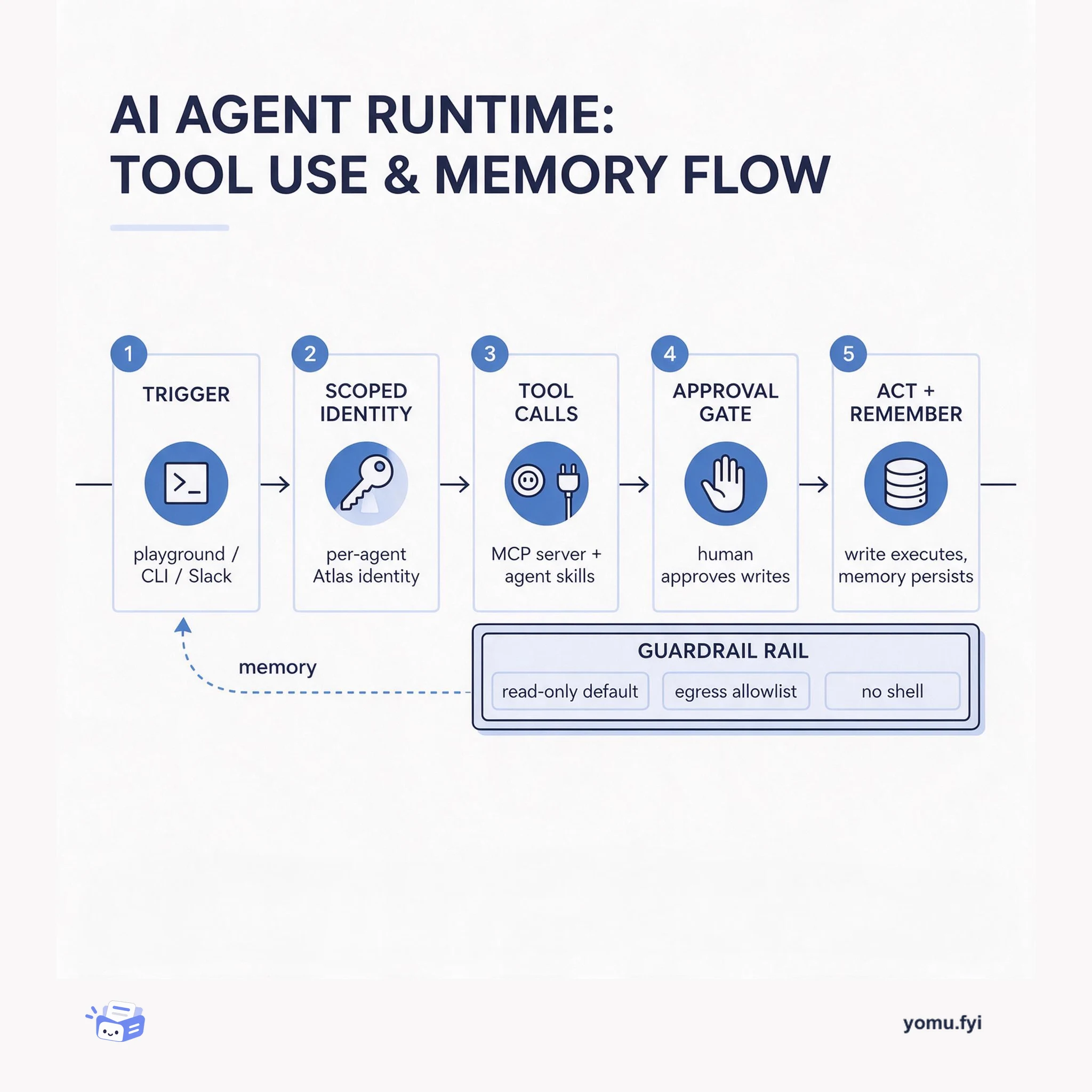
Teams increasingly want agents that handle routine database work—such as checking cluster alerts, reviewing slow queries, and answering questions about a schema—but building agents takes much more than a prompt, including credential handling, access scoping, tool orchestration, approval flows, and more. Today MongoDB launched MongoDB Agents, a collection of open source agent templates that combine the MongoDB MCP Server and MongoDB Agent Skills with the plumbing you would otherwise build yourself. Each template includes scoped MongoDB Atlas credentials, approval flows for writes, and a ready-to-run deployment configuration for Atlas Agent Engine. Built-in guardrails give each agent its own Atlas identity, default read-only access, require human approval for every write tool, block outbound traffic to unallowed hosts, and prevent shell execution. You can use the agents in the Agent Engine Playground, via the agentengine CLI, or integrate with Slack using the optional bot to ask questions, approve writes, and schedule reports.
Context
Teams want agents for routine database work like checking alerts and slow queries, but building them requires extensive setup for credentials, tool orchestration, and approval flows.
Approach / What changed
MongoDB Agents provides open source templates (Atlas Explorer and Atlas Query Insights) that combine the MongoDB MCP Server and Agent Skills with built-in plumbing, including scoped Atlas credentials, approval flows, and deployment configuration for Atlas Agent Engine.
Takeaways
1
MongoDB Agents launch with two open source templates: Atlas Explorer for conversational database questions and workflows, and Atlas Query Insights for on-demand or scheduled slow-query reports.
2
Each template includes built-in guardrails: a dedicated Atlas identity per agent, default read-only access, write tools hidden until enabled and requiring human approval, restricted egress, and no shell execution.
3
Agents can be deployed via the Atlas Agent Engine Playground, the agentengine CLI, or an optional Slack bot that supports on-demand queries, write approvals, and scheduled read-only reports using Slack Workflow Builder.
FAQ
Can MongoDB Agents connect to on-premises or Atlas for Government?
No, for now MongoDB Agents can only connect to MongoDB Atlas, not to Enterprise Advanced, on-premises deployments, or Atlas for Government. Atlas Agent Engine is in Public Preview, and each deployment supports about 50 new conversations per hour across all users.
How do MongoDB Agents handle write operations?
Write tools are hidden by default in Atlas Explorer unless write operations are explicitly enabled. When enabled, each write tool requires human approval before execution. Atlas Query Insights has no write tools at all. Writes are also blocked if the credential lacks write capability.
Can you use MongoDB Agents in Slack?
Yes, the repository includes an optional Slack bot built on the Chat SDK. It allows allowlisted users to ask questions in channels or DMs, approve or reject write requests they initiated, and post read-only reports on a schedule via Slack Workflow Builder. The bot uses a shared Atlas identity, so only the person who requested a write can approve it.
Atlas Agent Engine is the managed runtime that hosts MongoDB agents: it gives each one its own Atlas identity, read-only tools, and an approval gate before any write. Here is the loop, step by step.
Keep reading
Related reading
The Good Stuff
Paid picks we use ourselves. Links carry a referral code — a subscription through one earns us a commission at no extra cost to you.