What Is an AI Factory? Four Stages From Data to Served Answer
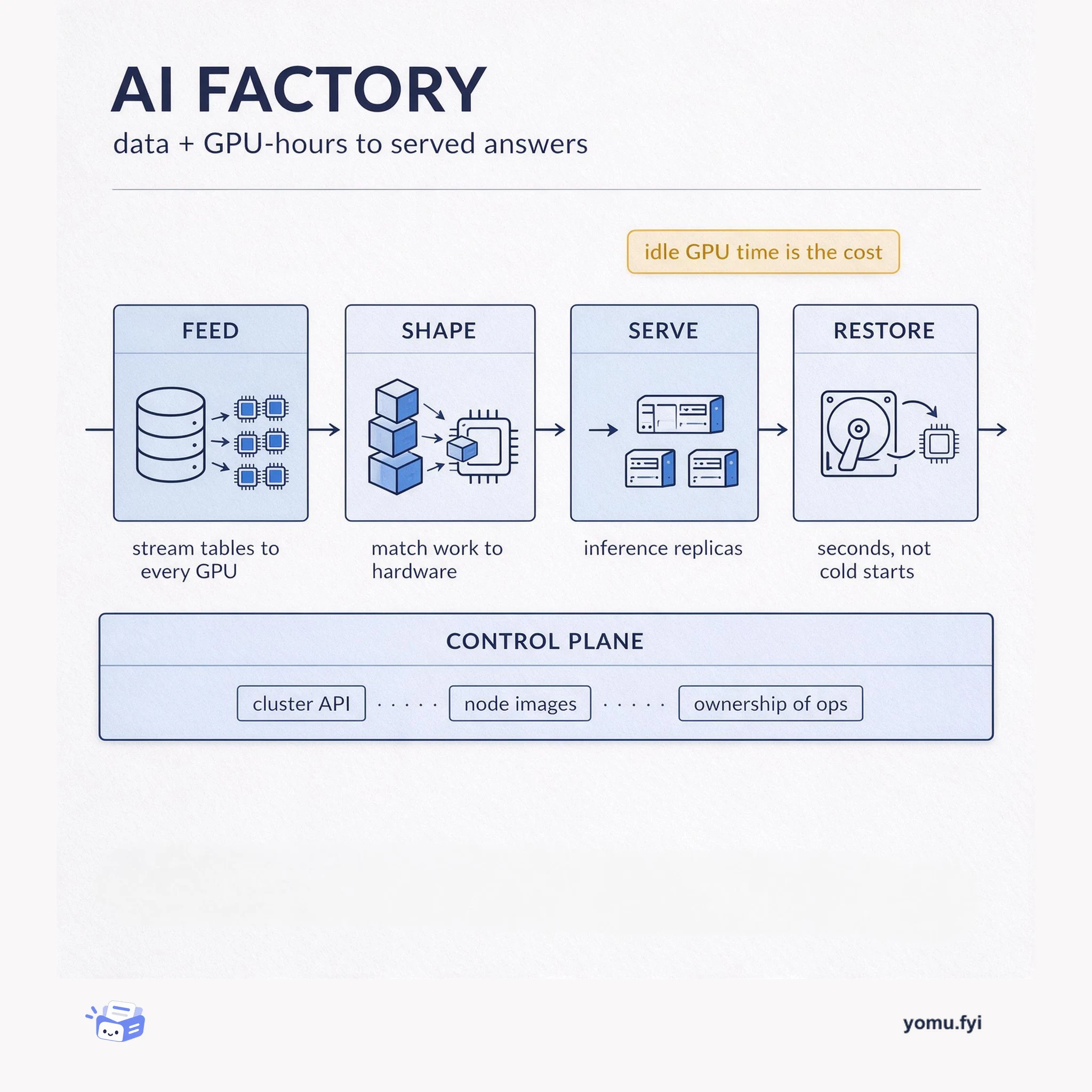
An AI factory turns raw data and GPU-hours into served model output. This diagram breaks it into four stages — feed, shape, serve, restore — plus the control plane that owns them.
 DatabricksJohn Spencer, Milan Stefanovic, Bruce Fontaine, Tejas SundaresanAnnouncement
Databricks released UCDataset in Beta on AI Runtime, a native PyTorch data loader that streams Unity Catalog tables directly to every GPU in a training job without exports or custom loader code. The bottleneck in GPU training is often data delivery, not the model, and common workarounds like exporting to Parquet or using toPandas() are slow or do not scale. UCDataset reads a table’s files directly from cloud storage, splits matching rows evenly across all GPUs and workers, and applies filters and deletion vectors as data is read. On a simulated production workload with a 300 GB feature table across 8 NVIDIA H100 GPUs, UCDataset cut training time by 10x compared to reading an exported Parquet copy. The package is available on PyPI and reads Delta tables registered in Unity Catalog, including tables with deletion vectors.
GPUs often sit idle because getting data from storage to the GPU is slow. Common workarounds—exporting to Parquet, pulling the whole table into memory with toPandas(), or streaming through a warehouse—each introduce delays, extra storage costs, or scaling limits. UCDataset aims to eliminate these bottlenecks by making Unity Catalog tables a first-class data source for distributed PyTorch training.
UCDataset is a native PyTorch data loader that streams Unity Catalog tables directly to GPUs by reading the table’s files from cloud storage, splitting matching rows evenly across every GPU and data loader worker, and applying filters and deletion vectors as data is read.
UCDataset streams Unity Catalog tables directly to GPUs by reading the table’s files from cloud storage, eliminating the need for an export step or a second copy of the data.
On a simulated production workload with a 300 GB feature table across 8 NVIDIA H100 GPUs, UCDataset reduced training time by 10x compared to loading data from an exported Parquet copy.
UCDataset enforces Unity Catalog permissions on AI Runtime, but in Beta it cannot read tables that have row filters or column masks.
UCDataset is a native PyTorch data loader that streams Unity Catalog tables directly to the GPUs in a training job. It is available in Beta on Databricks AI Runtime.
No. UCDataset reads the live table in Unity Catalog, so there is no export step and no second copy to store or keep in sync. It applies your filter and the table's deletion vectors as it reads.
Yes. On AI Runtime, training jobs read data as the identity that runs them, and Unity Catalog permissions on the table apply. In the Beta, UCDataset cannot read tables that have row filters or column masks.
Summaries are generated from the original by a language model. Check the original before relying on it.
See the idea
An AI factory turns raw data and GPU-hours into served model output. This diagram breaks it into four stages — feed, shape, serve, restore — plus the control plane that owns them.
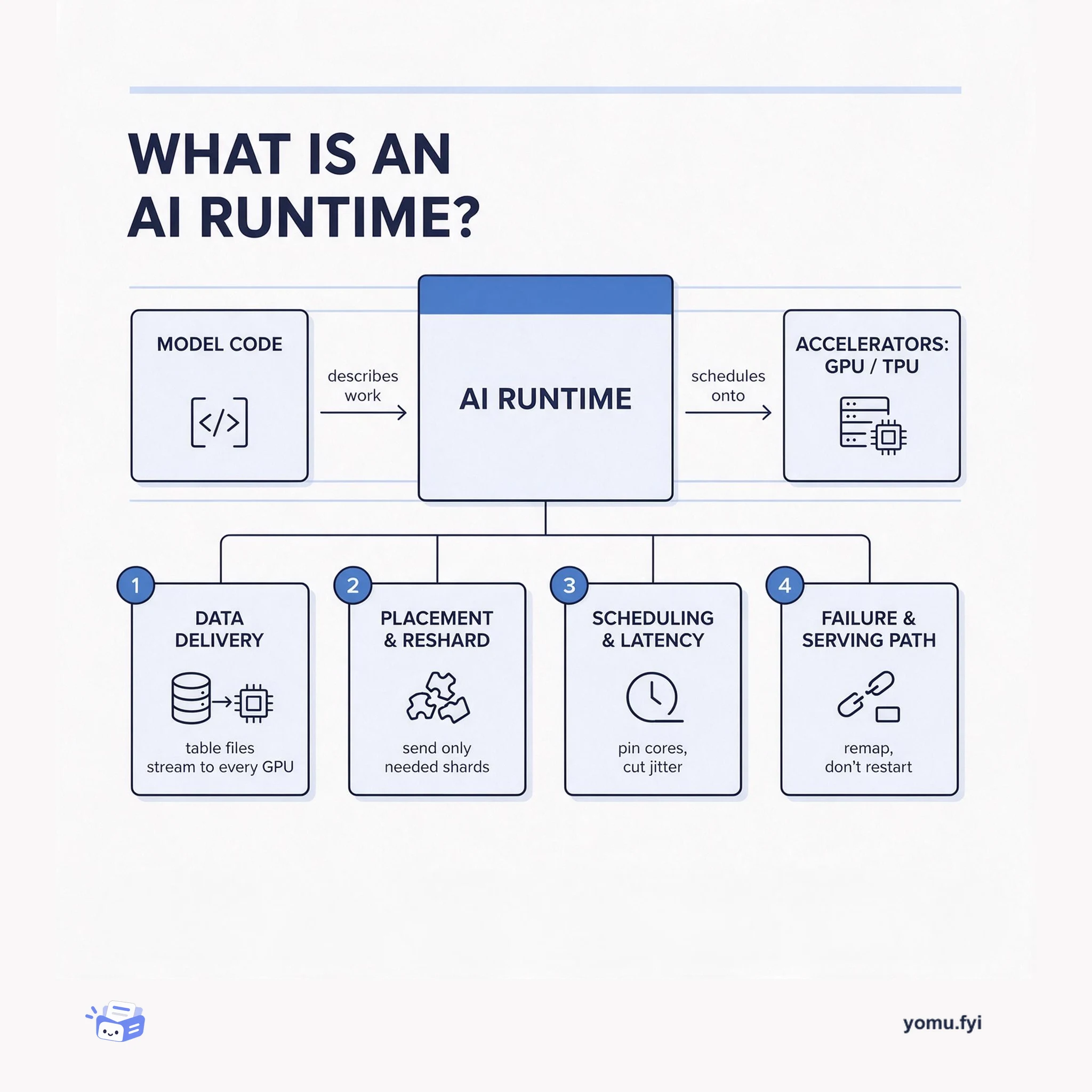
An AI runtime is the execution layer between model code and hardware: it feeds data to accelerators, places and reshards tensors, schedules work, and holds latency steady. Here are its four core jobs.
Keep reading
The Good Stuff
Paid picks we use ourselves. Links carry a referral code — a subscription through one earns us a commission at no extra cost to you.
One useful email. Unsubscribe anytime.