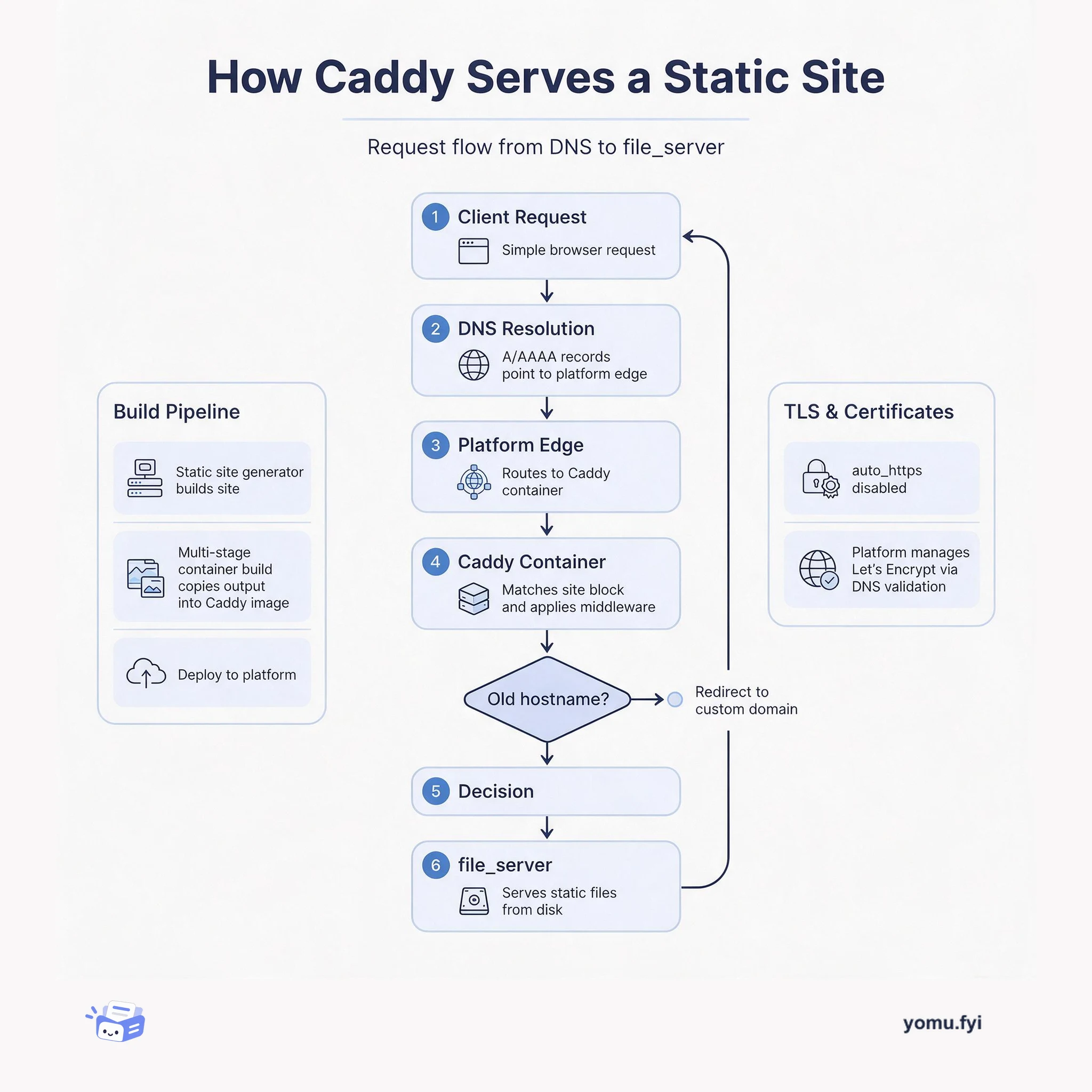
How Caddy Serves a Static Site: The Request Flow
See how Caddy handles a request for a static site, from DNS resolution through container routing to file_server, and how TLS and redirects fit into the flow.
Loading…
Topic
36 posts about Fly. Every summary links to the original.
See the idea
See how Caddy handles a request for a static site, from DNS resolution through container routing to file_server, and how TLS and redirects fit into the flow.
The Good Stuff
Paid picks we use ourselves. Links carry a referral code — a subscription through one earns us a commission at no extra cost to you.
Newest first
Fly.io is consolidating its region map and deprecating 17 regions across North America, Europe, Asia-Pacific, South America, and Africa. The announcement lists 17 deprecated locations, including Madrid, Bucharest, Warsaw, Atlanta, Boston, Denver, Guadalajara, Miami, Phoenix, Querétaro, Seattle, Montreal, Bogotá, Ezeiza, Rio de Janeiro, Santiago, and Hong Kong, and names 18 consolidated regions: seven in North America, five in Europe, four in Asia-Pacific, and one each in South America and Africa. For apps migrated by Fly.io, most moves should be seamless, although applications with region-specific logic must be updated to use the new region. Manual moves generally require changing primary_region in fly.toml, scaling up in the destination with fly scale count, and scaling down in the original region. If volumes are involved, the guidance recommends stopping existing machines, forking volumes into the new region, and creating machines from those forks; support is offered for issues that arise.
Fly.io has made GPU instances available to everyone, adding datacenter-grade accelerators to its globally distributed compute platform. Users can select Ampere A100 variants with 40GB or 80GB of memory, or a Lovelace L40s with 48GB, by setting an app or process’s vm.size to the corresponding GPU kind. The post demonstrates an Ollama deployment using an L40s, a 100GB persistent volume mounted at /root/.ollama, and HTTP service settings that allow machines to stop and start automatically with zero minimum running machines. These instances are positioned for large language model inference, text transcription, and image generation; lower-cost A10 GPUs are planned for the next few weeks, while some organizations may need additional verification based on account age and payment history.
This tutorial builds a Discord image-generation bot that uses Fooocus, an open-source interface for Stable Diffusion, to provide a Midjourney-like /imagine command. It separates the system into a normal Fly Machine running a Python Pycord bot and a GPU Machine running Fooocus-API, with Flycast connecting them over Fly.io’s private network. The bot defers Discord responses, polls for the generated image each second, and uploads the resulting file, while the post notes that this blocking flow will not perform well for hundreds of simultaneous users. Fly GPU rootfs supports the nearly 12GB image, and an L40S setup costs about $3.20/hr when running, with scale-to-zero intended to avoid charges for unused compute. GPU activity is verified with nvidia-smi, and the source code can be extended with additional commands and image-to-image features.
Fly.io announces GPU support for its cloud, extending its near-user deployment model to AI and machine-learning workloads at the edge. The offering attaches Nvidia A100 GPUs with 40GB or 80GB of RAM, CUDA support, eight AMD EPYC CPU cores, and volumes up to 500GB; L40s are also listed as coming soon and then noted as available. A sample fly.toml deploys Ollama with a 100GB model volume, while auto-start and auto-stop settings can reduce min_machines_running to zero when idle. GPU apps can scale across supported regions, retaining the same public IP address and TLS certificates, with an Amsterdam example using fly scale count 2 --region ams. Listed prices are $2.50 per hour for A100 40GB and $3.50 for A100 80GB, with reserved-instance and dedicated-host discounts available.
Fly.io introduces a streamlined version of its fly launch command for deploying applications near their users. The CLI now infers desired infrastructure from application source code and offers opinionated defaults or alternative options when it cannot apply the same shape. Previously, the launch flow asked a series of questions; the change reduces guesswork by folding varied frameworks, languages, and toolchains into a few basic infrastructure shapes. A Rails application using SQLite is given an example set of defaults that developers can build from, while other applications can be configured through a confirmation webpage. Once settings are accepted, the app is built and deployed unless --no-deploy is supplied, and the CLI provides a link to the running app.
Fly GPU Machines are used to run Whisper Webservice for audio transcription, with the post noting that Fly GPUs are deprecated and unavailable after August 1. The setup uses a GPU-friendly Docker image, an a100-pcie-40gb Machine, and a Fly Volume mounted at /root/.cache/whisper so model files download and persist outside the image; ASR_MODEL=large and ASR_ENGINE=faster_whisper configure the service. It shows flyctl commands for creating the app, GPU-hosted volume, Machine, public IPs, and HTTPS routes, then verifies GPU availability with nvidia-smi and exposes the web UI and OpenAPI specification. A second path automates volume and Machine creation through the Machines API, requiring cpu_kind plus valid cpus and memory_mb values. It also demonstrates a custom Ubuntu 22.04 image with NVIDIA CUDA libraries, FFmpeg, Python, and Whisper, concluding that GPU Machines can support composable AI workloads.
An unexpected network outage can make an application misbehave while also removing crucial log data from the normal Fly.io pipeline. The post traces that pipeline from application STDOUT through Fly.io, NATS, the Log Shipper, Vector, and a third-party provider, then presents two ways to add redundancy. One strategy broadcasts framework logs to a separate file on each machine, preferably on a persistent volume with rotation; a Rails example uses ActiveSupport::Logger.broadcast. The other runs a separate app that subscribes directly to NATS, parses messages, and writes selected fields to disk, with a Fly authentication token and provisions for reconnection and error handling. File copies are more failsafe but raw and harder to fetch, while a custom shipper can produce more usable data but is less bulletproof.
Fly.io introduces two improvements to its persistent storage volumes: extending an existing volume and restoring a regular volume from a snapshot. Previously, increasing capacity required provisioning an empty volume and copying data, whereas the new fly volume extend command resizes it after the attached app restarts; regular apps restart automatically, while Machines VMs require manual restarts. Individual restores are available from flyctl v0.0.363 by supplying --snapshot-id when creating a new volume, after listing snapshots and selecting the desired ID. Snapshots are taken daily, stored in object storage for five days, and can restore data only to a volume at least as large as the source.
Fly.io’s April 20, 2022 logbook combines a recent changelog with an account of how the company produces updates for a distributed platform running apps in VMs on hardware around the world. It records added IAD capacity, backup regions disabled by default, flyctl releases with NuxtJS and RedwoodJS deployment support, and reliability improvements to postgres operations, failover handling, error reporting, builders, logs, and releases. The post says commits and status updates often fail to capture completed user-relevant work or its impact. It therefore asks engineers to write updates that explain both what changed and why it matters. Collection is automated through a Slack bot and an app that collates entries into feeds, while the team plans to cultivate stronger changelog habits.
Fly.io announces that Postgres is now available at no cost for small projects, addressing the storage cost that has kept persistent data out of its existing free tier. The offering adds 3GB of persistent volume space through LVM block devices as small as 1GB, alongside the free VM and RAM allowance. Production deployments use intentional two-node Postgres clusters with data on two isolated NVMe drives and volume snapshots, while a free setup begins as a single Development node and becomes a leader-replica cluster when scaled. The volumes are not limited to Postgres: applications can mount up to 3GB for SQLite or other uses. A credit card is still required for free services, which the post says helps deter cryptocurrency-mining abuse of free VMs.
Globally distributed Postgres describes a way to serve a conventional CRUD application across regions while keeping Postgres writes directed to one primary and reads near users. Fly’s proxy sends each request to the local application instance, where most requests succeed; when a write reaches a read-only replica, Rails catches PG::ReadOnlySqlTransaction and returns a fly-replay header naming PRIMARY_REGION. The proxy then retries the complete HTTP request inside its network, avoiding per-query cross-region database routing and allowing the application to retain its ordinary connection behavior. The approach can also support session-based read-your-own-writes and replica-freshness checks, but it is not suitable for every workload; the text contrasts it with geographically distributed databases such as CockroachDB.
Fly’s 2020 retrospective covers the launch and expansion of its Global Application Platform, alongside features and articles released throughout the year. The platform added Turboku for moving Heroku apps to the edge, Cloud Native Buildpack support, Custom Domains with a GraphQL management API, scaling controls, Deno support, pausing and resuming, persistent volumes, and builtin Flyctl builders for Node, Ruby, Deno, Go, and static websites. Later additions included a new logging system, 6PN Private Networking, WireGuard peering, graceful VM shutdown options, and revised VM sizes, while examples demonstrated services such as Redis, MinIO, Gogs, and MQTT using persistent volumes. The article also records supporting work including GoStatic, JSON output in Flyctl, Firecracker-based workload isolation, and Heroku database usage.
The November 2020 Fly changelog records new example applications, Fly CLI enhancements, and platform updates. Guides now cover Gogs, MQTT with Mosquitto, MinIO, Node-RED, and Redis with and without TLS, and demonstrate preview persistent Volumes for database persistence, data storage, preserved programming state, and queued messages. The CLI added bulk secret imports from key=value files, including multiline values enclosed in triple double quotes, while list commands gained filtering, sorting, and JSON output; the Deno builtin added a Version setting defaulting to 1.5.4. Platform changes included an upgrade to Firecracker v0.23, improved restart and connection handling, timeout fixes, and stronger application-context isolation. The changelog also notes new crash-log context, humanized app times, improved image resolution, and corrected internal port and metrics handling.
Pi-Hole blocks advertising and tracking domains by acting as a DNS server that returns a dummy address for listed hosts, but a home deployment is difficult to use while traveling and can incur latency. The post presents “Fli-Hole,” a globally reachable Pi-Hole application deployed on Fly’s edge network, using the official Docker image without modifying Pi-Hole itself. Its configuration sets INTERFACE and DNSMASQ_LISTENING, exposes UDP port 53 through fly.toml, stores the web password as a Fly secret, and deploys with fly deploy. Additional Fly regions, such as Frankfurt, can be added so nearby traffic is routed through them. Each regional instance has independent settings and no persistence or sharing, while Dockerfile changes and redeployment provide a way to distribute configuration updates.
Maps, Apps, and Tracks describes how to build an online map that tracks a marathon runner from a mobile device and deploys it with Fly. The route is drawn and exported as GPX, imported into Google My Maps, enriched with mile markers, and exported as KML for display through Leaflet.js and the leaflet-kml plugin. An Express server accepts OwnTracks HTTP POSTs at /log/, filters location messages by a hard-coded topic, stores latitude and longitude in memory, and exposes them through /where/. Browser code places or moves a marker by polling that endpoint every 30 seconds, while static files are served from the mappages directory. Local testing uses a shell script with mock OwnTracks JSON, and Fly deployment uses flyctl, fly init, and fly deploy; the post notes authentication, Redis persistence, and multiple runners as possible additions.
September’s Fly CLI changes focus on easier installation, updates, and Windows 10 use while also adding static-site deployment options and app-initialization controls. The installer still installs flyctl but now creates a symbolic link for fly, beginning a planned migration to fly as the CLI’s actual name; fly version update now downloads and installs the latest release. New hugo-static and staticplus builders support static websites, with hugo-static running a Hugo build before deployment and staticplus adding HTTPS redirection for custom domains, though staticplus is slated for retirement. Windows received PowerShell-based installation and updating, while fly init gained --overwrite and --nowrite for controlling fly.toml changes and supporting deployments under alternate app names recorded in fly.alias. The release also included DNS and domains command updates, Alpine avoidance for builtins, a Deno builder change removing the deps.ts requirement, and improved allocation displays.
A Fly application can use Heroku Postgres without migrating the application itself, with Heroku hosting an add-on-only app that provides the database. The setup provisions a Hobby Dev Heroku Postgres database, retrieves its URI credentials, and passes DATABASE_URL to the Fly deployment as a secret. A Node REST API using Sequelize parses that URI with pg-connection-string, then supplies the database, user, password, and host while enabling SSL and setting rejectUnauthorized to false for Heroku’s certificate-chain issue. After fly deploy, the app connects externally to Postgres, but the Hobby plan limits it to 20 connections unless upgraded. The article presents Heroku’s US and Europe data-center choices as a way to keep the database relatively close while Fly places the application near users, and warns that credentials rotate periodically without notification.
Migrating a Heroku application to Fly requires attention to database connectivity because Heroku Postgres must be accessed over SSL from outside Heroku. The post uses the DATABASE_URL environment variable, parses it with pg-connection-string, and passes a configured connector to Massive.js, setting sslmode to require and rejectUnauthorized to false to accommodate self-signed certificates in Heroku Postgres’s certificate chain. It also shows a local-development fallback that uses a non-SSL localhost Postgres connection when DATABASE_URL is undefined. With these changes, Turboku can migrate the app and convert DATABASE_URL into a Fly secret, while the application retains its database connection and can use Fly’s region and scaling controls. Database latency still depends on proximity to Heroku’s US or European database regions, so caching within Fly regions may matter for mission-critical performance.
The post explains how to ensure users reach an HTTPS version of an application running behind Fly’s edge proxies, particularly when a custom domain and certificate are attached. Fly’s default fly.dev behavior redirects HTTP automatically, but custom certificates do not activate that upgrade because connection behavior remains under the application owner’s control. The recommended method checks the X-Forwarded-Proto header, which records whether the original client connection used http or https, and returns a 301 redirect to the same URL with an https scheme when needed. Examples implement the check in Go middleware, Express middleware for Node, and Nginx configuration; the post also notes that non-Fly deployments can inspect the request and URL scheme instead, while Fly was considering future automation.
This Q&A addresses three operational questions about Fly: running non-HTTP applications, identifying connection IP ranges, and renaming applications. Non-HTTP apps need a network service for Fly’s default TCP or optional HTTP health checks; otherwise, Fly may kill them, although Worker process support is planned. For connectivity controls, Fly says AS40509 ranges may not match source addresses seen by servers and advises treating Fly IPs as changeable, while client certificates over TLS offer improved authentication. Future IPv6 per-application addresses could support firewall allowlists. Renaming currently requires creating a new app with flyctl init, claiming the desired name, changing fly.toml, redeploying, and manually restoring secrets, certificates, hostnames, scaling, regions, and other configuration, while sacrificing the original app’s history.
The best engineering reads, once a week.

