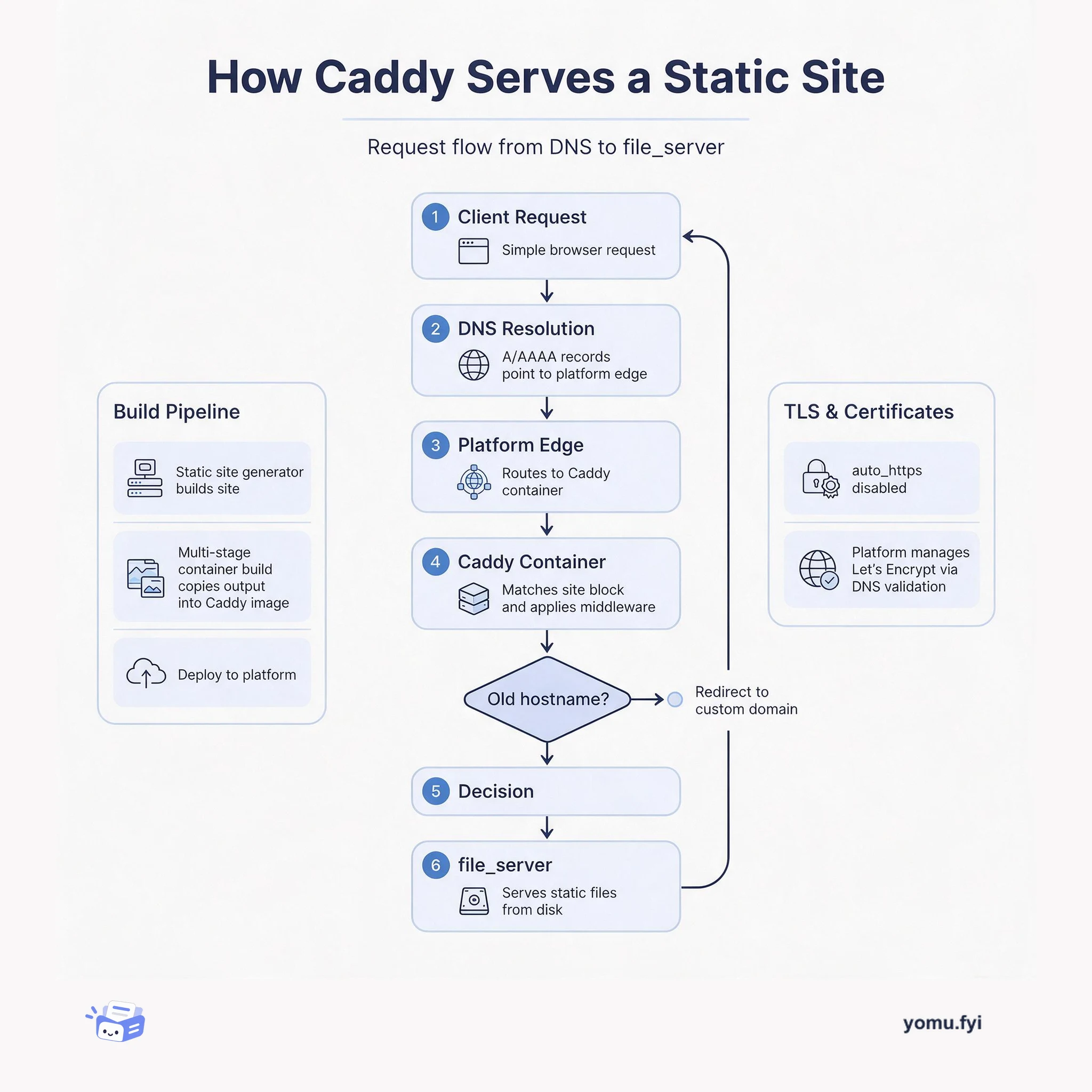
How Caddy Serves a Static Site: The Request Flow
See how Caddy handles a request for a static site, from DNS resolution through container routing to file_server, and how TLS and redirects fit into the flow.
Loading…
Topic
12 posts about TLS. Every summary links to the original.
See the idea
See how Caddy handles a request for a static site, from DNS resolution through container routing to file_server, and how TLS and redirects fit into the flow.
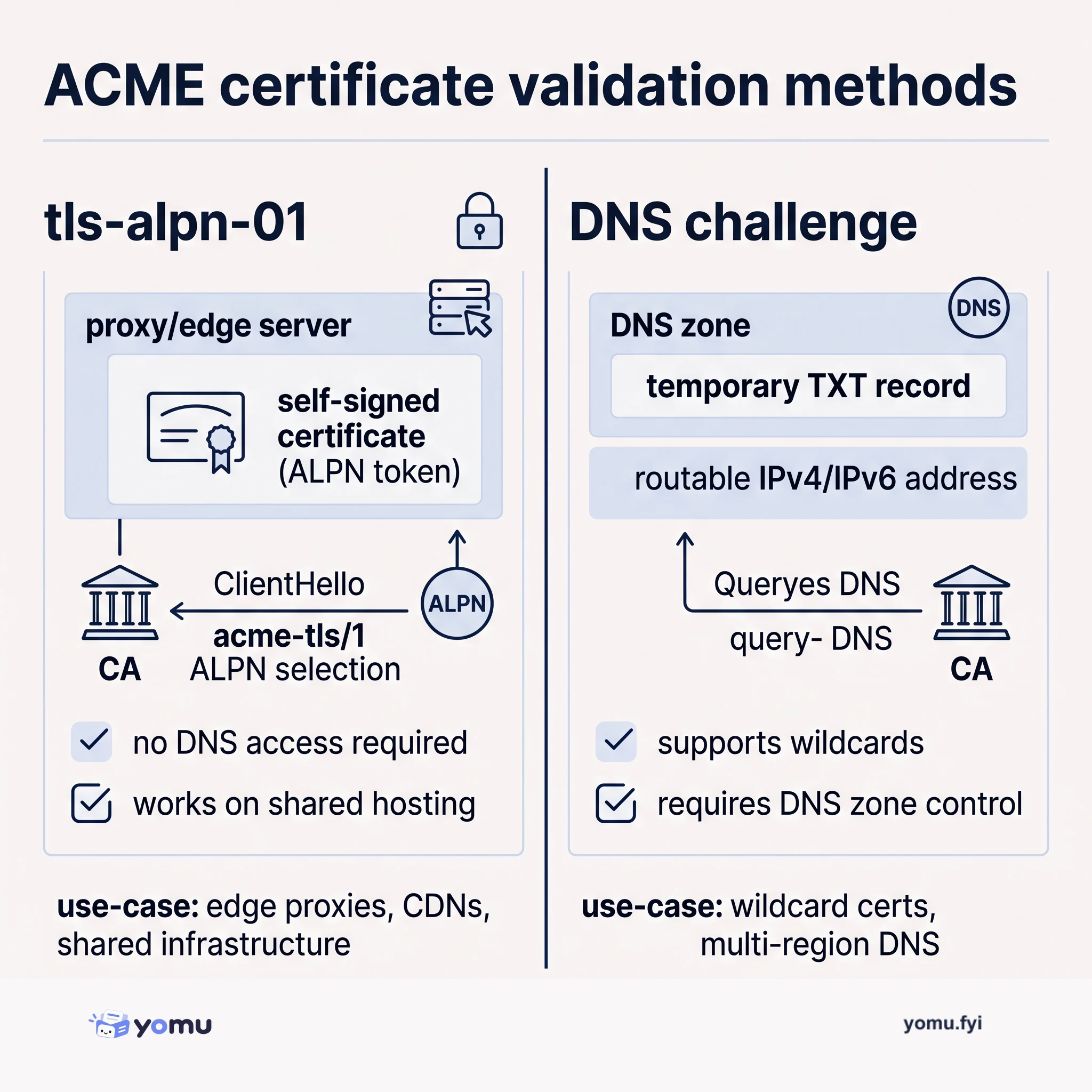
ACME uses different domain-control validation methods. tls-alpn-01 works on shared hosting without DNS access; DNS challenges suit wildcard certificates but require external DNS control.
The Good Stuff
Paid picks we use ourselves. Links carry a referral code — a subscription through one earns us a commission at no extra cost to you.
Newest first
Cloudflare, which terminates TLS for millions of domains and sits in front of over 20% of global Internet request traffic, announced its intent to become a public certificate authority (CA) during Birthday Week 2026. The company has applied for inclusion in the Chrome, Apple, Microsoft, and Mozilla root programs and signed a definitive agreement to acquire an established root from GlobalSign. This acquisition ensures certificate compatibility with older clients that a fresh root would never reach, addressing the long tail of devices where avoidable breakage occurs. Cloudflare plans to be among the first CAs to issue production Merkle Tree Certificates (MTCs) in early 2027, targeting post-quantum readiness as part of Chrome’s Quantum-resistant Root Program. The CA will be ACME-first, require ACME Renewal Information (ARI) support for issuance, and operate transparently with reproducible builds of signing software and a public dashboard.
The Web PKI faces a scaling problem because post-quantum (PQ) signatures are roughly 40 times larger than classical ones, making direct adoption at Internet scale expensive. Merkle Tree Certificates (MTCs) address this by batching certificates into an append-only Merkle tree, allowing a CA to sign the tree root and clients to verify with a compact inclusion proof. Cloudflare is building a certificate authority that will support MTC issuance, targeting early 2027 for inclusion in Chrome’s new Quantum-resistant Root Store, and will offer standard MTC issuance at no cost. The MTC architecture couples issuance with logging (“issue by logging”), making transparency a first-party property rather than an add-on, which reduces redundancy and scaling overhead. Cloudflare successfully completed an experimental deployment with Chrome and is now moving to full production, but notes that broader ecosystem participation from browsers, CAs, and monitors is needed for the transition.
Cloudflare introduced new post-quantum cryptography visibility tools in its Application Security and Logs products, including Logpush, Log Explorer, and the HTTP Traffic Analytics dashboard, to help customers monitor encryption adoption. These tools surface the key exchange algorithm negotiated on every incoming request, enabling customers to audit their post-quantum posture, assess compliance, and identify cryptographic gaps across their domains. The primary post-quantum algorithm in TLS 1.3 is X25519MLKEM768, a hybrid of classical ECDHE over curve X25519 and the post-quantum ML-KEM, which provides belt-and-suspenders security against harvest-now-decrypt-later attacks. Cloudflare Radar data shows about 70% of browser-generated traffic uses post-quantum encryption on the visitor-to-Cloudflare connection, but only 15% of origin connections to Cloudflare use hybrid ML-KEM. For legacy origin servers that cannot support modern post-quantum cryptography, Cloudflare Tunnel can tunnel traffic over TLS 1.3 with X25519MLKEM768 without requiring any upgrade to the origin server itself.
Cloudflare’s Automatic Key Exchange addresses extra TLS 1.3 handshake latency and the difficulty of enabling post-quantum origin connections without manual configuration. Cloudflare previously sent an X25519 keyshare as its first guess; origins preferring another group returned a HelloRetryRequest, while sending X25519MLKEM768 indiscriminately risked oversized, split ClientHello messages and legacy compatibility failures. The system reuses Automatic SSL/TLS scanning to run lightweight handshakes for each supported group, map every origin’s capabilities and preferences, and tailor the initial keyshare, preferring X25519MLKEM768 when supported. During rollout, HelloRetryRequests dropped from roughly 52% to 3.7%, cutting more than 150 ms from p90 handshake latency, while hundreds of thousands of domains gained post-quantum origin connections without configuration. Cloudflare says it plans to extend scanning to post-quantum authentication, including ML-DSA certificates and future Merkle Tree Certificates.
Fly edge proxies began reporting elevated HTTP errors and sharply higher CPU utilization on several IAD hosts, with restarting fly-proxy providing only temporary relief. Profiling an affected process showed Rust tracing and repeated Future polls dominating samples while little time was spent in the kernel, pointing to an async busy-loop. Investigation narrowed the fully qualified polling type to a stack containing the proxy’s Duplex and Rustls’s TlsStream, whose mishandled Waker behavior after a TLS CloseNotify could spin when buffered data remained underneath. Tigris Data’s load test, involving tens of thousands of connections that sent small HTTP bodies and terminated early, triggered the condition; stopping the test and deploying the fix ended the spin-outs. The incident prompted plans to instrument spurious wakeups and reinforced that dependency updates require deliberate tracking, testing, and prioritization.
Heroku Router 2.0 is generally available and is expected to become the default, making migration planning important before rollout. The guidance recommends creating a staging application, enabling the http-routing-2-dot-0 feature, restarting web dynos when needed, and checking response headers and system logs to confirm routing. Router 2.0 identifies requests with Via values such as “2.0 heroku-router” or “1.1 heroku-router,” and its logs add protocol, tls, and tls_version fields. HTTP/2 is enabled by default on custom domains with valid TLS certificates, while HTTP/2 can be disabled through a Labs feature. Keepalives are also enabled between the router and web dynos, but applications using recent Puma versions may need the keepalive opt-out because of a connection-handling bug.
Heroku’s migration of Rendezvous, the bidirectional proxy that connects Heroku Run sessions to one-off dynos, from EC2 Classic to AWS VPCs caused one customer’s app to hit H12 timeouts. The move replaced a single Elastic IP ingress and process-level TLS termination with a Network Load Balancer, whose larger TLS frames exposed a blocking flaw in Rendezvous’s single-threaded Ruby channel loop. That loop used IO.select on the TCP socket and dyno terminal, but OpenSSL::SSL::SSLSocket could retain unread buffered data after a partial read; IO.select saw no TCP bytes and blocked beyond the Heroku Router’s 30-second limit. Engineers reproduced the behavior across two languages, instrumented the instance agent, then fixed the channel with separate threads and corrected socket-reading and IO.select handling. After staging tests, the customer moved back to VPC Rendezvous and confirmed the issue was resolved.
Two new Appkata examples show how to run selected applications on Fly: Node-RED and Redis secured with TLS. Node-RED is a GUI flow-programming environment built on Node, with modules for connecting MQTT, Redis, Graphana, and other systems, plus creating web dashboards; the guide is intended to get it running quickly. The secured Redis example uses mkcert to simplify creation of TLS certificates, extending an earlier Redis example that presented Redis as a simple service. The post also points to Community.fly.io as a place for questions, hints, and tips, noting that Fly accounts can use single sign-on to make participation easier.
Fly describes how its CDN automatically generates TLS certificates for customer hostnames with Let’s Encrypt and ACME, focusing on why the older tls-sni-01 validation method was unsafe on shared hosting. ACME authenticates an account with an ECDSA/EdDSA key, creates an order, and verifies domain control through challenges; Fly uses tls-alpn-01, which avoids requiring DNS access or port 80. For validation, Fly requests a challenge, creates a self-signed certificate containing Let’s Encrypt’s token, stores it in distributed certificate storage, and signals the CA to connect with a ClientHello selecting acme-tls/1 via ALPN. The Rust proxy recognizes that ALPN case, retrieves the challenge certificate, and serves it to Let’s Encrypt, which completes the challenge and permits certificate issuance. Fly assigns each application a unique routable IPv6 address and requires CNAME resolution to it for ALPN validation; wildcard certificates instead use DNS challenges.
Shopify’s TLS certificate infrastructure evolved from a handful of manually renewed certificates for administration and checkout traffic to an automated system supporting more than 1M merchants. The initial Shopify Plus implementation added domains to shared Subject Alternative Name (SAN) certificates, but manual provisioning, certificate-authority limits, extra IP requirements, and the inability to rely on SNI made the approach labor-intensive and error-prone. Notary automated certificate-authority API requests, domain verification, delivery, and renewals, storing one certificate and unique private key per domain in a relational database. OpenResty Lua middleware dynamically loaded certificates through ssl_certificate_by_lua, while an in-memory LRU cache reduced handshake latency; theme processing replaced HTTP asset references to prevent mixed-content warnings. After reaching all-merchant encrypted storefronts in February 2016, Shopify migrated much of its certificate use to Let’s Encrypt and later a cloud edge, ultimately returning to Notary-issued certificates uploaded to both edge networks to simplify synchronization.
Fly Answers Questions compiles responses about custom domains, configuration recovery, Turboku deployment, database latency, TLS termination, global databases, continuous deployment, and idle-app scaling. Fly allows multiple custom hostnames per application and automatically provisions Let’s Encrypt certificates after validation; a deleted fly.toml can be restored with flyctl config save -a , with -c supporting another filename. For Turboku, Heroku slugs run as containers in a nearby datacenter rather than at the edge, while region selection can reduce database latency and retain edge SSL termination. The service supports TLS-only termination up to HTTP/1.1, GitHub Actions deployment, Redis for local caching, and a replication system for distributing changes, while keeping one running instance for idle apps instead of scaling them to zero.
Custom Domains with Fly is an application guide for using Fly to proxy traffic or serve applications across multiple custom domains. It explains how to configure an NGINX server for external sites and how to attach host and domain names to Fly applications with the flyctl command line. For automated workflows, it describes the Fly GraphQL API operations for adding, removing, checking, and deleting hosts and associated certificates, and points to a repository of ready-rolled Node applications demonstrating the API. The guide's speed run retrieves an app's IPv4 and IPv6 addresses, adds corresponding A and AAAA DNS records, creates a certificate with flyctl, and uses another command to monitor issuance. The resulting setup provides auto-renewing Let's Encrypt TLS certificates, edge TLS, and HTTP/2 support; the guide also states that Fly applications have no limit on attached certificates and can scale on demand.
The best engineering reads, once a week.