The post details how to add secure human-in-the-loop approval to an AI expense agent built with Microsoft Agent Framework and Auth0, completing the four-part series that handles identity, authorization, and action. Because approval is a security-sensitive action requiring the same cryptographic rigor as any authentication event, the agent uses Client-Initiated Backchannel Authentication (CIBA) to push a notification to the manager’s phone instead of accepting chat input. The notification includes a binding message describing the expense by ID, amount, vendor, and context, giving the manager enough information to decide from a lock screen. The agent polls Auth0’s token endpoint until the manager approves or denies, then uses the CIBA-issued access token scoped with approve:expenses to record the decision on a separate Expense API. This design ensures approval decisions are cryptographically bound to the manager’s identity and verifiable by downstream services, completing the secure loop.
Context
The post describes how to implement human-in-the-loop approval for an AI expense agent using Auth0’s Client-Initiated Backchannel Authentication (CIBA). It covers building an ASP.NET Core minimal API as the system of record, configuring Auth0 for CIBA, and integrating the approval flow into a Microsoft Agent Framework agent. The approach addresses the gap of secure, out-of-band approval without requiring the manager to be in a browser.
Approach / What changed
Implemented CIBA with Auth0 to trigger push notifications for manager approval, built an ASP.NET Core minimal API with an authorization policy validating the approve:expenses scope, and used polling to wait for the out-of-band decision from the manager’s enrolled device.
Takeaways
1
CIBA enables backend-initiated authentication where the user responds out-of-band on an enrolled device, making it suitable for secure approval flows in AI agents.
2
Binding messages in CIBA notifications are critical for security—they provide specific context so the user can make an informed decision from a lock screen.
3
The CIBA-issued access token should carry a specific scope (e.g., approve:expenses) validated by a separate API to ensure the token was issued for that particular action.
FAQ
How does CIBA work for agent approval?
The agent calls Auth0's /bc-authorize endpoint with a binding message and target user. Auth0 pushes a notification to the user's device. The agent polls the /token endpoint until the user approves or denies. On approval, a token scoped with approve:expenses is returned for use against the Expense API.
Why is a binding message necessary in CIBA?
Without a binding message, the notification would be vague like 'an application wants your approval,' training users to tap yes without context. A specific binding message like 'Approve expense exp-001: $450 at Hotel for NYC client dinner' lets the manager make an informed decision from a lock screen.
How does the agent validate the CIBA-issued token?
The agent sends the token to the Expense API, which requires the approve:expenses scope via an ASP.NET Core authorization policy. This ensures the token was specifically issued for that approval action, not just a generic login token.
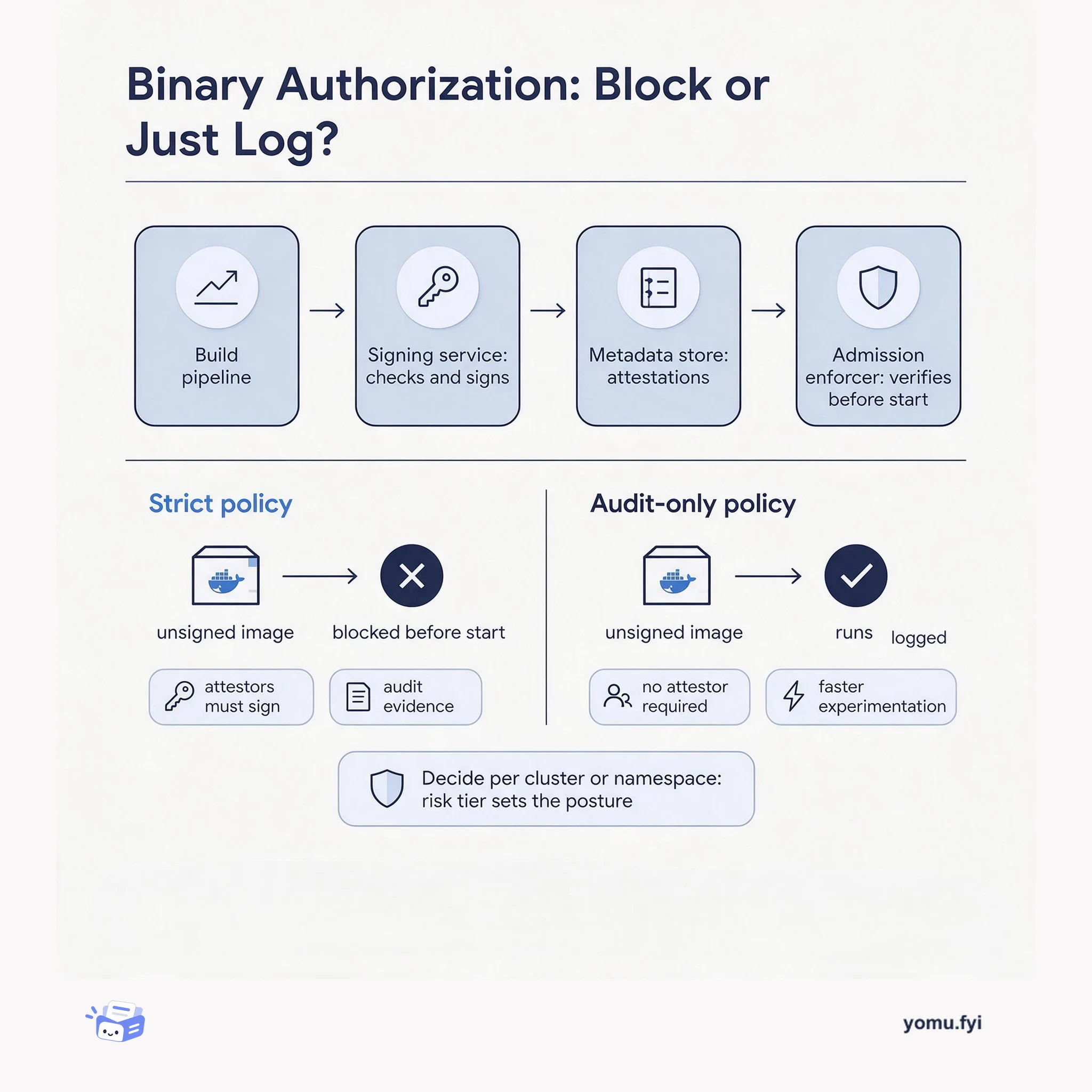
Binary Authorization blocks container images that lack the attestations a cluster policy requires. This comparison sets a strict blocking posture beside an audit-only one, and shows how to choose between them.
Keep reading
Related reading
The Good Stuff
Paid picks we use ourselves. Links carry a referral code — a subscription through one earns us a commission at no extra cost to you.