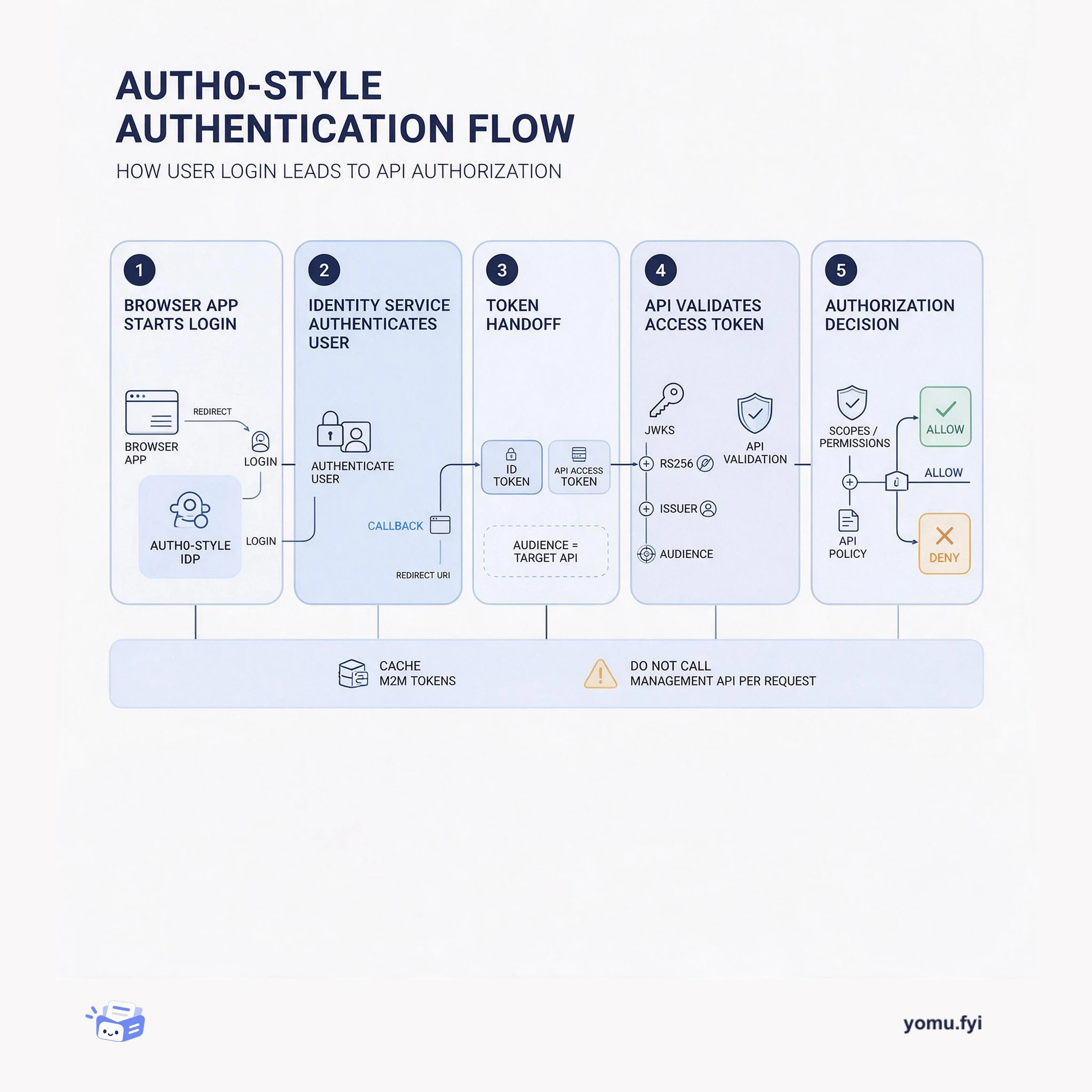
The Token’s Route: From Auth0 Login to API Authorization
See how an Auth0 login becomes an API decision: redirect the user, issue the right token, validate its claims, and apply audience, scope, and access policies.
Loading…
Topic
25 posts about Auth0. Every summary links to the original.
See the idea
See how an Auth0 login becomes an API decision: redirect the user, issue the right token, validate its claims, and apply audience, scope, and access policies.
The Good Stuff
Paid picks we use ourselves. Links carry a referral code — a subscription through one earns us a commission at no extra cost to you.
Newest first
Auth0 released its official Kotlin Multiplatform SDK for Android and iOS, enabling unified authentication logic in shared common code. Developers write login, logout, token management, and direct API calls once in commonMain using Kotlin suspend functions and a sealed Result type for exhaustive error handling. Native security is maintained through platform-specific implementations: Android uses Keystore-backed DataStore and Custom Tabs, iOS uses Keychain and ASWebAuthenticationSession, with Swift async/await interop via SKIE. The SDK is available on Maven Central as com.auth0.kmp:auth0:1.0.0-beta.1 as a single artifact or separate modules, requiring Kotlin 2.3.21, Android minSdk 24, and iOS 14.0+. It includes a Credentials Manager for token storage and automatic renewal, and supports advanced features including WebAuthn passkeys, DPoP token binding, custom storage, and configurable retry with fixed or exponential backoff.
Auth0 released a dedicated SDK for TanStack Start, a full-stack React framework, to replace hand-rolled OIDC flows or adapted SDKs. The SDK provides hooks, components, route guards, server middleware, and server helpers that integrate with TanStack Start’s server functions, middleware, and file-based router. Setup involves installing the package, configuring environment variables for the Auth0 application, creating a server-side Auth0 instance, registering the auth0Middleware in the start file, and wiring the router context and Auth0Provider in the root route. The SDK automatically mounts auth routes for login, callback, logout, profile, and backchannel logout, and supports features like login, logout, protected routes via requireAuth, session reading on the server with getSession, and additional capabilities such as passkeys, organizations, MFA, and API scope checks. The fastest way to try it is the official quickstart, which scaffolds a fresh app and adds the SDK step by step.
Auth0 Organizations provide an isolated workspace per tenant with dedicated members, identity provider connections, metadata, and role-based access control, addressing enterprise requirements like Acme Corp’s SSO ultimatum. Login flows differentiate between B2C users (no organization parameter) and B2B users (organization parameter scopes connections, branding, and token claims including org_id). Home Realm Discovery automatically matches users to their enterprise IdP by email domain when an organization is set, requiring the Identifier First authentication profile and eliminating password prompts. Authorization is per-organization via org_id claims in access tokens, with organization-level roles and permissions resolved through RBAC. The post also covers invitation tickets, tenant context switching where users obtain new tokens with a different org_id, recommends one Auth0 Organization per app tenant, describes Auth0 Actions for custom metadata, and introduces this as part one of a five-part series on B2B identity.
Customer Identity and Access Management (CIAM) has traditionally been viewed as a security obligation, but Auth0 argues it can be a growth driver when optimized for conversion. The Auth0 Identity Conversion Suite combines Anonymous Sessions and Experiment Center to transform identity from a rigid gatekeeper into a dynamic growth engine. Anonymous Sessions issue scoped access tokens to track anonymous users from their first interaction, preserving cart contents, preferences, and consent selections when they convert to authenticated accounts. Experiment Center enables native A/B testing and gradual rollouts of authentication flows, allowing teams to test changes on controlled traffic segments before global deployment with audit trails. The suite addresses high cart abandonment in retail, cross-device context loss in travel, and onboarding friction in financial services by enabling seamless guest transitions, cross-channel journey unification, and progressive trust and compliance.
Auth0’s user_metadata and app_metadata define a security boundary: user_metadata is writable by users through the update:current_user_metadata scope, while app_metadata requires privileged scopes available only to confidential clients via the client credentials grant. Post-login Actions reading authorization data like subscription plans or feature flags from user_metadata allow users to escalate privileges by modifying their own metadata, for example setting plan to enterprise and beta_access to true. Writing to app_metadata demands a server-side M2M application with update:users_app_metadata scope, which no public client or user token can obtain. The correct practice is to store access-control data such as roles, tenant membership, and IP allowlists in app_metadata, and non-sensitive preferences like theme or language in user_metadata. A third field, client_metadata, holds application-level properties readable via event.client.metadata in Actions.
Enterprises centralize authentication into a single Auth0 environment but must comply with frameworks like PCI-DSS, HIPAA, and SOC 2 that restrict data to private channels. Auth0 Outbound PrivateLink provides a secure unidirectional connection between Auth0 and AWS infrastructure, avoiding the public internet. However, a single PrivateLink connection per environment cannot directly reach multiple isolated VPCs for staging and production. The Intelligent Gateway Pattern solves this by deploying an API gateway or reverse proxy at the PrivateLink termination point to fan out traffic. Auth0 Actions append context such as custom headers like X-Target-Env or specific paths, and the gateway inspects these to route requests to the appropriate isolated VPC, decoupling secure transport from internal routing. This pattern unblocks identity consolidation by allowing a single Auth0 tenant to serve both staging and production workloads while maintaining strict VPC isolation.
Auth0’s free tier supports up to 25,000 MAUs for MVPs, but teams must complete seven architecture checks before production launch to avoid blockers. The checks cover Auth0 Organizations for multi-tenancy, Enterprise Connections for SSO, Custom Domains, JIT hash migration, Fine-Grained Authorization, MFA factor progression, and tenant lifecycle management. The free plan caps Organizations at five, Enterprise Connections at one plus unlimited Okta, and MFA at passwordless and passkeys only. Upgrading to B2B Essentials or Professional unlocks unlimited organizations, up to five enterprise connections, and advanced MFA including TOTP, WebAuthn, push, and SMS; Professional also enables Custom Database migration scripts. Teams must add a credit card for Custom Domains, add a secondary admin to prevent tenant deletion after 150 days of inactivity, and note that FGA free trial supports 100 MAUs and 50,000 tuples for prototyping.
This tutorial explains how to integrate Claude Code with Auth0’s Management API using the Auth0 MCP Server, enabling AI-driven authentication configuration management from the terminal. The setup uses the OAuth 2.0 Device Authorization Flow to obtain scoped access tokens stored in the OS keychain, avoiding static secrets that risk exposure in source control. Developers initialize the MCP server with explicit scopes like read:clients or update:actions, then register it with Claude Code via the claude mcp add command, with credentials never stored in plain text. A CLAUDE.md file provides project context and constraints, guiding the agent to respect environment-specific configurations and security policies such as never modifying production callback URLs without confirmation. The tutorial demonstrates refactoring JWT validation code in a single terminal session, with human-in-the-loop confirmation ensuring safe agentic changes and all auth-critical paths undergoing manual PR review.
Auth0 is bringing secure identity to the Universal Commerce Protocol (UCP) so retailers can safely let AI agents discover and purchase products on shoppers’ behalf. UCP is an open standard that gives AI agents a consistent way to interact with a merchant’s catalog, cart, and checkout, reducing the need for separate integrations per platform. Auth for UCP provides the identity and trust layer, handling agent registration, account linking, and scoped temporary token issuance through an on-behalf-of token exchange. This ensures that every purchase ties to a verified human with time-limited access and a full audit trail, while agents see only the authenticated shopper’s data. Auth0 is opening Auth for UCP Limited Early Access to select customers through its Agentic Commerce Partnership Program.
The Auth0 plugin for ChatGPT enables developers to configure authentication, manage tenants, and generate integration code through natural language prompts without leaving the ChatGPT session. It connects to a real Auth0 account, producing SDK code that matches the actual tenant configuration rather than generic boilerplate that requires fixing later. Users can create applications, set up connections, query tenant data, and get accurate answers grounded in Auth0’s documentation right in the conversation, all without opening the Auth0 dashboard. The plugin addresses the common pattern where identity setup is postponed until after the app demo, disrupting development flow. By integrating identity management into the conversational workflow, it allows developers to describe what they need and receive working identity infrastructure directly in the chat, including enterprise capabilities like Organizations and MFA.
Building multi-factor authentication (MFA) in-house is a much larger project than teams expect, requiring authenticator app integration, QR code generation, secure backup recovery codes, and edge cases like lost phones. Auth0 positions its MFA offerings as a way to offload that work so developers can focus on core product features. The company’s paid plans include MFA directly, with Pro MFA covering standard authenticator apps in B2C and B2B Essentials plans. Enterprise MFA adds WebAuthn, push notifications, SMS, and voice, available as an add-on to B2B Essentials or included in Professional tiers. Auth0 argues that using its MFA helps teams pass compliance, unblock enterprise deals, and avoid weeks of building login infrastructure.
The post details how to add secure human-in-the-loop approval to an AI expense agent built with Microsoft Agent Framework and Auth0, completing the four-part series that handles identity, authorization, and action. Because approval is a security-sensitive action requiring the same cryptographic rigor as any authentication event, the agent uses Client-Initiated Backchannel Authentication (CIBA) to push a notification to the manager’s phone instead of accepting chat input. The notification includes a binding message describing the expense by ID, amount, vendor, and context, giving the manager enough information to decide from a lock screen. The agent polls Auth0’s token endpoint until the manager approves or denies, then uses the CIBA-issued access token scoped with approve:expenses to record the decision on a separate Expense API. This design ensures approval decisions are cryptographically bound to the manager’s identity and verifiable by downstream services, completing the secure loop.
Auth0 Agent Gateway is announced in beta as a Customer Identity and Access Management (CIAM) control plane for governing product-native, customer-facing AI agents in multi-tenant SaaS applications. It addresses a trust model involving organizations, delegated user access, customer consent, independently owned connected accounts, and cross-tenant data boundaries, rather than workforce-only identity. Positioned between an agent and its tools, the gateway evaluates each call using agent, user, and organization context; it uses Organizations, Agents as Principals, Token Vault, token exchange, tenant logs, and administrative controls. The described capabilities include short-lived agent-only tokens, user-scoped credentials, runtime tool authorization, audit logging with optional SIEM streaming, and an agent kill switch. Auth0 is seeking product and engineering teams to join the beta.
Auth0 FGA Permissions Index is announced in Early Access as a way for B2B SaaS applications to enforce permissions while handling expanding AI-agent activity and complex relationship graphs. Customers select relations used for search and filtering, typically high-cardinality relations such as can_view, and the index precomputes the access those relations imply. It streams the resulting data into the customer’s database alongside application data, allowing indexed permission checks through SQL JOINs instead of repeated authorization API calls or runtime graph traversal. Computation moves to relationship-write time, while relations outside the index continue to be evaluated by FGA in real time. The announcement positions this design as a path to consistently low-latency filtering at enterprise scale, with permission decisions described as precomputed, traceable, and compliant.
Auth0 Identity Conversion Suite addresses identity friction across the visitor-to-user journey, where forced account creation and complicated checkout are cited as contributors to abandonment. It combines Anonymous Sessions, which uses OAuth 2.0 access tokens to track pre-authentication activity and transfer session data into an authenticated profile, with Experiment Center, which supports controlled authentication-flow tests. Visitors can be assigned to percentage- or segment-based variants, kept in the same variant during their journey, and measured through exposure, success-rate, and time-to-auth events across supported Auth0 surfaces. The Early Access release is available to Enterprise-plan Auth0 customers and is presented as a way to improve personalization, onboarding, guest checkout, and authentication decisions without changing application APIs or code.
The Agentic Arcade’s admin panel adds an admin-only “reset all scores” action to prevent a long-lived or stolen admin session from wiping every player’s history. It combines the arcade-admin role with step-up MFA, requiring a recognized MFA signal and auth_time or iat within five minutes. A shared helper checks amr, acr, or a tenant claim; buildMfaStepUpUrl uses acr_values and can add max_age=0, while mfa.challengeWithPopup() opens MFA before the reset request. A beforeSessionSaved hook preserves claims filtered by the Auth0 Next.js SDK, and the API enforces session, role, and freshness gates before clearing scores; cancelled or blocked popups stop the request.
Auth0 is launching an integration for v0 that lets builders add real authentication to prompt-built applications. v0 can respond to requests for login, protected routes, B2B use cases, enterprise identity providers, or MFA by creating Auth0 resources, configuring connections, and wiring its SDK into generated code. The integration operates within the v0 conversational workflow and builds on Auth0’s native Vercel integration, which syncs tenant configuration and credentials across development, preview, and production environments. This replaces placeholder authentication screens with authenticated sessions, protected access, and Auth0-specific implementation patterns including real session handling and protected routes. It is available in any v0 project today, with setup beginning by installing Auth0 from the project’s Integrations settings.
The tutorial shows how to add Google login to a Vite-based React single-page app without implementing OAuth directly, using Auth0’s React SDK and Google social connection. It covers installing @auth0/auth0-react, creating an Auth0 Single Page Web Application, checking RS256 and OIDC Conformant settings, registering callback, logout, and web-origin URLs, and supplying the domain and client ID through Vite environment variables. The React code wraps the app in Auth0Provider, uses useAuth0 for loading and authentication state, and calls loginWithRedirect with connection: 'google-oauth2' to bypass provider selection. For production, it explains replacing Auth0’s shared development keys with Google Cloud credentials whose origin and redirect URI target the Auth0 domain, then storing them in the Auth0 social connection. It also points to route protection with withAuthenticationRequired, API access tokens from getAccessTokenSilently, and exact redirect-URI matching as important follow-on considerations.
Auth0 API Access Policies for Applications control whether an application can obtain an access token for a registered API, separately for user-delegated and client access. The FinFlow example separates a browser application that should reach both APIs from a machine-to-machine Risk Engine restricted to the Payments API. Policies provide three choices—allow_all, require_client_grant, and deny_all—while client grants specify an application's audience and permitted scopes, with the audience determining which API policy is evaluated. The guide shows Dashboard and Management API configuration, including subject_type_authorization settings and grants for user and client access. It also explains that third-party applications still require grants under allow_all, while default third-party grants establish a baseline and per-application grants take precedence for exceptions.
Auth0 429 responses in production are tied to rate limits, commonly when applications call the Management API for every request or obtain a new machine-to-machine (M2M) token for every request. Because limits are per tenant and vary by plan, logging x-ratelimit-limit, x-ratelimit-remaining, and x-ratelimit-reset headers exposes approaching exhaustion. User roles, permissions, and metadata that can be treated as access-token snapshots should be added as custom claims by a Post-Login Action, while APIs read them from the JWT. M2M tokens, valid for 24 hours by default, should be cached and refreshed with a 60-second expiry buffer; data requiring freshness should sit behind a server-side cache with a 30-to-60-second TTL. When a 429 occurs, retry at the Unix timestamp in x-ratelimit-reset rather than applying exponential backoff, because the reset time is deterministic.
The best engineering reads, once a week.