Agents CLI: The Terminal Control Plane for Coding Agents
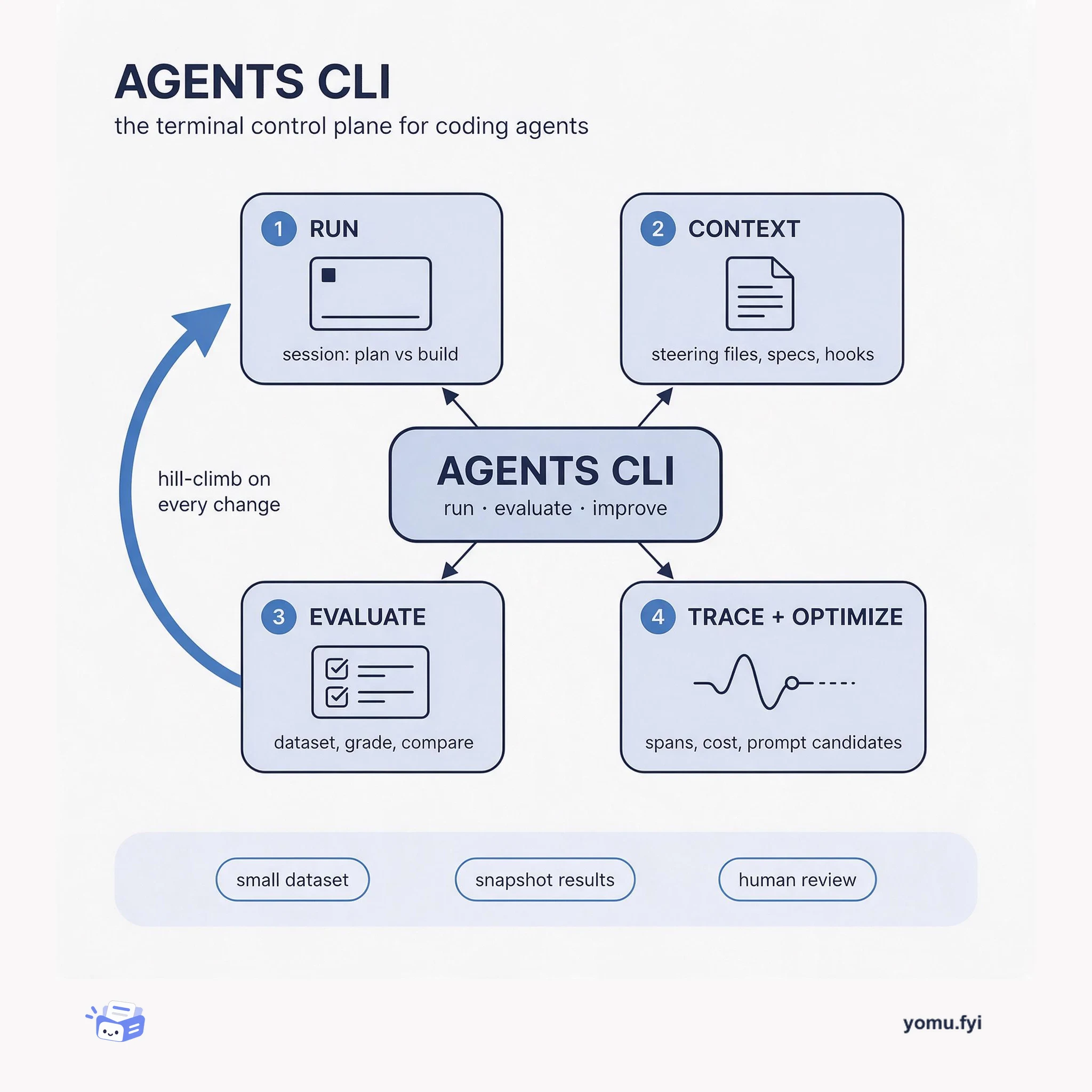
Agents CLI is the command-line surface where you run a coding agent, score its output against a dataset, and trace what happened, so quality becomes a loop instead of a guess.
 SentryAnton BjorkmanTutorial
Sentry’s Agent Tracing captures prompts, tool calls, and outputs in a single trace, enabling debugging of silent failures, slow steps, and context loss in multi-agent workflows. The post details five recipes: exporting production conversations into eval datasets via a CLI command that records the first user message as input and the last agent reply as output. Another recipe automates error triage by having Claude’s scheduled tasks pull stats via the MCP server and file tickets in Linear for broken tools, stuck loops, or costly runs. Additional recipes cover tracking per-call costs with the Vercel AI SDK, building dashboards and alerts for spend monitoring, and sending OpenTelemetry spans to Sentry as an extra destination without replacing existing pipelines.
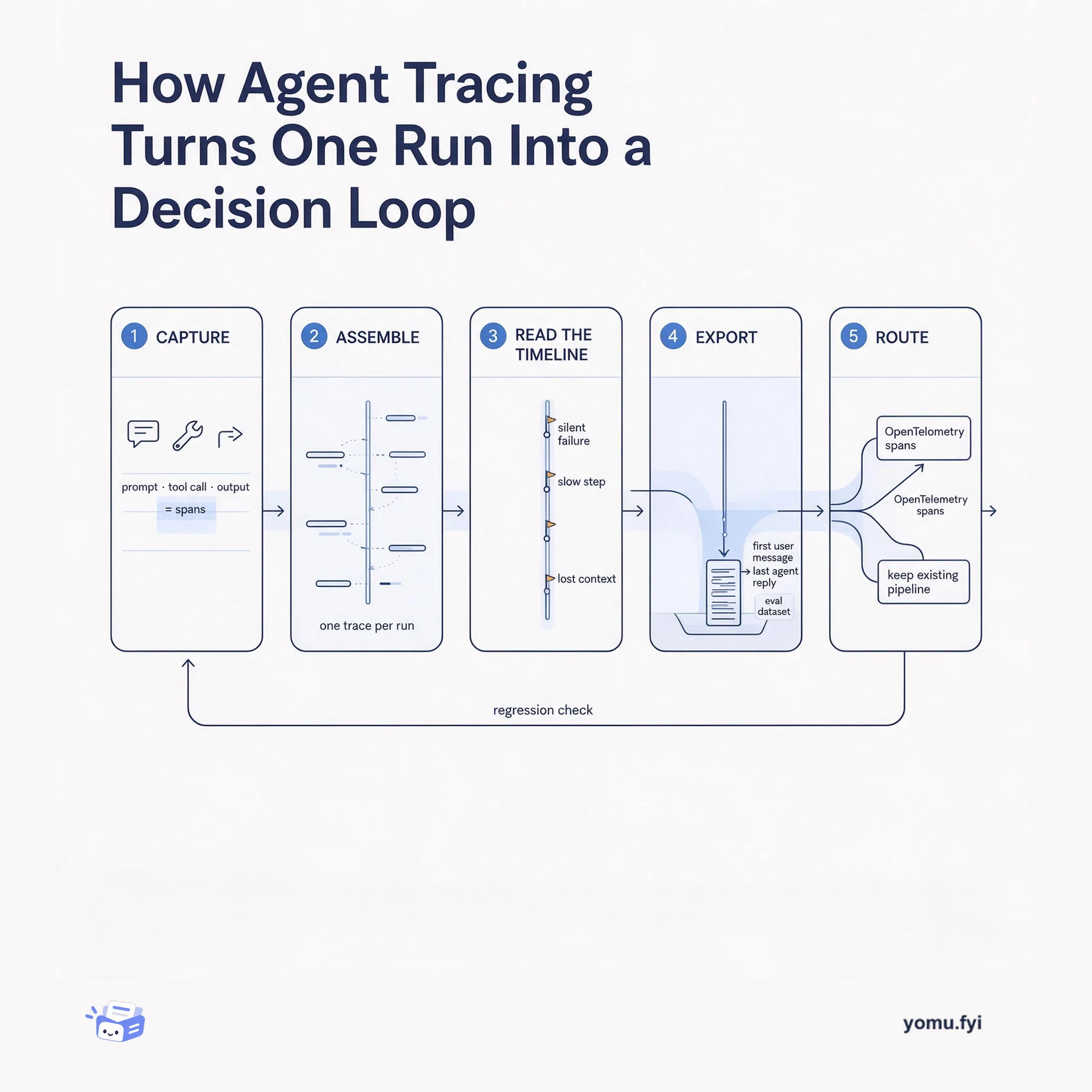
AI-powered apps are hard to debug without observability because AI produces different results each run. Agent Tracing bridges the gap between prompts, tool calls, and outputs in a single trace, enabling debugging of silent failures, slow steps, and context loss in multi-agent workflows.
Using Sentry’s Agent Tracing to capture AI agent traces, then applying five specific recipes: exporting conversations for evals via CLI, automating triage with Claude scheduled tasks via MCP, tracking costs with Vercel AI SDK, monitoring spend with dashboards and alerts, and sending OpenTelemetry spans to Sentry as an additional destination.
Agent Tracing captures model calls, tool executions, and handoffs in a single trace, allowing debugging of silent tool failures and slow steps in multi-step workflows.
Production AI agent conversations can be exported into eval datasets using a single Sentry CLI command, with the first user message as input and last agent reply as output, along with cost and token metadata.
AI agent error triage can be automated by having Claude’s scheduled tasks pull stats via the MCP server and file tickets in Linear when it finds broken tools, stuck loops, or costly runs.
Use the Sentry CLI to export production conversations with one command. The first user message becomes the input, the last agent reply becomes the output, and cost, tokens, and tool errors are included as metadata. You can then load these records into eval tools like Braintrust, Langfuse, promptfoo, or Arize Phoenix for scoring.
Set up a scheduled task in Claude that runs daily and connects to Sentry through the MCP server. It pulls stats from the last 24 hours of conversations, reads a mix of failed and successful runs, and files tickets in Linear when it finds broken tools, stuck loops, or costly runs.
Use Sentry's Vercel AI SDK integration, which is enabled by default with the Sentry Next.js SDK. Name each AI SDK call and set a conversation ID to group turns. In Sentry's Explore → Agents view, you can see estimated cost by model, agent runs, and tool calls over time, plus individual conversation costs.
Summaries are generated from the original by a language model. Check the original before relying on it.
See the idea
Agents CLI is the command-line surface where you run a coding agent, score its output against a dataset, and trace what happened, so quality becomes a loop instead of a guess.
Agent tracing records prompts, tool calls, and outputs as one span-linked run, then turns that record into eval datasets, alerts, and regression checks. Here is the five-stage flow from capture to decision.
Keep reading
The Good Stuff
Paid picks we use ourselves. Links carry a referral code — a subscription through one earns us a commission at no extra cost to you.
One useful email. Unsubscribe anytime.