What Is an AI Factory? Four Stages From Data to Served Answer
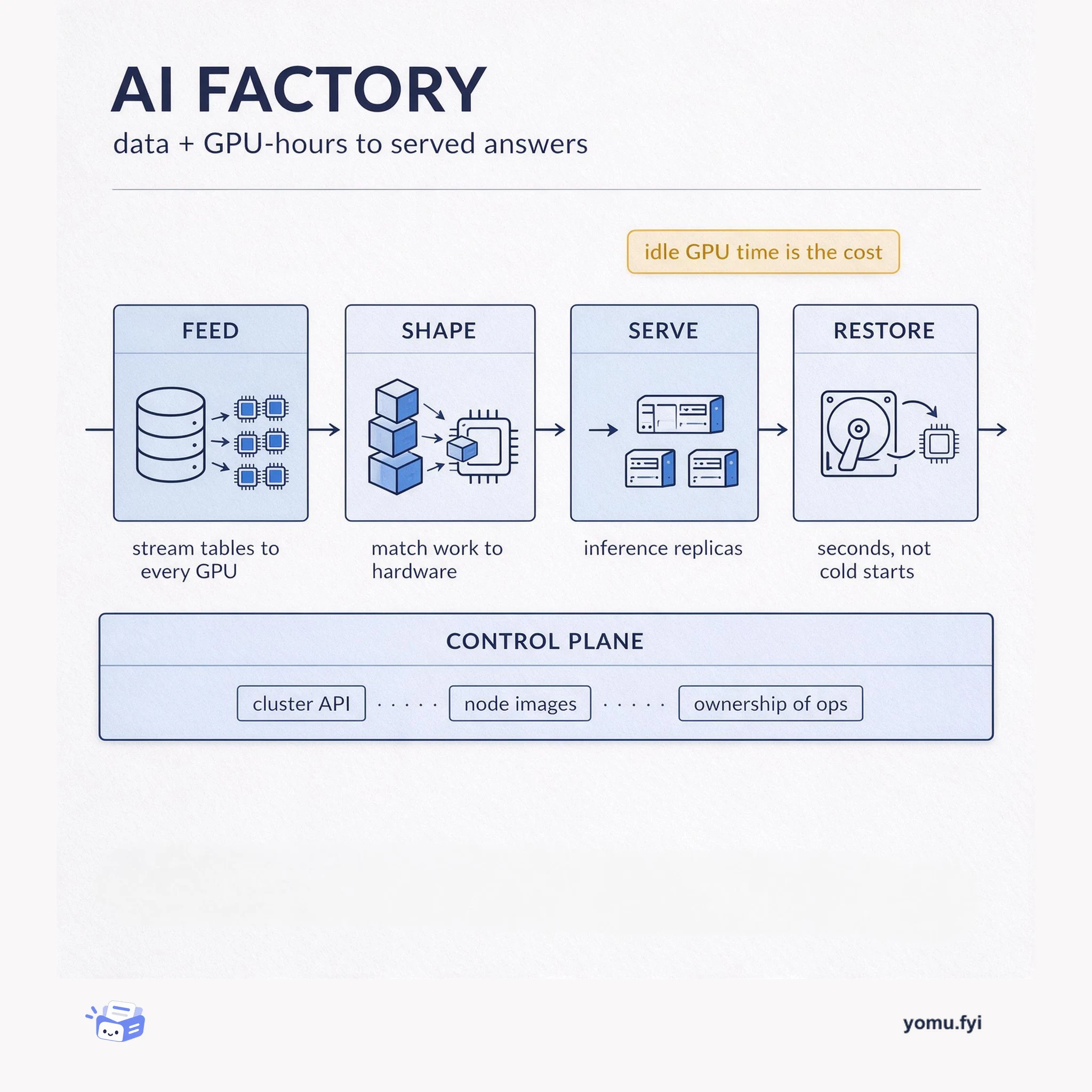
An AI factory turns raw data and GPU-hours into served model output. This diagram breaks it into four stages — feed, shape, serve, restore — plus the control plane that owns them.
Agents CLI is the command-line surface where you run a coding agent, score its output against a dataset, and trace what happened, so quality becomes a loop instead of a guess.
The Agents CLI is the command-line surface where a coding agent is launched, given context, evaluated, and improved. It has four parts that reinforce each other: a session that plans and edits code, a context layer of steering files, specs, and hooks, an evaluation harness that grades cases against a metric, and a trace and optimization stage that records prompts, tool calls, and cost. Teams lean on it because ordinary unit tests rarely catch tool misuse or persona regressions, and because splitting planning from implementation across two models can cut cost sharply without losing resolve rate. Treat the CLI as a quality control plane, not just a launcher.
Unit tests check deterministic code paths, not whether an agent picked the right tool or stayed in character. In a documented Agents CLI eval run, a swapped persona prompt dropped the mean score from 4.0 to 2.75, and the per-case diff exposed tool misuse on weather questions that unit tests never flagged. The eval harness catches that class of regression before it reaches users.
A planner model reads code and produces a structured plan without making changes, then a cheaper builder model executes that plan, edits files, and runs tests. Reported internal benchmarks cut average model cost per task by roughly half while resolve rates moved less than one percentage point. The trade-off is an extra planning phase and a plan that has to be good enough to follow.
The posts behind it
 AWS · · Problem & solution
Smarsh, a compliance platform, needed to review its first multi-agent workload against the AWS Well-Architected Framework’s Agentic AI Lens, which existed only as published documentation with 150 best practices. To avoid a multi-day manual effort, Smarsh built a custom Claude skill that treats the lens as structured data and automates evidence gathering from the workload’s GitHub repository. The skill uses a five-value status rubric, honesty rules, and a deterministic Python script to produce a formatted workbook with per-item status, evidence, gaps, and remediation. Smarsh validated the skill against two synthetic fixture repositories—a moderately mature workload and a deliberately rough proof of concept—achieving 16 of 16 verifiable expectations, compared to 8 of 16 without the skill; the evaluation suite ships inside the skill for ongoing regression testing. The resulting reviews enabled sharper AWS engagement by mapping specific best-practice gaps to focused working sessions with AWS Solutions Architects.
 Jetbrains · · Announcement
Junie Eco Mode splits coding tasks into two phases: planning with the user’s selected model and implementation with a cheaper model, cutting costs significantly. In two internal benchmarks, average model cost per task dropped 57.3% (benchmark B) and 48.1% (benchmark A), while average resolve rates changed by less than one percentage point. The architect only reads code and produces a structured plan in about 15 steps, never making changes. The builder then follows the plan exactly, editing files, running builds and tests, and fixing issues. Eco mode is enabled by default for many configurations in JetBrains Air EAP and Junie CLI.
 Sentry · · Tutorial
Sentry’s Agent Tracing captures prompts, tool calls, and outputs in a single trace, enabling debugging of silent failures, slow steps, and context loss in multi-agent workflows. The post details five recipes: exporting production conversations into eval datasets via a CLI command that records the first user message as input and the last agent reply as output. Another recipe automates error triage by having Claude’s scheduled tasks pull stats via the MCP server and file tickets in Linear for broken tools, stuck loops, or costly runs. Additional recipes cover tracking per-call costs with the Vercel AI SDK, building dashboards and alerts for spend monitoring, and sending OpenTelemetry spans to Sentry as an extra destination without replacing existing pipelines.
 Google · · Tutorial
The Agents CLI eval namespace supports a hill-climbing quality loop through iterative generate, grade, compare, analyze, and optimize commands. Starting with a four-case dataset expanded from a single default, the first eval run produces a baseline mean score of 4.0 on the custom_response_quality metric with a standard deviation of 1.41. A regression introduced by a swapped chef persona system prompt dropped the mean to 2.75, and the per-case diff from eval compare revealed tool misuse on weather questions that unit tests could not catch. The workflow supports automated prompt optimization via eval optimize using GEPA, but the candidate prompts require human review to avoid overfitting to the metric. Effective hill-climbing requires a small dataset that runs on every change, snapshotting full result files for later regression analysis, and treating summary metrics with suspicion as shown by the stdev tightening from 1.41 to 0.96 during the regression.
 Databricks · · Problem & solution
Document extraction across dozens of PDF layouts is unreliable when fields are tuned in isolation; fixing one field can cause hidden regressions and apparent improvements may stem from normal run-to-run variation. The project extracting roughly 40 structured fields from partner-submitted order documents used human reviewers who corrected and approved extracted values, providing ground truth for evaluation. Field-specific rules go in JSON schema descriptions, document-level reasoning in a global prompt, precision mode handles complex structures, and citations diagnose failures. Candidates are versioned in MLflow Prompt Registry with aliases and evaluated against fixed ground truth using three runs to filter noise before promotion, outputting a BETTER, WORSE, or INCONCLUSIVE verdict. This approach reduced total errors by 32% and revision errors by 64%, creating a repeatable and regression-safe extraction workflow now automated by Genie Code.
AWS · · TutorialManually packaging SCORM courses for an LMS requires restructuring slides and editing manifests, pulling authors away from content development. Kiro, an agentic AI with an IDE and CLI, automates this conversion through a two-stage pipeline: course development and course build. The pipeline uses steering files for persistent context, specs for formalizing features, and hooks for automatic linting, building, and validating. In a test with a bundled sample course, Kiro produced an upload-ready SCORM 1.2 zip package in a few minutes after a single prompt. The entire pipeline is stored as version-controlled artifacts in the repository, making it reusable across courses and teams.
More like this
An AI factory turns raw data and GPU-hours into served model output. This diagram breaks it into four stages — feed, shape, serve, restore — plus the control plane that owns them.
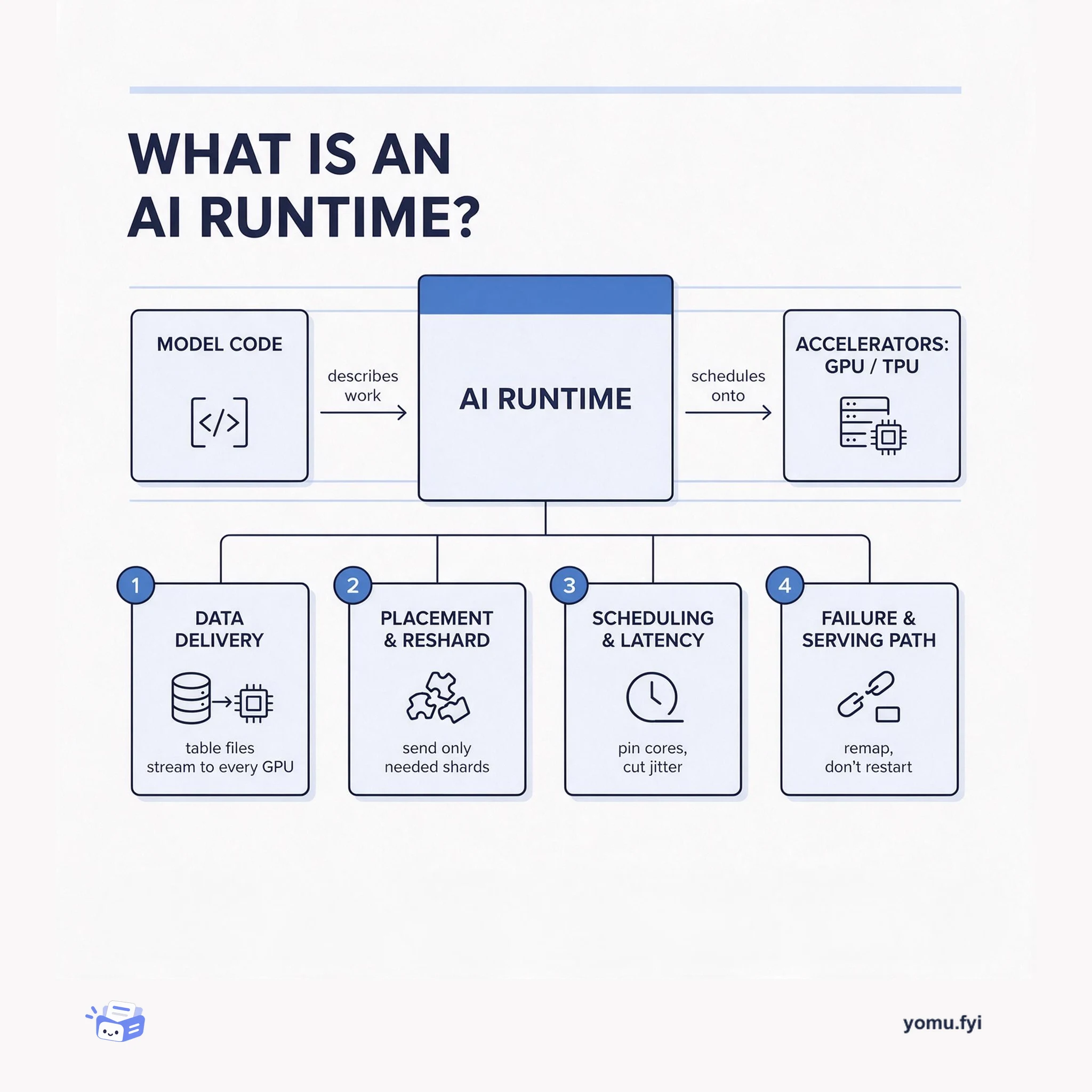
An AI runtime is the execution layer between model code and hardware: it feeds data to accelerators, places and reshards tensors, schedules work, and holds latency steady. Here are its four core jobs.
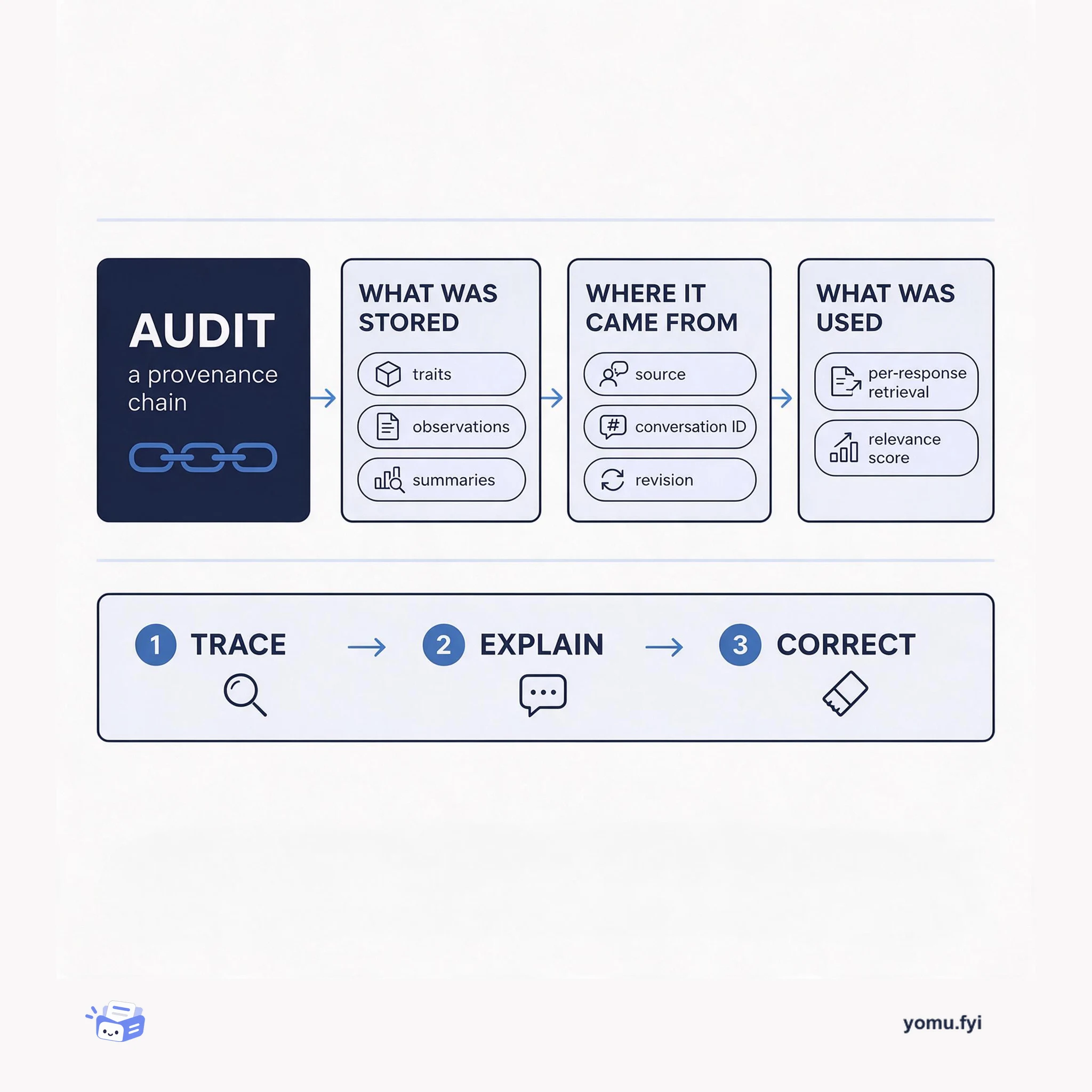
An audit is a provenance chain: what was stored, where each fact came from, and what was used for each decision. This explainer maps the three links that keep agent behavior traceable and fixable.
The Good Stuff
Paid picks we use ourselves. Links carry a referral code — a subscription through one earns us a commission at no extra cost to you.
One useful email. Unsubscribe anytime.