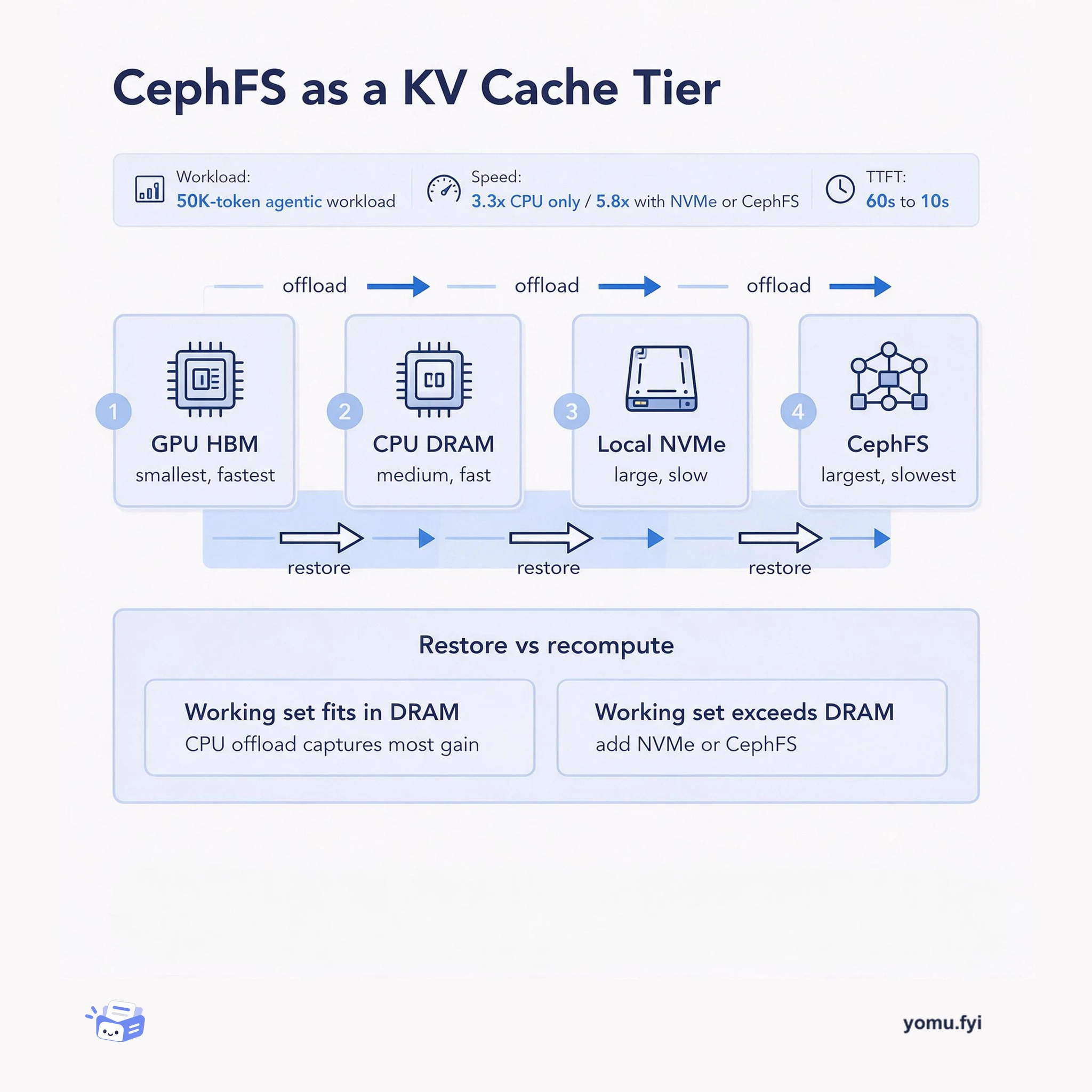
CephFS as a KV Cache Tier: When Restoring Beats Recomputation
A tiered KV cache flow that moves blocks from GPU HBM to DRAM, local NVMe, and CephFS—and shows how to decide when restoring a block beats recomputing it.
 NVIDIAPhil CarnsTutorial
NVIDIA GPUDirect Storage (GDS) accelerates GPU storage access by providing a direct data path between GPUs and storage, reducing latency and CPU overhead. The gds-diag tool, an open-source command-line utility distributed via the NVIDIA Magnum IO GitHub repository, simplifies configuring and optimizing GDS deployments by assessing environments, identifying problems, and suggesting improvements. It includes an optional AI agent skill that adds a natural-language interface and orchestration layer for multi-step diagnostics, working with coding assistants like Claude and Codex. The tool supports bare-metal, virtual machine, and container environments, and its subcommands include pre-install, post-install, config-audit, mount-check, and container-check, with each finding having a status badge (FAIL, WARN, INFO, PASS) and a mitigation plan. It requires Python 3.8 or newer, does not modify the system, and can output findings as structured JSON, while the support-matrix subcommand shows supported platform combinations with color-coded compatibility.
NVIDIA GPUDirect Storage (GDS) accelerates GPU storage access by providing a direct data path between GPUs and storage, increasing bandwidth and reducing latency and CPU overhead. Configuring GDS requires navigating extensive documentation for supported architectures and storage solutions. The gds-diag tool was developed to simplify optimization and configuration of GDS deployments.
Use the gds-diag tool, available as a command-line utility or an AI agent skill, to assess GDS environments, identify problems, and suggest improvements. The command-line tool provides deterministic checks via subcommands like pre-install, post-install, config-audit, mount-check, and container-check. The AI agent skill adds natural-language interaction and can interpret results and propose remediation. gds-diag requires Python 3.8+ and is distributed via the NVIDIA Magnum IO GitHub repository.
gds-diag is an open-source command-line utility that assesses GDS environments, identifies problems, and suggests improvements without modifying the system.
The tool includes an optional AI agent skill that works with coding assistants like Claude and Codex to provide natural-language diagnostics and orchestration.
gds-diag supports bare-metal, virtual machine, and container environments, and can output findings as structured JSON for integration with other tools.
Clone the NVIDIA Magnum IO GitHub repository and navigate to the gds-diag directory. It requires Python 3.8 or newer and has no other dependencies. You can then run it as a command-line tool or open it in an AI coding assistant for the agent skill.
Subcommands include all (end-to-end checks), pre-install, post-install, config-audit, support-matrix, container-check, and mount-check. Each focuses on different diagnostic tasks, and you can see details with --help.
The agent skill activates automatically when you open the gds-diag repository in a coding assistant like Claude or Codex. It interprets natural language queries, selects appropriate gds-diag subcommands, and can interpret results and propose remediation actions.
Summaries are generated from the original by a language model. Check the original before relying on it.
See the idea
A tiered KV cache flow that moves blocks from GPU HBM to DRAM, local NVMe, and CephFS—and shows how to decide when restoring a block beats recomputing it.
Keep reading
The Good Stuff
Paid picks we use ourselves. Links carry a referral code — a subscription through one earns us a commission at no extra cost to you.
One useful email. Unsubscribe anytime.