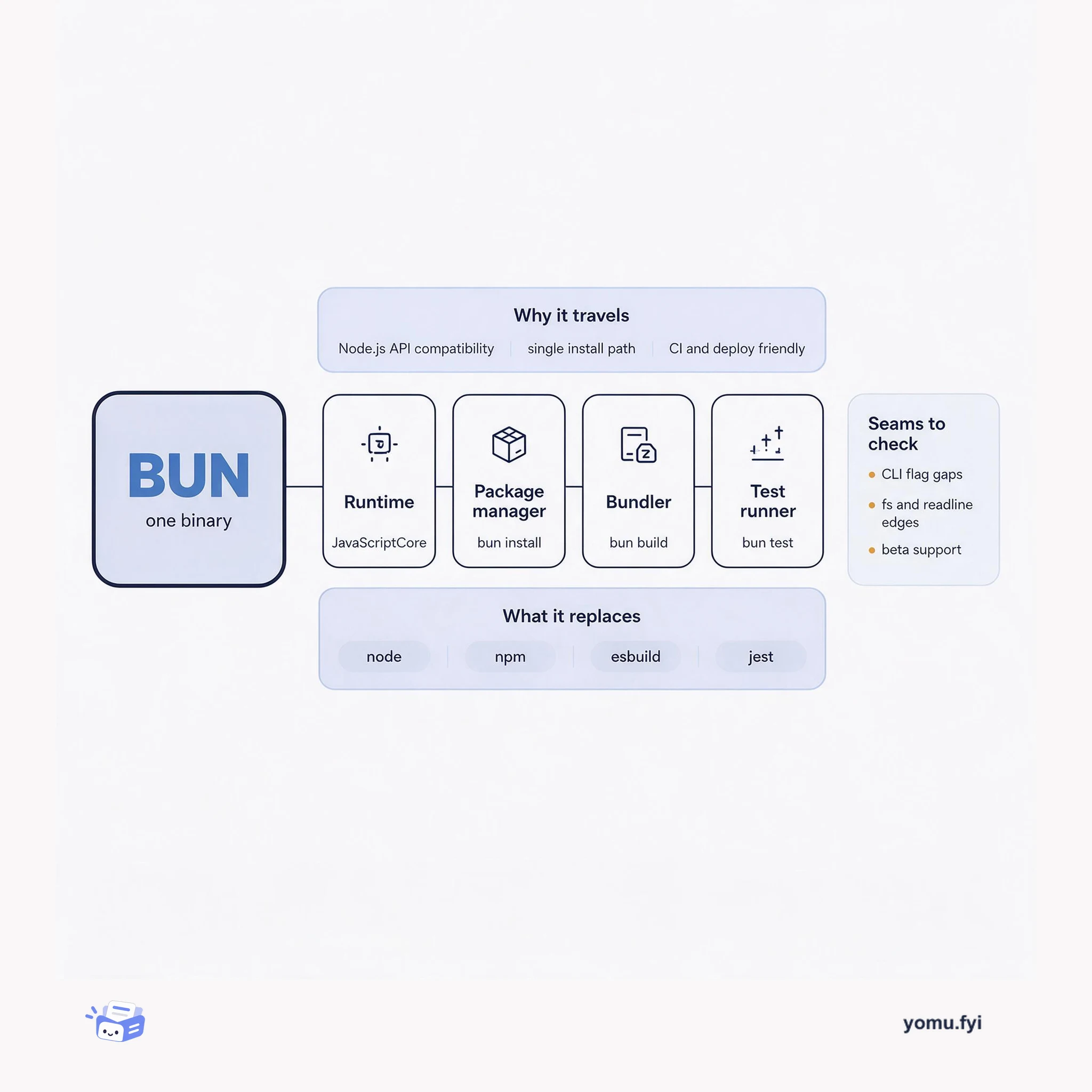
Bun Is a Toolkit, Not Just a Runtime
Bun packs a runtime, package manager, bundler, and test runner into one binary. Here is how those four parts fit together and where the seams still show.
Loading…
Topic
38 posts about Node.js. Every summary links to the original.
See the idea
Bun packs a runtime, package manager, bundler, and test runner into one binary. Here is how those four parts fit together and where the seams still show.
The Good Stuff
Paid picks we use ourselves. Links carry a referral code — a subscription through one earns us a commission at no extra cost to you.
Newest first
This walkthrough builds and deploys a Node.js API with Fastify, covering a public directory endpoint and a JWT-protected profile endpoint backed by Heroku Postgres. It uses Fastify’s plugin architecture, including a custom database plugin that reads DATABASE_URL, creates a PostgreSQL pool, and decorates the server with db.query; @fastify/autoload registers plugins from the plugins directory. Authentication uses a JWT signed with an RSA256 private key, while the public key validates requests, and Fastify Swagger plugins generate an OpenAPI specification and UI that Postman can import as an API client. After local testing, the project seeds 50 database records, configures the RSA public key, and deploys through Heroku CLI commands, where the /directory endpoint returns usernames and the deployed API is shown running.
The walkthrough shows how to connect an OpenAI custom GPT to a Node.js backend that provides natural-language access to an employee directory. It builds an Express API with a POST /search endpoint, where OpenAI’s Chat Completions API converts a user’s question into a single SQL query, the database returns rows, and a second OpenAI call turns those rows into a natural-language response. The project uses Heroku Postgres, environment configuration, bearer-key authentication, Swagger UI, and an OpenAPI specification imported into the GPT action. The deployment flow covers seeding dummy records, deploying from a GitHub-connected repository, and configuring the action to call the hosted API, while noting that data leaves Heroku’s trust boundary for OpenAI services.
Menu Maker is a Node.js web application that turns user-supplied ingredients into a dish name, fine-dining description, ingredient list, and recipe. Its React front end communicates with an Express back end, which adds prompt instructions and sends the request to OpenAI’s Chat Completions API. The application uses ChatGPT’s function calling feature to define an updateDish function with structured JSON fields for the title, description, ingredients, and recipe, so parsed arguments can update React state directly. The GitHub-hosted Node.js monorepo is deployed to Heroku, where an OPENAI_API_KEY config var authenticates requests, an optional CHATGPT_MODEL selects the model, and Heroku runs yarn build and yarn start.
Vanilla with Candy Sprinkles presents a baseline full-stack Node.js application: a stateful visitor counter that increments across refreshes, tabs, browsers, and machines. The post starts with a dependency-free package.json and a 72-line server.js, then uses node-demo to generate variants with ECMAScript modules, EJS or Mustache templates, and Express. It adds SQLite3 or PostgreSQL for persistence, Tailwind CSS and TypeScript with a build step, and Drizzle, Knex, or Prisma as ORM options, noting differing language and build requirements. WebSockets provide real-time updates, htmx can handle client-side connection and DOM work, and Redis coordinates notifications across multiple servers; Fly.io deployment can scale the setup across eight instances in four regions. The concluding section points to further alternatives, including React, Angular, Lit, SolidJS, Svelte, Vue, esbuild, rollup, and other deployment targets, while inviting alternate implementations.
Fly.io proposes a general-purpose way to deploy JavaScript and Node.js applications despite the ecosystem’s many frameworks, package managers, runtimes, and TypeScript conventions. Its dockerfile-node project uses package.json, lockfiles, and dependency metadata to generate a baseline Dockerfile, .dockerignore, and optionally a docker-entrypoint script; users can invoke it with npx @flydotio/dockerfile. Conditional EJS templates accommodate framework-specific requirements, with initial templates for Express, Fastify, Gatsby, Nest, Next, Nuxt, and Remix, though current support may extend only to a splash screen. Future plans include replacing Fly.io’s existing flyctl scanners, integrating deployment-time secrets, volumes, databases, and health checks, and adding customization such as build caching, swap, Docker Compose generation, browser setup, and non-root execution.
The post presents Yarn 2 workspaces as a way to manage dependencies for a JavaScript or Node.js monorepo containing separate server and UI applications. It configures the root package.json with workspace directories, imports the workspace-tools plugin, pins the project to a checked-in Yarn binary with yarn set version berry, and enables the dependency cache through .yarn/cache and Plug’n’Play. The walkthrough adds Express, TypeScript, and @types/express to a server workspace, creates a Next.js UI workspace, and uses workspace scripts to build both applications, while yarn dlx initializes TypeScript without a global install. It also shows the Git files to retain, generated JavaScript to ignore, and a Heroku start script that launches the server workspace; the stated benefit is faster installs through a committed cache and zero-install deployment.
Node.js applications can be difficult to debug because asynchronous workflows complicate stack traces, while crashes may require core-dump analysis through complex command-line tools. The article presents a layered toolkit: production-oriented logging with Pino or Winston, interactive inspection through Node Inspect and Chrome DevTools, IDE integrations, and the standalone ndb debugger. Running node --inspect-brk launches an application for inspection at chrome://inspect, where breakpoints, stepping, call stacks, heap snapshots, and memory profiling are available; ndb additionally supports edit-in-place changes. For catastrophic crashes, llnode maps JavaScript frames and objects to C/C++ representations from a core dump generated with process.abort, while debug filters namespaced logs and trace and clarify improve asynchronous traces and remove Node.js internals, respectively, for local debugging.
GraphQL lets API clients specify the fields they need instead of accepting a server-defined response, reducing unnecessary payload and potentially combining data from multiple stores behind one endpoint. The tutorial builds a JavaScript/Node.js implementation by loading Schema Definition Language (SDL) with graphql-tools, defining Query, User, and Address types, and connecting fields to resolver functions. Resolvers receive field arguments and can use context for authorization, illustrated by restricting address access to the current user. It also recommends keeping business logic separate from resolvers and notes that GraphQL does not eliminate database performance, caching, logging, monitoring, or versioning concerns. The discussion presents GraphQL as useful for evolving, front-end-heavy applications, while warning that its single HTTP status code and schema versioning limitations can complicate error handling and breaking changes.
Node.js applications can lose visibility into failures and experience downtime when processes crash or shut down without useful logging and recovery practices. The post presents lessons from consulting and a talk on the Node.js process lifecycle, focusing on graceful shutdown, error visibility, and fast restart after catastrophic errors. It recommends keeping startup lean by prebuilding data or compiling assets, then contrasts process.exit(), which accepts an exit code, with process.abort(), which terminates immediately and may generate a core dump for llnode-based postmortem debugging. It also explains beforeExit and exit, including their differing asynchronous-work behavior, and introduces SIGTERM and SIGINT as operating-system signals that applications can handle. The intended result is a restartable process strategy that reduces downtime, while preserving evidence needed to investigate crashes.
CLI commands commonly accept arguments, long flags, short flags, and flag arguments; environment variables and standard input are alternative data channels not covered in detail. GNU-style conventions use double dashes for long flags and single dashes for short flags; short flags can be stacked, and flag options may be separated by a space or equals sign, while short flags also allow no separator. The tutorial uses oclif to build greet-me, which prints a greeting based on a name supplied through -n or --name while registering version, help, name, and force flags. It scaffolds the project with npx oclif single greet-me, places handling code in src/index.ts, defaults the name to world, and runs the CLI through ./bin/run or an npm link.
Salesforce Platform Events and Change Data Capture enable custom applications to react to activity in Salesforce, motivating an event-sourced design for responsive, durable integrations. The article demonstrates a Node.js app on Heroku that consumes the Salesforce Streaming API through jsforce 1.9.0 or later, whose Faye-based streaming client handles authentication, network connectivity, and message callbacks. It notes that a basic subscription loses its position on restart and cannot coordinate parallel processing, then uses Redis to persist each topic’s Replay ID and distribute messages through pub/sub or reliable queues. Because the Salesforce Streaming API lacks consumer-group delivery, a singleton stream_consumer feeds Redis while scalable web or worker processes handle work. The design also recommends a separate non-admin integration user and monitoring connection status, active clients, last message time, and processing duration.
The post presents a Heroku-based system for handling high-volume product-usage events, combining near-real-time visualization with deeper SQL analytics. A Node.js producer sends simulated e-commerce events to an Apache Kafka topic, while a visualization consumer forwards selected data over WebSockets to a D3 stacked stream chart. A second consumer uses a Kafka consumer group, batches events, writes them to Amazon Redshift, and commits offsets after successful processing; Metabase then provides dashboards and ad-hoc SQL queries. The example uses Kafka, Redshift, and Metabase on Heroku, with Terraform described for provisioning Redshift and private connectivity, and notes that the setup incurs AWS and Heroku costs and requires Heroku Enterprise for that configuration. The source says the system can be provisioned on Heroku in 15 minutes.
ipify began as a free API that returns a caller’s public-facing IP address, created to help discover cloud instances’ external addresses without management APIs. Its initial implementation was a sub-50-Loc Node service deployed on one Heroku dyno for about $7/month; rising usage caused slow responses and 503s. Investigation showed roughly 10 rps, while one Node process and string manipulation around X-Forwarded-For limited throughput; clustering doubled capacity, and the implementation later used Go. Heroku supplied load balancing, automatic restarts, and horizontal dyno scaling as traffic expanded through bursty demand and malicious use; the operator chose manual capacity rather than paid autoscaling. The service surpassed 30B requests per month, routinely serving 2k–20k RPS with 1–20ms average response times at $150–$200 monthly; ownership later passed to whoisxmlapi.com, whose work includes an improved UI and more data endpoint.
Between 2008 and 2017, Heroku's CLI evolved from Ruby (v1–v3) through Go/Node versions v4 and v5 to a pure Node v6 implementation. The rewrite addressed slower Windows performance, separation of the CLI's runtime from users' Ruby environments, migration to API v3, and limitations in Ruby-based plugin dependencies. V4 kept existing command syntax and output while adding features such as non-TTY color suppression and --json output; its Go core used Node for plugins, and the CLI became a collection of core plugins that could also be developed and installed independently. The team migrated commands incrementally, then added Flow, Babel, and improved tests, including Jest tests that run the flag parser. The resulting foundation supports modular, tested feature development, with cli-engine and more interactive interfaces planned.
Django-based Heroku Connect needed realtime dashboard support through socket.io and Node.js, but Heroku apps could route traffic through only one dyno type. The team chose to run both stacks in one dyno using a runit buildpack and its sub-Procfile format: Node binds to PORT, while node-http-proxy forwards normal web requests to Gunicorn-hosted Django on 127.0.0.1:$DJANGO_PORT. This arrangement increases contention because processes share memory, CPU, and a filesystem, and it makes dyno logs less directly attributable; the team also flattened Procfiles into Procfile.local for Foreman-based local development. After running the architecture in production for a few months without issue, the team reported minimal proxy overhead and retained single-git-push deployment while establishing a path for websocket communication.
With a Salesforce hackathon approaching, the guide introduces the Force.com APIs as a way to build applications using Salesforce1’s authentication, data storage, and business rule services. It compares native Salesforce1 applications, connected web applications using SOAP or REST, and three mobile patterns, including hybrid extensions, native iOS or Android clients, and a “force.com proxy” model. For hands-on setup, it recommends a free Developer Edition account and Salesforce Workbench, then explains OAuth2 web flow and password-plus-token login before showing Ruby with Restforce and Node.js with Nforce. The examples configure a Connected App, keep credentials in environment variables, query records with SOQL, and create Account records, providing a practical starting path for API integration.
The Heroku Mobile Template is an open-sourced full-stack starting point for hybrid mobile apps that can be deployed to Heroku. It addresses the early choice among native iOS or Android, mobile web, hybrid clients, and backend technologies. The sample, “Quiz Live,” combines an AngularJS client with a Node.js and Express server, SocketIO real-time communication, BookshelfJS, and Postgres persistence for authentication, data storage, and notifications. Apache Cordova can package the HTML and JavaScript assets as a native app, while Ionic supplies cross-platform mobile UI components. Developers can fork the GitHub repository, deploy with the Heroku Button, and run it locally with Node.js and Postgres; the template also includes a Force.com example that creates Lead records for registering Quiz users.
Heroku Connect synchronizes data in both directions between Salesforce (Force.com) and Heroku Postgres, but its original polling design trades simplicity and reliability for synchronization latency, wasted API calls, and unnecessary database queries. The post presents an event-driven alternative using the Force.com Streaming API and PostgreSQL’s LISTEN/NOTIFY system. For Salesforce, Heroku Connect automatically creates a PushTopic per synchronized table, subscribes with Node.js and NForce, and dispatches Redis tasks when notifications arrive. Those events act as change signals rather than complete data transfers: workers query the Force.com SOAP API because streaming has limitations and subscribers may miss events. On Postgres, PL/pgSQL trigger functions call pg_notify after DML, while node-postgres listens on named channels; the system supports added UPDATE and DELETE triggers, though triggers are still required.
The best engineering reads, once a week.


