Building a Slack bot with OAuth usually requires setting up a server with a public URL, handling callbacks, storing tokens, and maintaining them across restarts. Sprites simplifies this by providing an internet-accessible environment with a persistent filesystem, eliminating the need for Ngrok or separate hosting. To create the bot, users initialize npm, install @slack/bolt and express, and build an OAuth handler for Slack’s callback that stores tokens to the filesystem. The bot is registered as a Sprite service with sprite-env services create , which enables auto-start on HTTP requests, automatic request routing to port 8080, and persistent registration across hibernations. When idle, the Sprite hibernates to save costs and wakes in under a second, and users can create a checkpoint snapshot for easy restoration.
Context
Slack bots need OAuth, which demands a server with a public URL to handle callbacks, store tokens, and maintain them across restarts. Sprites provides an internet-accessible environment with a persistent filesystem, eliminating the need for separate hosting, Ngrok, or custom token storage.
Approach / What changed
Create a Sprite environment, initialize npm and install @slack/bolt and express. Write a server.js using the Bolt framework to handle OAuth callbacks and store tokens in the filesystem. Register the bot as a Sprite service with sprite-env services create slack-bot --cmd node --args server.js --http-port 8080 . Update the Sprite URL to public with sprite url update --auth public . Set environment variables for Slack credentials. Install the bot via the generated install URL. Optionally create a checkpoint with sprite checkpoint create for easy recovery.
Takeaways
1
Sprites uses its own service manager instead of systemd, enabling auto-start on HTTP requests and persistent registration across restarts and hibernation.
2
The sprite url update --auth public command provides a public URL for Slack’s OAuth redirect, removing the need for tools like Ngrok or manual SSL setup.
3
A Sprite checkpoint captures a snapshot of the entire environment (code, filesystem, state), allowing restoration of a working bot after changes with sprite restore <checkpoint-id> .
FAQ
How does Sprites handle Slack OAuth callbacks?
Sprites provides a public URL via `sprite url update --auth public`. The service auto-routes incoming HTTP requests to the specified port (8080), so the bot server receives the callback. Tokens are stored in the persistent filesystem, and the service registration survives restarts.
What happens when the bot is idle?
The Sprite hibernates when idle to reduce costs and wakes in under a second when Slack sends events or users visit the install URL. This eliminates paying for idle server time.
How can I recover if I break my bot?
Create a checkpoint with `sprite checkpoint create` to snapshot the entire environment. If the bot breaks, run `sprite restore <checkpoint-id>` to revert to that exact state, including code, configuration, and tokens.
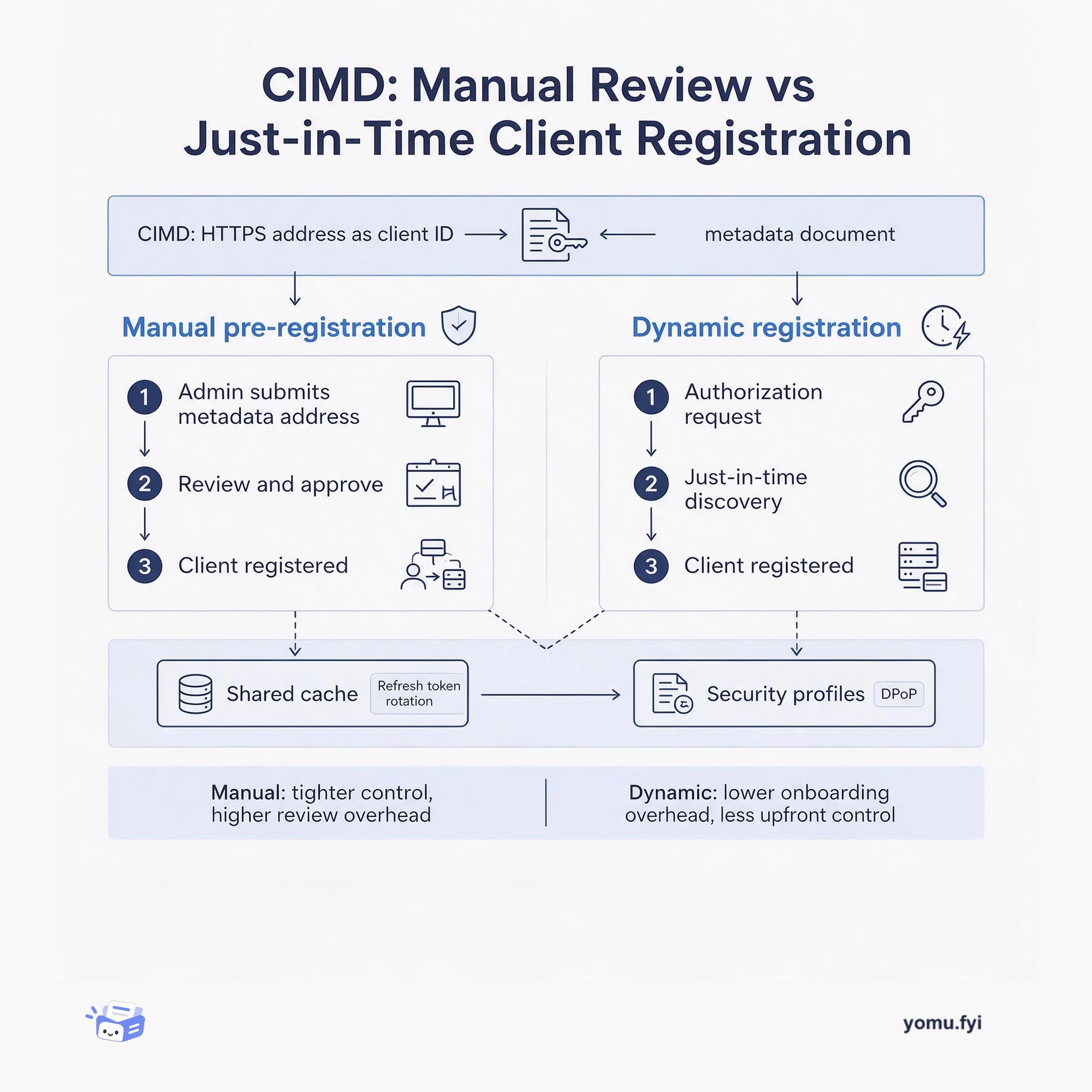
CIMD uses an HTTPS URL as an OAuth client identifier that points to a metadata document. This comparison shows when to pre-register clients manually and when to let dynamic discovery handle agent onboarding.
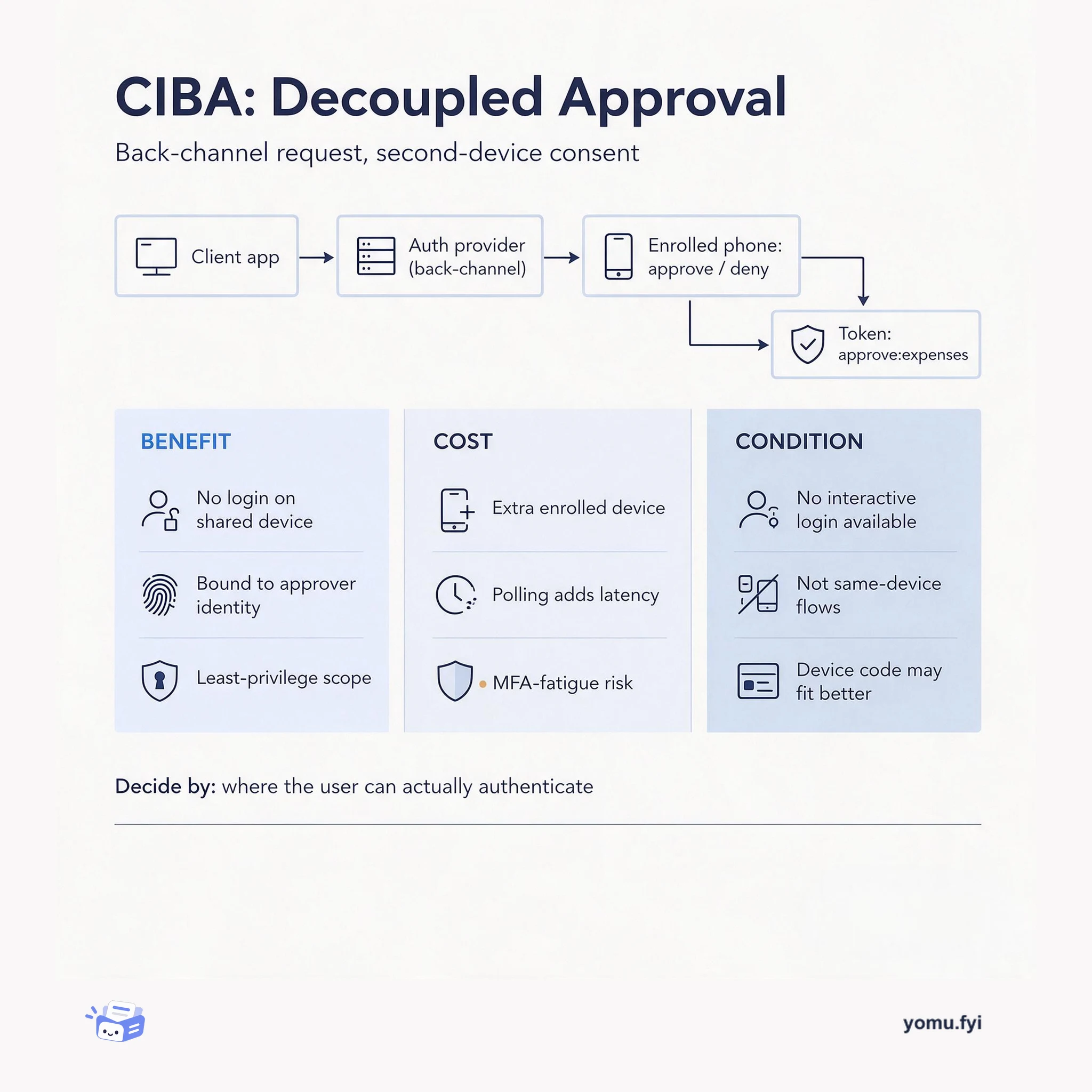
CIBA moves authentication off the device in use: the client sends a back-channel request and the user approves on an enrolled phone. See what that buys and what it costs.
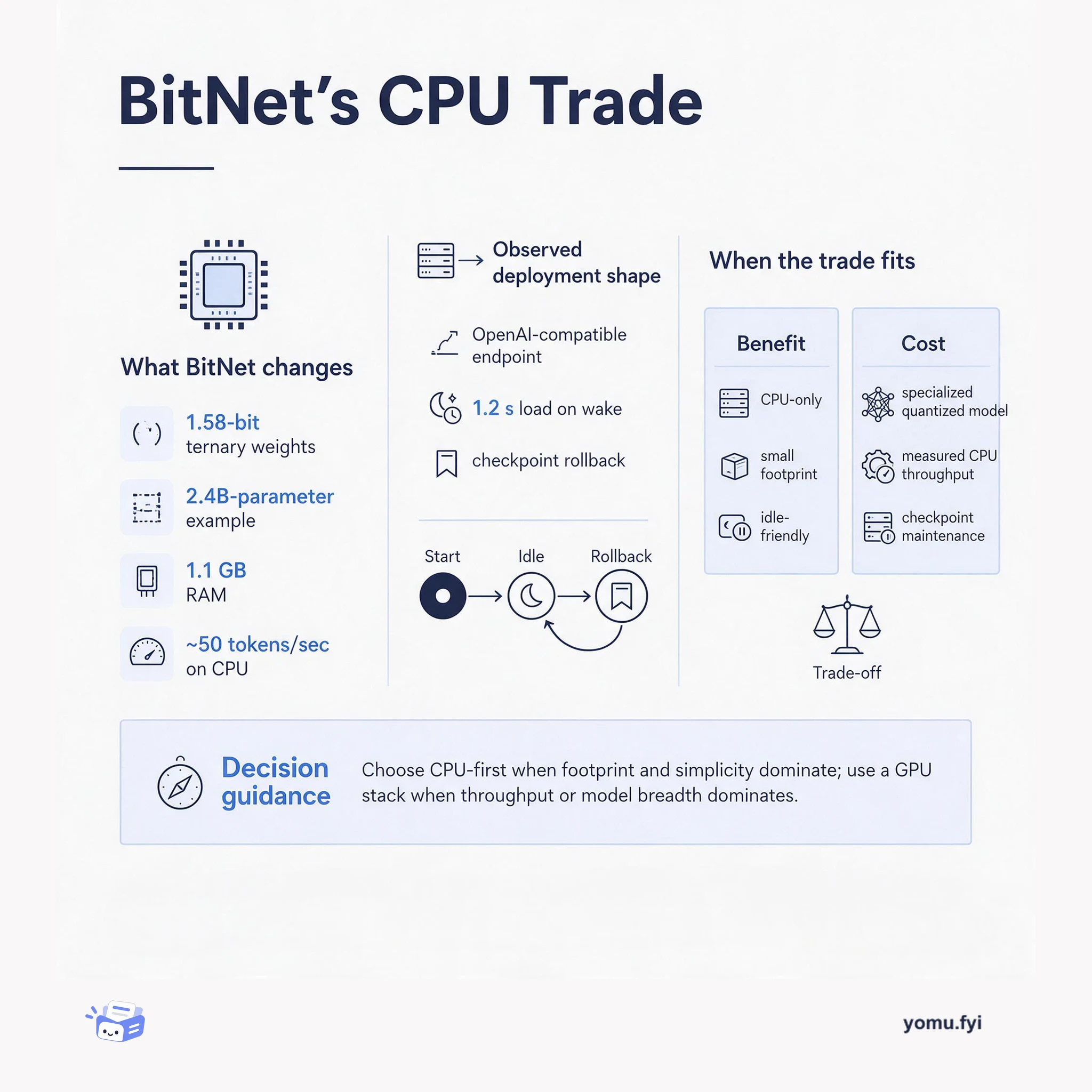
BitNet trades floating-point precision for a tiny, CPU-friendly footprint. This diagram maps the payoff—small memory and local serving—against the constraints that decide when the trade is worth it.
Keep reading
Related reading
The Good Stuff
Paid picks we use ourselves. Links carry a referral code — a subscription through one earns us a commission at no extra cost to you.