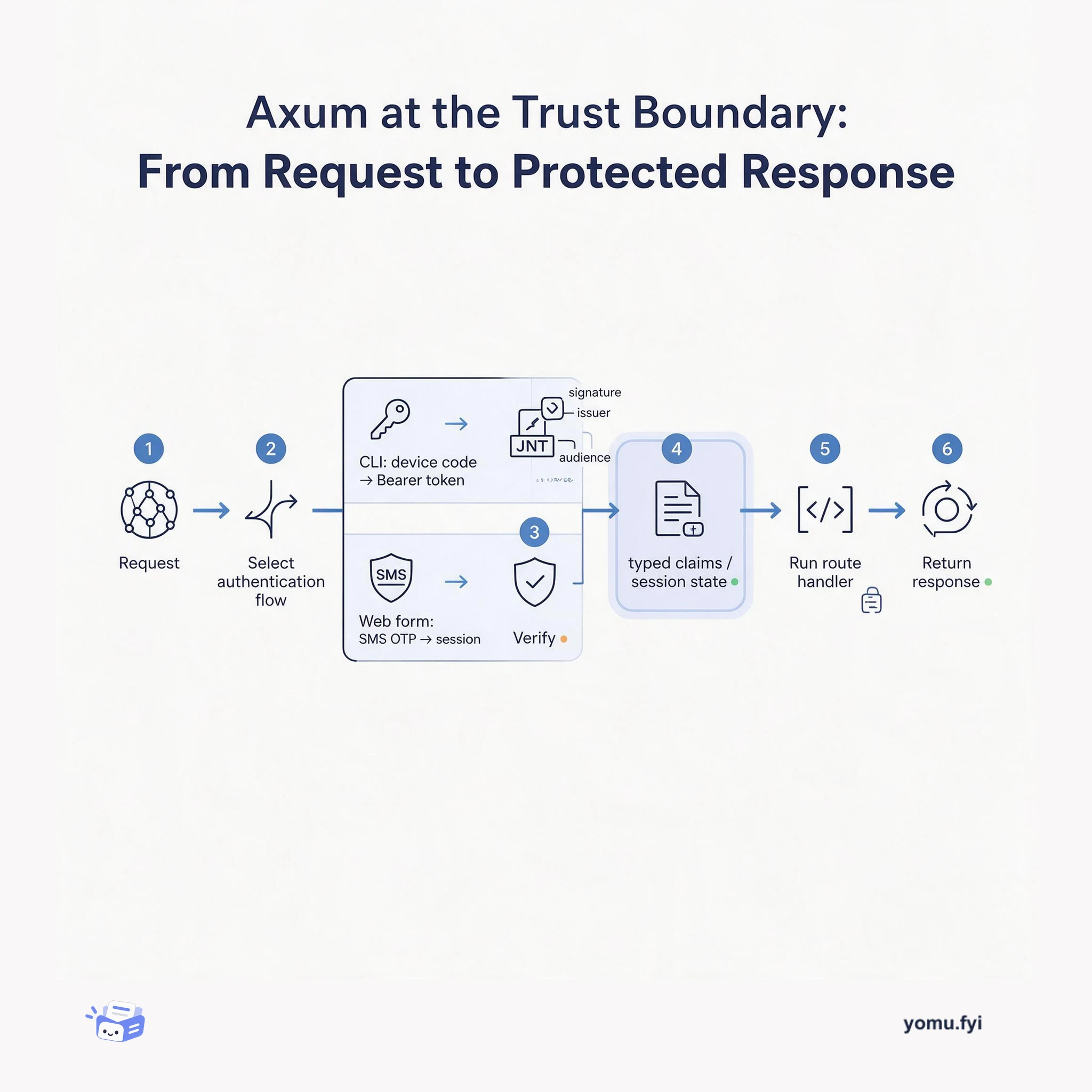
Axum at the Trust Boundary: From Request to Protected Response
Axum is a Rust web framework for composing routes, middleware, and extractors. This explainer shows how different login flows become verified identity before a handler responds.
Loading…
Topic
26 posts about OAuth 2.0. Every summary links to the original.
See the idea
Axum is a Rust web framework for composing routes, middleware, and extractors. This explainer shows how different login flows become verified identity before a handler responds.
The Good Stuff
Paid picks we use ourselves. Links carry a referral code — a subscription through one earns us a commission at no extra cost to you.
Newest first
Okta warns that applications using its embedded Sign-In Widget may encounter Chrome login problems after January 1, 2025, when Google’s temporary exemption allowing third-party cookies ends. The guidance recommends testing with Chrome feature flags and watching for console errors, unexpected reauthentication, or logout during session extension. It presents four migration paths: issue first-party cookies through a custom domain, use the authorization code flow with refresh tokens, configure AuthJS with the offline_access scope, or replace deprecated sessions/me calls with supported OAuth and revocation mechanisms. A custom domain can require CSP updates for externally hosted sign-in resources, while offline_access must be enabled both on the authorization server and in application code. An Okta-provided script offers a temporary exemption through the end of 2024, but it is not a lasting fix.
The tutorial shows how to add OAuth 2.0 Step Up Authentication Challenge support to an Angular frontend and NestJS backend, so sensitive routes and API resources can require stronger authentication than ordinary access. It starts from a Lerna monorepo, configures an OAuth 2.0/OpenID Connect single-page application, and uses Okta libraries plus an Okta JWT Verifier to establish the basic authenticated app. The implementation checks authentication assurance through token ACR claims, returns the standard insufficient_user_authentication error when an API request lacks the required assurance, and uses Angular interceptor and application-code handling to redirect with acr_values before retrying. It also describes authentication recency through max_age and auth_time, while noting that the original Okta CLI instructions no longer work exactly as written after the May 2025 account-plan change.
This tutorial shows how to configure Okta authentication in an Angular standalone application, comparing values embedded in the app, build-time environment files, and runtime-loaded configuration. It scaffolds an Angular 17 project, creates an Okta OAuth 2.0/OpenID Connect single-page client, installs @okta/okta-angular 6.3 and @okta/okta-auth-js 7.5, and wires routes, guards, claims, and an authorization-header interceptor. Runtime configuration is served from src/api/config.json and loaded during startup through APP_INITIALIZER, using HttpBackend so the authentication interceptor does not intercept the configuration request; the resulting properties populate OktaAuthConfigService. The sample verifies sign-in, profile access, protected routes, and sign-out, while noting that the original Okta CLI instructions are deprecated and no longer work exactly as written after May 2025.
Static API tokens provide a simple way to authorize calls to protected third-party APIs, but their long lifetimes, broad permissions, and lack of user context create security and auditing risks. OAuth 2.0 addresses these limitations through a centralized authorization server that issues short-lived access tokens, which clients send in the Authorization header with the Bearer scheme. The post describes Client Credentials for service-to-service interactions and explains that scopes can distinguish permissions such as okta.users.read and okta.users.write; other configurations support task-based automation and user access through web applications. Migration guidance recommends implementing new calls with OAuth 2.0, applying least privilege, testing expiration and error handling, and securing private keys and JWKS generation before production deployment.
Semona describes her transition from Okta Developer Support Engineer to Developer Advocate after three years supporting admins, developers, Independent Software Vendors, and partners integrating with Okta workforce products. Her earlier work included OpenID Connect, OAuth 2.0, external and social identity providers, SCIM, OIN App Submission, Okta SDKs, the Okta Sign-in Widget, Token Inline Hooks, and Terraform, while cross-functional alliances connected her with Customer Success, Product, Engineering, Solutions Engineering, and Architects. She saw support cases as a way to understand developer problems and collect feedback that could inform improvements. In advocacy, she plans to use that experience to help developers avoid common problems, build community, learn with developers, and advocate for Okta developer community needs, with Python as her favorite programming language.
With a Salesforce hackathon approaching, the guide introduces the Force.com APIs as a way to build applications using Salesforce1’s authentication, data storage, and business rule services. It compares native Salesforce1 applications, connected web applications using SOAP or REST, and three mobile patterns, including hybrid extensions, native iOS or Android clients, and a “force.com proxy” model. For hands-on setup, it recommends a free Developer Edition account and Salesforce Workbench, then explains OAuth2 web flow and password-plus-token login before showing Ruby with Restforce and Node.js with Nforce. The examples configure a Connected App, keep credentials in environment variables, query records with SOQL, and create Account records, providing a practical starting path for API integration.
The best engineering reads, once a week.


