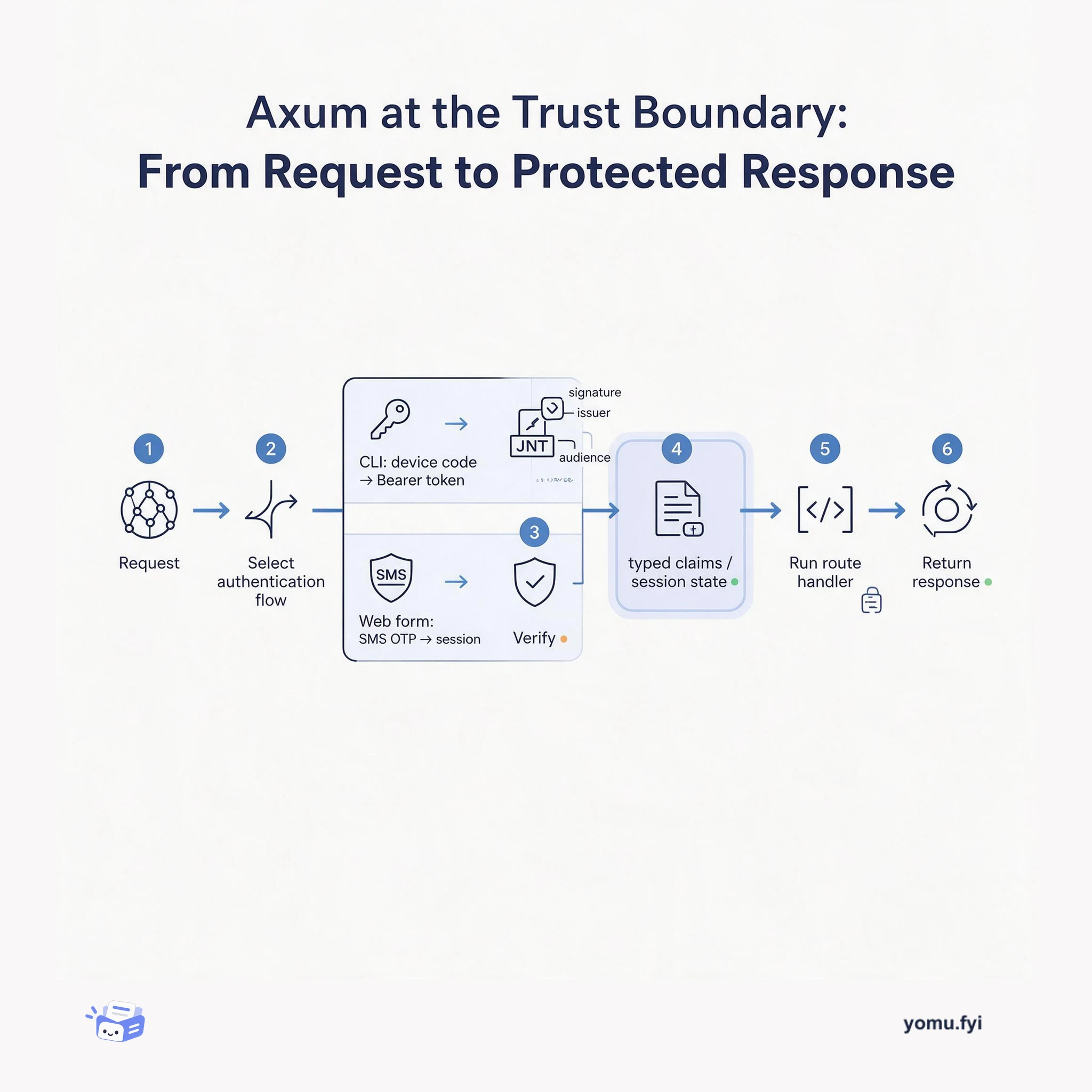
Axum at the Trust Boundary: From Request to Protected Response
Axum is a Rust web framework for composing routes, middleware, and extractors. This explainer shows how different login flows become verified identity before a handler responds.
Loading…
Topic
26 posts about OAuth 2.0. Every summary links to the original.
See the idea
Axum is a Rust web framework for composing routes, middleware, and extractors. This explainer shows how different login flows become verified identity before a handler responds.
The Good Stuff
Paid picks we use ourselves. Links carry a referral code — a subscription through one earns us a commission at no extra cost to you.
Newest first
Auth0 Identity Conversion Suite addresses identity friction across the visitor-to-user journey, where forced account creation and complicated checkout are cited as contributors to abandonment. It combines Anonymous Sessions, which uses OAuth 2.0 access tokens to track pre-authentication activity and transfer session data into an authenticated profile, with Experiment Center, which supports controlled authentication-flow tests. Visitors can be assigned to percentage- or segment-based variants, kept in the same variant during their journey, and measured through exposure, success-rate, and time-to-auth events across supported Auth0 surfaces. The Early Access release is available to Enterprise-plan Auth0 customers and is presented as a way to improve personalization, onboarding, guest checkout, and authentication decisions without changing application APIs or code.
Auth0 API Access Policies for Applications control whether an application can obtain an access token for a registered API, separately for user-delegated and client access. The FinFlow example separates a browser application that should reach both APIs from a machine-to-machine Risk Engine restricted to the Payments API. Policies provide three choices—allow_all, require_client_grant, and deny_all—while client grants specify an application's audience and permitted scopes, with the audience determining which API policy is evaluated. The guide shows Dashboard and Management API configuration, including subject_type_authorization settings and grants for user and client access. It also explains that third-party applications still require grants under allow_all, while default third-party grants establish a baseline and per-application grants take precedence for exceptions.
Cross App Access (XAA) provides an identity framework for securing token-based communication when software or AI agents access external ecosystems through trusted identity providers. It replaces long-lived API keys and hardcoded secrets with real-time identity propagation, while allowing enterprises to control connected apps, requested scopes, and user access. The guide explains prerequisites for requesting and resource apps, including OIDC or SAML SSO, authorization-server support, protected resources, scopes, an Okta Integrator Free Plan org, and tested workflows. It then describes token exchange testing: requesting apps obtain an ID token and mint an ID-JAG, while resource apps validate the ID-JAG and issue a scoped access token. To seek OIN listing and XAA enablement, applicants submit SSO integration details, metadata, testing evidence, and a questionnaire to Okta.
Cross App Access (XAA) lets applications using existing SAML federation obtain API access without migrating to OpenID Connect (OIDC). An agent presents a short-lived Identity Assertion Authorization Grant (ID-JAG), which the resource authorization server validates, resolves to a user, and exchanges for its own access token; SAML processing remains upstream. For SAML identity resolution, implementations must validate the saml-nameid sub_id and match issuer, NameID, and sp_name_qualifier rather than relying on NameID alone. The guide recommends binding iss to a registered SAML connection before verifying the JWT against that connection’s JWKS, then checking typ, aud, and client_id and applying local scope policy. It also walks through Okta configuration and xaa.dev checks that redeem the ID-JAG, call the API, and export conformance results.
Okta Developer Connect San Francisco brought more than 100 developers, architects, founders, platform engineers, and security leaders to Okta HQ for technical sessions, hands-on labs, and community conversations about securing identity in the age of AI. The keynote announced general availability of Okta for AI Agents, which provides discovery, shadow AI detection, short-lived credentials, scoped tokens, vaulted secrets, MCP server controls, lifecycle governance, SIEM audit logs, and a kill switch. Sessions examined Cross App Access, using identity assertion and token exchange across a requesting app, identity provider, and resource app, plus Auth0-based patterns including Token Vault, asynchronous authorization, and fine-grained access control. Discussions described agents outpacing governance, static credentials creating risk, and RAG pipelines requiring data-layer permissions that match user access. The event concluded that builders should treat agents as identities with ownership, scope, review, consent, and revocation designed before integrations go live.
Enterprise app-to-app integrations can create governance, security, and consent problems when API keys lack user context and standard OAuth leaves connection approval to individuals. The tutorial adds Cross App Access (XAA), an OAuth extension based on the Identity Assertion Authorization Grant, to a NestJS note-taking app and connects it to a to-do app through xaa.dev. It uses TypeScript, openid-client, and the testing site’s IdP, with two token exchanges: an ID token becomes an ID-JAG token, then a JWT-bearer grant exchanges that assertion at the resource authorization server for an access token. After authentication, the completed flow calls the to-do API and exposes each handshake step and response in console logs.
Salesforce integrations commonly use Connected Apps or External Services, but long-lived OAuth tokens and public vendor endpoints can expose org data to replay and misuse. Heroku AppLink provides a managed bridge in which a service mesh admits requests only from explicitly connected Salesforce orgs, validates context, and exposes services as native Salesforce actions. For calls back to Salesforce, its SDK obtains short-lived, scoped credentials at runtime through user, user-plus, or authorized-user modes, avoiding refresh-token storage in vendor systems. The mesh uses the x-client-context header to convey org and user information, while the SDK keeps bearer credentials out of application code. The post describes setup commands for the AppLink add-on, service-mesh buildpack, External Service publication, and authorizations, concluding that AppLink improves governance, least privilege, and replay resistance.
The guide presents Cross App Access (XAA) as a protocol for secure agent-to-app and app-to-app access, giving enterprise IT centralized control over connections, policies, and accessed resources. It walks through an OIDC demonstration using Todo0 as the Resource App, Agent0 as the Requesting App, and Okta as the enterprise identity provider, covering app registration, trust establishment, token exchange, and API calls. The flow uses the OAuth 2.0 Identity Assertion Authorization Grant: Bob logs in once, Agent0 obtains an identity assertion, Okta exchanges it for a Todo0 access token, and Agent0 calls the protected API. The demonstrated result is an agent that can read pending tasks, add tasks, and mark tasks complete, with changes reflected in Todo0. The guide is marked out of date because its Admin Console instructions have been replaced by AI agent registration under Directory > AI Agents.
This tutorial shows how to add secure authentication and backend authorization to an iOS app using Okta’s BrowserSignIn module from the Okta Swift SDK. It registers a native OIDC client with Authorization Code Flow and PKCE, configures redirect URIs and authorization-server policies, and recommends phishing-resistant MFA factors such as Okta Verify with biometrics and FIDO2 with WebAuthn. The implementation uses Swift Package Manager, an Okta.plist configuration file, a testable AuthService protocol, and SwiftUI views for login, token handling, user information, and authenticated state. It then demonstrates authorized API requests by attaching an access token to a URLRequest, calling a backend endpoint, decoding its response, and displaying a returned message, concluding that OAuth 2.0 and JWT validation provide integrated authorization verification.
Oktane 2025 will focus on security, AI, and identity, with programming for protecting software systems that use both human and non-human identities. The event is scheduled for September 24–26, 2025, at Caesars Forum in Las Vegas, and will include the Oktane Developer Lounge, Expo Hall activities, lightning talks, documentation feedback games, and Developer Support consultations. Hands-on labs cover securing enterprise AI with the OAuth Cross App Access (XAA) extension and Model Context Protocol (MCP), automating Okta with Terraform, replacing standing administrative access with time-bound requests through Okta Identity Governance and Workflows, and using OAuth 2.0 Demonstrating Proof of Possession (DPoP) tokens in a single-page application. An Okta Workflows community meetup will add networking, drinks, and appetizers, while the broader event offers learning, expert conversations, and application-focused discussions.
CIBA addresses identity verification when an application cannot use an interactive login on the consumption device, including bank customer-service changes, retail POS payments, browser-constrained devices, and shared kiosks. Client-Initiated Backchannel Authentication decouples authentication from the application: a client sends a back-channel request to an OAuth 2.0 authorization provider, while the user approves it on a separately enrolled phone or smartwatch. CIBA extends OpenID Connect with a grant type, discovery metadata, and poll, ping, and push token-delivery modes; in the described banking flow, the application receives a user-scoped token to update the email address. The approach improves least-privilege access and avoids exposing credentials on shared devices, but can enable MFA-fatigue-style attacks, should not be used same-device, and may warrant device code flow in some cases.
Building authentication from scratch is risky and time-consuming, so the tutorial integrates Okta with an Express application using Passport, openid-client, OAuth 2.0, and OpenID Connect (OIDC). It creates a role-based expense dashboard in which users view spending data for their assigned teams, with team membership mapped from the email claim in the ID token. The setup uses Authorization Code Flow with PKCE, defined in RFC 7636, alongside express-session, EJS views, environment variables, and Okta redirect URI configuration. The sample project includes routes for login, logout, dashboard, profile, and team-specific expenses, while the running app displays these authenticated views. It concludes that OIDC supplies the identity layer over OAuth 2.0 and presents PKCE as a security baseline for server-side and browser-based web applications.
Enterprise AI tools increasingly use protocols such as Model Context Protocol (MCP) to request data and resources from work applications, creating identity and authorization challenges that ordinary app-to-app consent does not expose to enterprise administrators. Cross App Access (XAA) places the enterprise identity provider between the requesting application and resource application by combining OAuth Token Exchange (RFC 8693), JWT Profile for Authorization Grants (RFC 7523), and the Identity Assertion Authorization Grant profile. In the illustrated flow, a user signs in to Agent0, the IdP issues an ID token, and Agent0 exchanges it for an ID-JAG targeted at Todo0’s authorization server. Todo0 validates that assertion and returns its normal access token, enabling MCP requests without interactive consent while allowing enterprise policy checks. The design leaves access-token format and validation with the resource application, while refresh-token behavior remains to be defined to balance policy enforcement and session continuity.
Okta management API integrations can use a Node.js service app with OAuth 2.0 client credentials, but a bearer access token can be replayed by anyone who obtains it during its one-hour lifetime. The tutorial configures Okta for private_key_jwt authentication, grants the okta.users.read scope and Read-only Administrator role, and builds a Node.js service that requests and caches an access token. It then enables Demonstrating Proof of Possession (DPoP), handles an initial use_dpop_nonce response by retrying the token request with a nonce-bound proof, and generates a fresh proof for each API call. Each request binds the proof to the access token through the SHA-256-based ath value and uses DPoP rather than Bearer authorization. The demonstrated service successfully lists users through Okta Admin Management API endpoints.
The guide presents a secure CI/CD pipeline for managing Okta resources with Terraform, AWS, and GitHub Actions, addressing local setup, collaboration, state storage, secrets, and deployment automation. Its architecture uses GitHub as source control and workflow trigger, GitHub OIDC to authenticate to AWS IAM STS and assume roles, S3 for Terraform state, DynamoDB for state locking, and AWS Secrets Manager for Okta OAuth 2.0 client credentials private keys. Developers push changes to develop for an automatic development build, open a pull request to main for a production plan, and merge approved changes to trigger the production build. The workflows run Terraform init, plan, and apply as appropriate, while the guide also covers repository setup, branch organization, and troubleshooting for missed configuration in GitHub, Okta, or AWS.
Bearer access tokens grant whoever possesses them access, making theft especially risky for public clients such as SPAs and mobile apps. DPoP, an OAuth 2.0 extension, binds a token to a client’s public key and uses signed proofs so authorization and resource servers can verify requests. The tutorial migrates an Angular single-page application from bearer tokens to DPoP while building on the Authorization Code flow, inspecting token exchanges, request headers, replay protection, and calls to Okta’s APIs; React and Vue variants are also noted. It recommends IndexedDB with non-exportable WebCrypto keys, cleanup during sign-in, and browser capability checks, while noting that the preserved setup instructions no longer work exactly as written after Okta’s May 2025 account changes.
Bearer access tokens let anyone holding a valid token call a resource server, creating risk when tokens are stolen. Existing protections include secure coding, short expiration, and origin restrictions, but the post presents OAuth 2.0 Demonstrating Proof of Possession (DPoP) as a way to bind tokens to client-generated cryptographic proof. The client creates a JWT containing request details, issue time, unique identifier, and public key; the authorization server uses it to bind a key hash and request information to the returned token. For sensitive requests, authorization or resource servers can require a nonce, prompting a new proof and limiting lifetime and replay risk. Resource servers must validate both proof and access token properties, with a vetted OAuth library recommended.
The tutorial shows how to use Okta’s official PowerShell module to administer an Okta org, covering authentication, user operations, group management, and broader API automation. It requires a PowerShell terminal, the module installed from the PowerShell Gallery, Chocolatey, or GitHub, plus an Okta Developer Edition account for the setup described. Authentication uses an OIDC Native application with the Device Authorization grant, a client ID, the org base URL, and the okta.users.manage and okta.groups.manage scopes; Invoke-OktaEstablishAccessToken completes authorization. Examples search and retrieve users, create and update profiles, create groups, add users, and inspect memberships with PowerShell pipelines and formatting cmdlets. The demonstrated workflow connects successfully and manages users and groups, while the same techniques are presented as applicable to other Okta API endpoints.
The tutorial builds Universal Logout for an OIDC-enabled SaaS Todo application so enterprise administrators can end suspicious user sessions after account compromise or other detected risk. It explains how to create a /global-token-revocation endpoint, connect it to the Express app, identify a user from the revocation request, and invalidate that user's application session. Initial protection uses an API key, while the updated flow upgrades authorization to OAuth 2.0 Private Key JWT with the Okta JWT Verifier library. The tutorial then exposes the endpoint publicly, configures Okta Admin Console integration, and describes optional OIN submission with Private Key JWT and an email identifier for sub_id. In the test, an admin clears the user's sessions and tokens; the Todo app redirects the user to login when they attempt to add a task, demonstrating Universal Logout works.
Okta’s official PowerShell Module provides PowerShell-based access to Okta group, group-rule, and user operations. The post shows installation from PSGallery, configuration with an organization base URL, client ID, and OAuth 2.0 scopes, followed by browser-based token establishment. Examples create a “Sales Team” group, define a rule that assigns users with the title “Sales Representative,” activate it, and create a matching user during onboarding. A second script imports employee records from a CSV, copies each property into a user profile, uses the email as the login, and calls New-OktaUser for each row. The source presents these workflows as examples for automating employee data synchronization when a custom tool lacks OIDC or SCIM compatibility.
The best engineering reads, once a week.