Bun Is a Toolkit, Not Just a Runtime
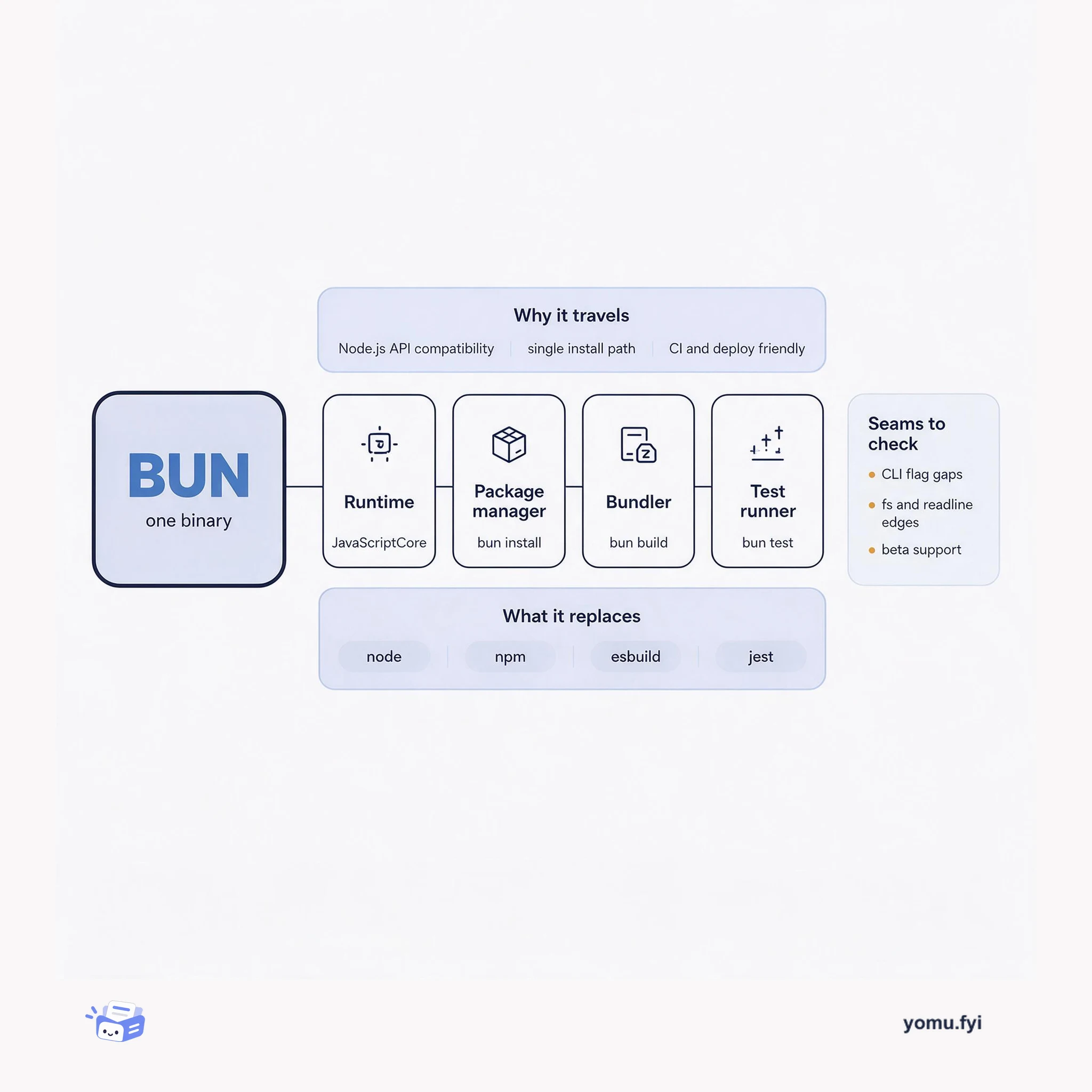
Bun packs a runtime, package manager, bundler, and test runner into one binary. Here is how those four parts fit together and where the seams still show.
Loading…
Topic
437 posts about Developer Experience. Every summary links to the original.
See the idea
Bun packs a runtime, package manager, bundler, and test runner into one binary. Here is how those four parts fit together and where the seams still show.
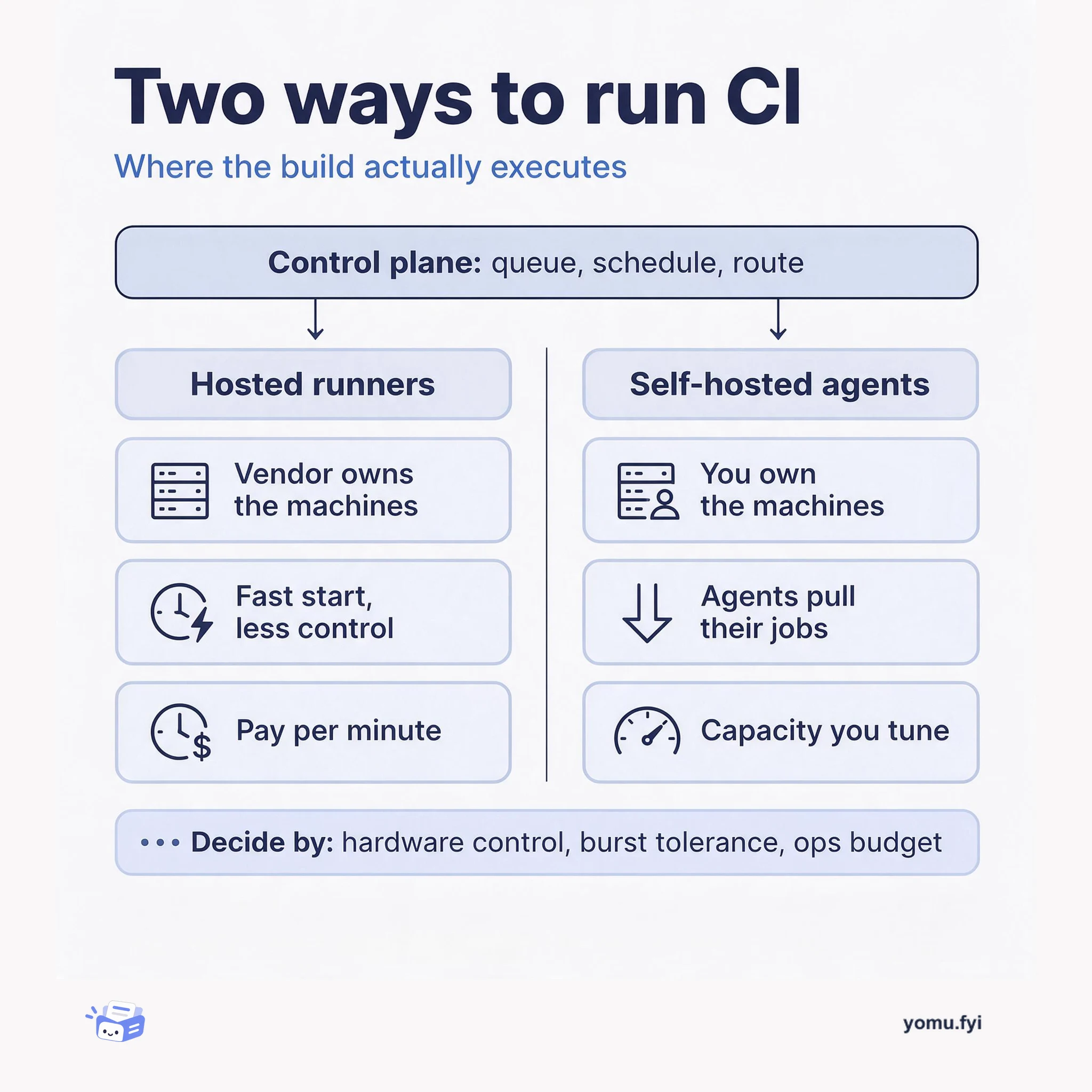
Buildkite splits CI into a hosted control plane and agents you run on your own machines. This comparison weighs that self-hosted agent model against fully hosted runners so you can pick the right fleet.
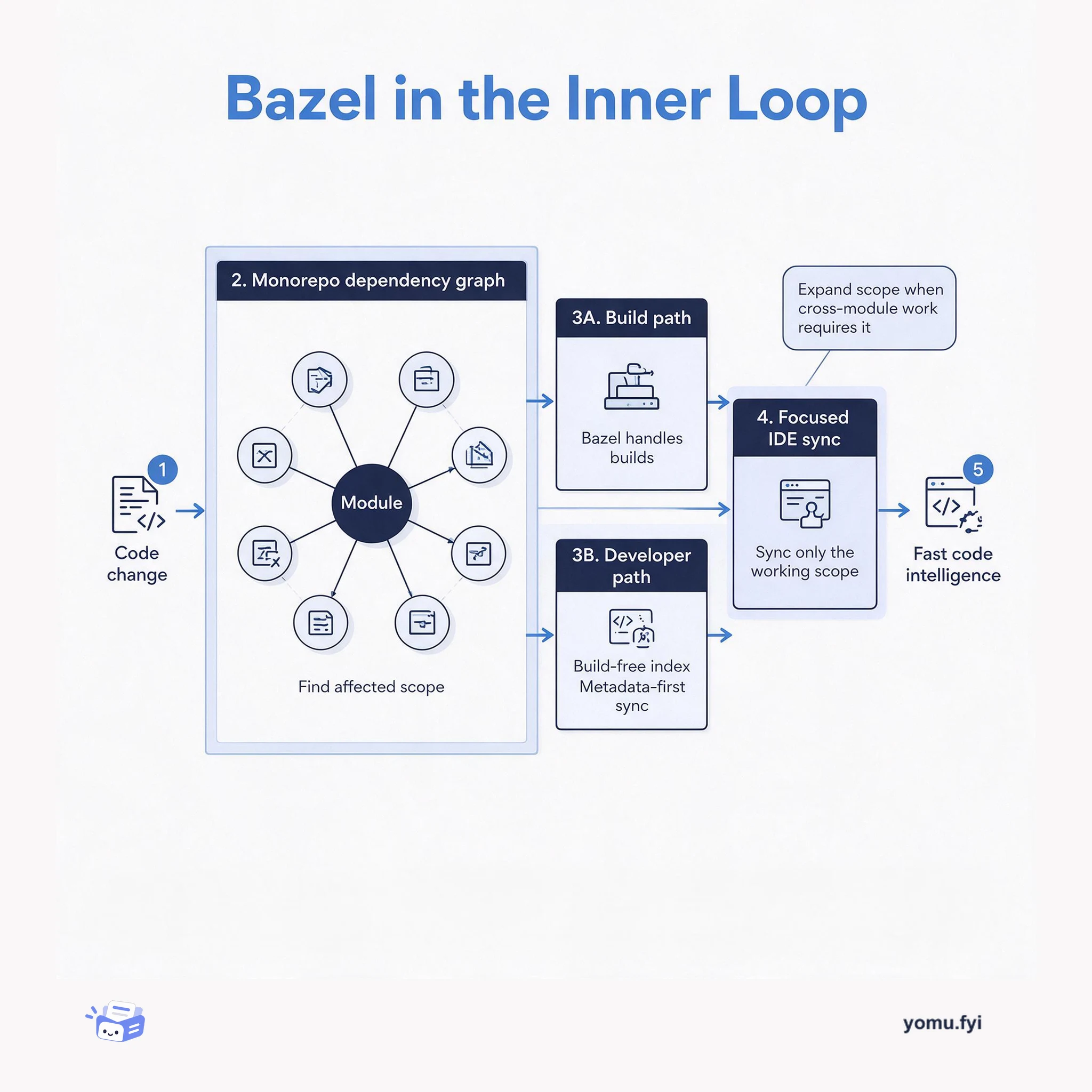
See how Bazel’s dependency graph can separate build scope from IDE scope, helping engineers move through large monorepos without syncing every module.
The Good Stuff
Paid picks we use ourselves. Links carry a referral code — a subscription through one earns us a commission at no extra cost to you.
Newest first
The article presents Stripe Sandboxes as isolated environments for developing and investigating subscription systems without affecting production data or settings. It explains how to create subscriptions, inspect dashboard actions through Workbench, and review API requests, JSON resource data, and webhook events such as customer.subscription.created and invoice.created. Test Clocks allow developers to advance time and examine subscription cancellation behavior, including the customer.subscription.deleted event after a scheduled cancellation. Workbench’s Shell tab, API Explorer, and Print SDK Request feature support testing requests in the browser and converting them into implementation code, while the article stresses testing plan changes, trial expirations, cancellations, and payment failures.
Managing access rights across multiple SaaS pricing plans can require maintaining feature lists, subscription and pricing relationships, and related database resources as plans or features change. The post presents Stripe’s Entitlements API as a way to register features, associate them with Stripe Products, and retrieve active entitlements for a customer’s subscriptions. Its example defines Free, Personal, and Business monthly products priced at $0, $98, and $980, then maps article-viewing and business-report features to those products using Stripe CLI commands in Workbench. Customer entitlement checks can support application authorization, while entitlements.active_entitlement_summary.updated webhooks expose before-and-after permission data for workflows triggered by plan changes or cancellations.
The 2023 BFCM Globe is a real-time visualization of purchases made through Shopify-powered merchants worldwide, with animated arcs, city dots, fireworks, camera movement, atmospheric noise, stars, and a custom material. Performance was a central concern because the earlier approach used a separate mesh and draw call for every arc, causing more than 1,000 simultaneous arcs to slow some mobile devices. The revised arc system uses instancing, interleaved per-arc attributes, and vertex-shader Bézier deformation, allowing tens of thousands of arcs in one draw call and an initial benchmark of up to one million arcs on an M1 laptop. Other effects were similarly consolidated, including billboarded point particles for cities and single-draw-call fireworks, while 2D psrdnoise and a stripped-down shader reduced rendering cost. The result combines richer visuals with substantially greater rendering capacity.
Upgrading a third-party API can bring new features and fixes but may also introduce breaking changes, so applications should be evaluated before production changes. Stripe Sandboxes provide isolated test accounts with separate API keys and access controls, optionally copying production configuration without copying products, customers, or transaction data. The workflow uses Dashboard Workbench to inspect and upgrade the sandbox API version, then runs the application with sandbox credentials and forwards webhook events through the Stripe CLI. In the example, Stripe.net 41.0.0 rejected an event because it expected API version 2022-11-15 while the sandbox delivered 2024-09-30.acacia; upgrading the SDK to 46.0.0 resolved the mismatch.
Payment method choices affect ecommerce conversion, and the post notes that 81% of surveyed customers frequently abandon carts when their preferred method is unavailable. It explains how Stripe’s dynamic payment methods in Elements and Dashboard settings can apply country, region, and amount rules without embedding those conditions in PaymentIntent code. The proposed workflow uses Dashboard experiments to enable methods such as Klarna, set display rules and traffic allocation, then uses Workbench Inspector, Logs, and Events tabs to inspect presented payment_method_types, API requests, and webhook history. A Klarna example reports a 16% increase in average order value, while new payment methods were deployed within four days.
Stripe Workbench provides browser-based tools for investigating EMV 3DS authentication and related payment flow behavior in the Stripe dashboard. It lets developers inspect Payment Intent and Charge data, including payment_method_details.card.three_d_secure.authentication_flow and result, to determine whether authentication used a challenge UI and whether it completed successfully. The Inspector also exposes API history and webhook events, while the Events tab can filter historical payment_intent.requires_action events and show their frequency over a selected period. In the Shell tab, stripe trigger payment_intent.requires_action simulates a 3DS-related flow and generates event data without installing additional tools, allowing webhook handling to be tested and investigated from the dashboard.
Setting up development machines with the correct tools, permissions, and dependencies can take weeks for new engineers, so the setup combines Stripe Sandboxes with development containers. Stripe Sandboxes provide isolated accounts with full Stripe API access for testing without real transactions, while sandbox settings remain independent and production customer, product, and transaction data is not copied. A C# example uses Bogus to generate ten fake products and Stripe.net’s ProductService to create them with metadata in the sandbox, and the text notes that SDKs can populate additional account data. The containerized workspace uses Docker development containers, a .NET 8 image, Redis via Docker Compose, environment variables, VS Code customizations, and a post-create script that installs Stripe CLI. Configuration files can then be checked into source control, giving team members an isolated and consistent workspace for exploring payment workflows without affecting live data.
Grab faced major bottlenecks in dataset discovery across its 200,000 data lake tables due to low documentation coverage and vanilla Elasticsearch limitations in its internal tool, Hubble. To resolve this, engineers first tuned Elasticsearch by boosting frequently queried P80 tables and certified schemas while deboosting deprecated datasets. They then deployed a GPT-4 pipeline that generated documentation from table schemas and sample data, raising P80 documentation coverage from 20% to roughly 90%. Finally, the team developed HubbleIQ, an LLM-powered assistant built via Glean Apps and integrated into Slack and Hubble search to answer semantic queries. These initiatives increased search click-through rates to 94% and lifted the proportion of users finding discovery easy to 73%.
Stripe sandboxes provide isolated environments for testing Stripe features without affecting a live integration, with access controls for the people who use them. Each live account can have up to five sandboxes, which admins can create, name, configure by copying selected live-account settings, and delete when no longer needed. The guide describes a staged setup for startups and small teams, using separate environments for development, integration testing, user acceptance testing, and spare capacity, while larger organizations may assign sandboxes to departments and rotate them between projects. It also presents an iterative model in which teams prototype, collect stakeholder feedback, retest changes, and document results. The recommended strategy depends on team size, organizational structure, workflow, and development methodology.
Stripe’s August 2024 developer update announces that Workbench is available to everyone across every Dashboard surface, addressing developers’ request for in-context guidance and debugging tools during API integration work. Workbench is a developer home in the Dashboard that provides an at-a-glance view of integration behavior, lets users inspect API and event history, prototype integrations, and receive critical account alerts. As developers build, it highlights errors, helps resolve them, and recommends ways to improve integration efficiency; it can be opened with a single keystroke. The update also places Sandboxes and Event Destinations in public beta, expands Tap to Pay on iPhone with Stripe to seven countries, and notes community resources for Stripe Tax, the Stripe CLI, Payment Links, and related integrations.
The post demonstrates how Stripe Workbench’s Inspector can be used to examine a PaymentIntent throughout its lifecycle and diagnose payment workflow issues. It maps states including requires_payment_method, processing, requires_action, succeeded, and canceled, showing how the status property changes as inputs and decisions move the object through a state machine. The walkthrough creates and confirms test PaymentIntents with Stripe Shell commands, including a 3DS-required card that produces a requires_action state and a use_stripe_sdk next_action. It also describes reacting to state changes through webhook endpoints or Amazon EventBridge, using the Inspector to identify friction such as PaymentIntents stalled at requires_action and to debug abandoned payments.
The post demonstrates how to debug and fix Stripe Invoicing integration errors with Workbench, a context-aware tool available throughout the Stripe Dashboard. It uses the Overview and Errors tabs to locate a recent parameter_missing error, then examines the failed Invoice create request and identifies the missing Customer object that prevented invoice creation. The Shell and API Explorer let developers list customers, supply a Customer ID, construct and run the corrected create command, and generate an SDK request from the configured fields. Workbench’s Inspector then exposes the invoice’s JSON data map, logs, and lifecycle events; the example confirms successful payment for a zero-dollar invoice and explains that non-zero charges require Invoice Items tied to products and prices.
Grab's Chimera team built Chimera Sandbox to address resource accessibility challenges and enable rapid machine learning experimentation across technical and non-technical teams. The platform runs on multi-cluster Kubernetes infrastructure capable of scaling to thousands of nodes per cluster during peak loads. Users can provision customizable Docker environments with varying CPU and GPU configurations, collaborate in real time, and query data using Spark-on-Kubernetes integrations and helper magic cells. The workspace integrates with Grab's AI Gateway for LLM access alongside tools like MLflow, Optuna, RStudio, and LabelStudio on shared storage, backed by user-level cost attribution.
Stripe Invoicing’s no-code workflow hides the API calls and invoice state transitions that developers may need to inspect when debugging payment failures. Using Stripe Workbench’s Inspector, Logs, and Events tabs, the walkthrough maps object hierarchies, requests, event payloads, and previous_attributes across an invoice lifecycle. Creating an invoice in the Dashboard produces a draft Invoice, a separate Invoice Item, an automatically generated Invoice Line Item, and related creation or update events. Sending it creates a Payment Intent and finalizes the invoice from draft to open; charging captures the Payment Intent, creates a Charge, and changes the invoice to paid. Draft invoices can be deleted, while open invoices can be voided, preserving the record and canceling the Payment Intent, and the same Workbench method can be applied to other Stripe API areas.
Shopify built Tophat to reduce the time and friction involved in manually testing mobile pull requests, where switching branches, stashing changes, and waiting for Xcode or Android Studio builds slowed review. The macOS menu-bar application links GitHub pull requests to iOS and Android artifacts produced by CI and stored in Google Cloud Storage, allowing contributors to install builds on simulators or real devices with one click. Tophat parallelizes tasks such as downloading applications and booting devices, and its Quick Launch feature retrieves builds with up-to-date native code for React Native development. The project also addressed real-device iOS installation and signing challenges, integrated with Shipit Mobile, and provided automated setup guidance. After the latest improvements, daily usage doubled, and Tophat was later made open source.
Stripe payment methods differ in how quickly they confirm attempted payments, with cards reporting status immediately and bank debits, bank transfers, and cash-based vouchers requiring additional processing time. The post uses Stripe Workbench and its in-browser CLI shell to create Checkout sessions in test mode, submit card and ACH Direct Debit payments, and inspect emitted events. For cards, charge.succeeded and payment_intent.succeeded signal successful payment, while integration code must inspect checkout.session.completed payment_status rather than confuse it with the session status. With delayed methods, checkout.session.completed can show unpaid before checkout.session.async_payment_succeeded or checkout.session.async_payment_failed arrives; the former changes payment_status to paid, and production processing can take days.
Online data materialised in Kafka topics at Grab traditionally remained uninspected until ingested into the Data Lake as offline data, introducing latency and making stream processing applications difficult to develop. To enable earlier data exploration, Grab adopted Apache Zeppelin notebooks integrated with an internal data streaming platform. Zeppelin uses a Flink interpreter to convert interactive SQL queries into Flink jobs submitted to a Flink session cluster. The platform dynamically translates Protobuf schemas into SQL Data Definition Language statements to simplify table discovery. Security and compliance risks are addressed by combining mutual TLS authentication with Strimzi's Open Policy Agent to enforce read-only access policies and audit logging on Kafka topics.
Grab’s Coban real-time data streaming team initially relied on direct Terraform merge requests for managing self-served resources like Kafka topics and CDC pipelines. This pure Infrastructure-as-Code workflow faced challenges with CI pipeline failures from manual errors, security risks from lacking access controls, and platform team review bottlenecks. To resolve this, Coban implemented a three-tier control plane comprising the Coban UI, a Go backend named Heimdall, and a Git storage and provisioner repository named Khone. Heimdall translates user form submissions into validated merge requests containing Terraform and metadata files, polling Khone's CI status and alerting users. This architecture abstracts infrastructure code behind a graphical self-service portal while preserving underlying Git auditing and automation.
Fly.io introduces a streamlined version of its fly launch command for deploying applications near their users. The CLI now infers desired infrastructure from application source code and offers opinionated defaults or alternative options when it cannot apply the same shape. Previously, the launch flow asked a series of questions; the change reduces guesswork by folding varied frameworks, languages, and toolchains into a few basic infrastructure shapes. A Rails application using SQLite is given an example set of defaults that developers can build from, while other applications can be configured through a confirmation webpage. Once settings are accepted, the app is built and deployed unless --no-deploy is supplied, and the CLI provides a link to the running app.
Ruvy is an open-source toolchain that takes Ruby code as input and produces a WebAssembly module whose exported _start function executes that code. Built on ruby.wasm, it pre-initializes the Ruby virtual machine and includes Ruby files during the build, while avoiding the need to supply a Ruby script path as a WASI argument at runtime. In Wasmtime benchmarks, Ruvy’s instantiation and _start execution took about 44.4–45.2 ms, compared with 55.8–56.9 ms for ruby.wasm plus wasi-vfs, and its Wasm-to-native compilation took about 440–457 ms versus 1.62–1.68 seconds. These results correspond to roughly 20% faster runtime performance and about 70% less compilation time in the reported tests. Ruvy currently requires users to install build dependencies and compile it because precompiled binaries are not shipped.
The best engineering reads, once a week.