How Caddy Serves a Static Site: The Request Flow
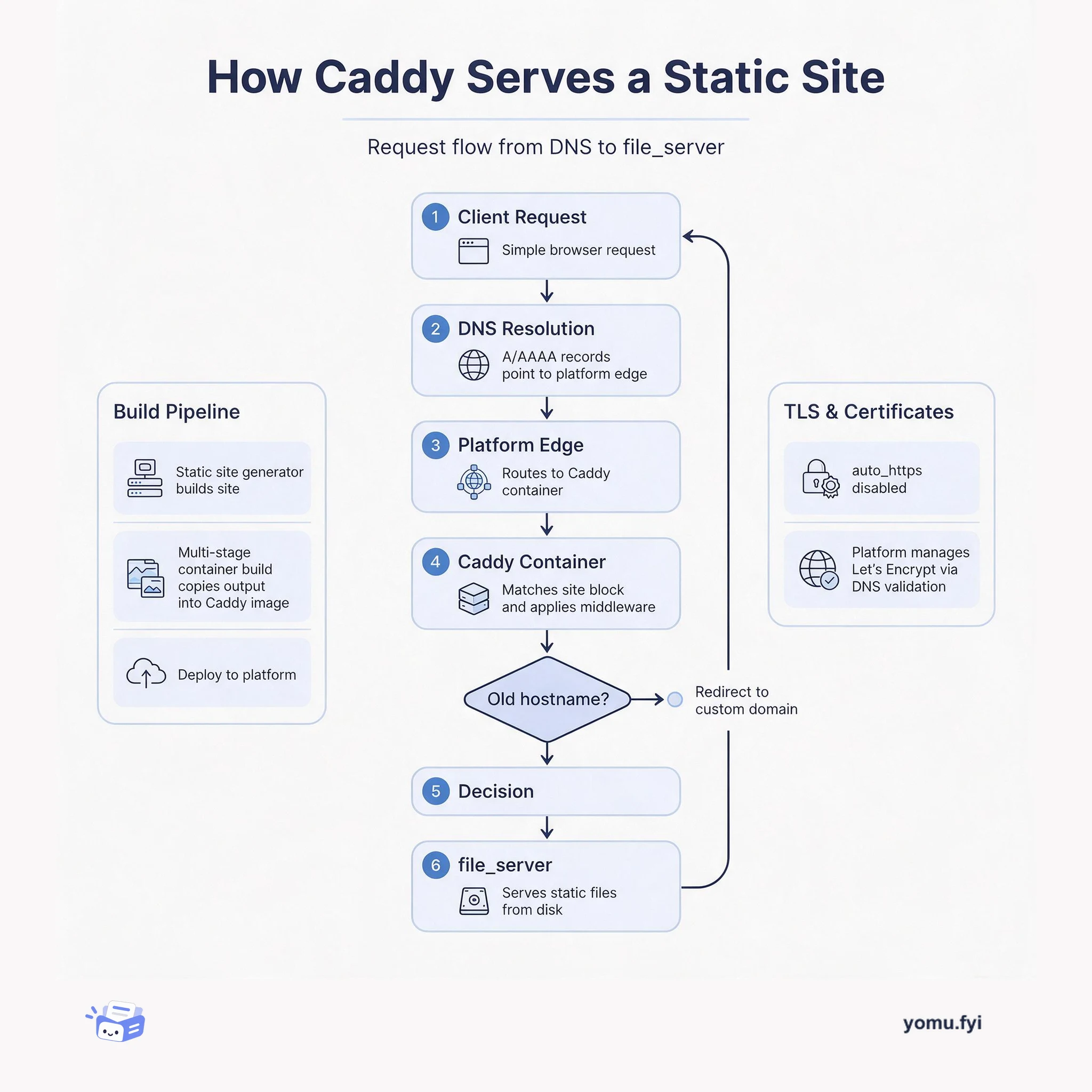
See how Caddy handles a request for a static site, from DNS resolution through container routing to file_server, and how TLS and redirects fit into the flow.
Loading…
Topic
83 posts about Docker. Every summary links to the original.
See the idea
See how Caddy handles a request for a static site, from DNS resolution through container routing to file_server, and how TLS and redirects fit into the flow.
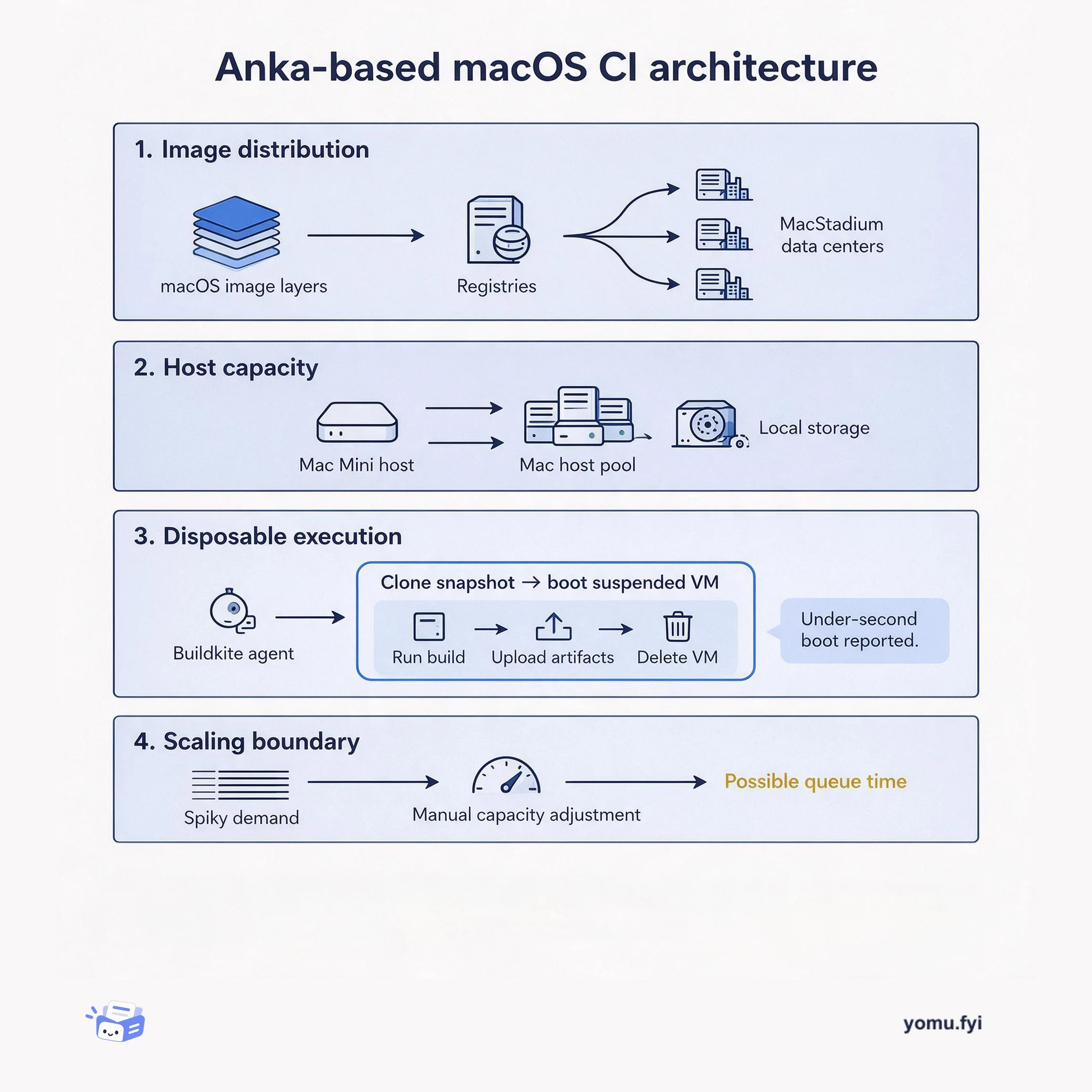
Anka is a Docker-like macOS virtualization layer for disposable CI environments. This architecture shows how images, Mac hosts, snapshots, build agents, and artifacts connect.
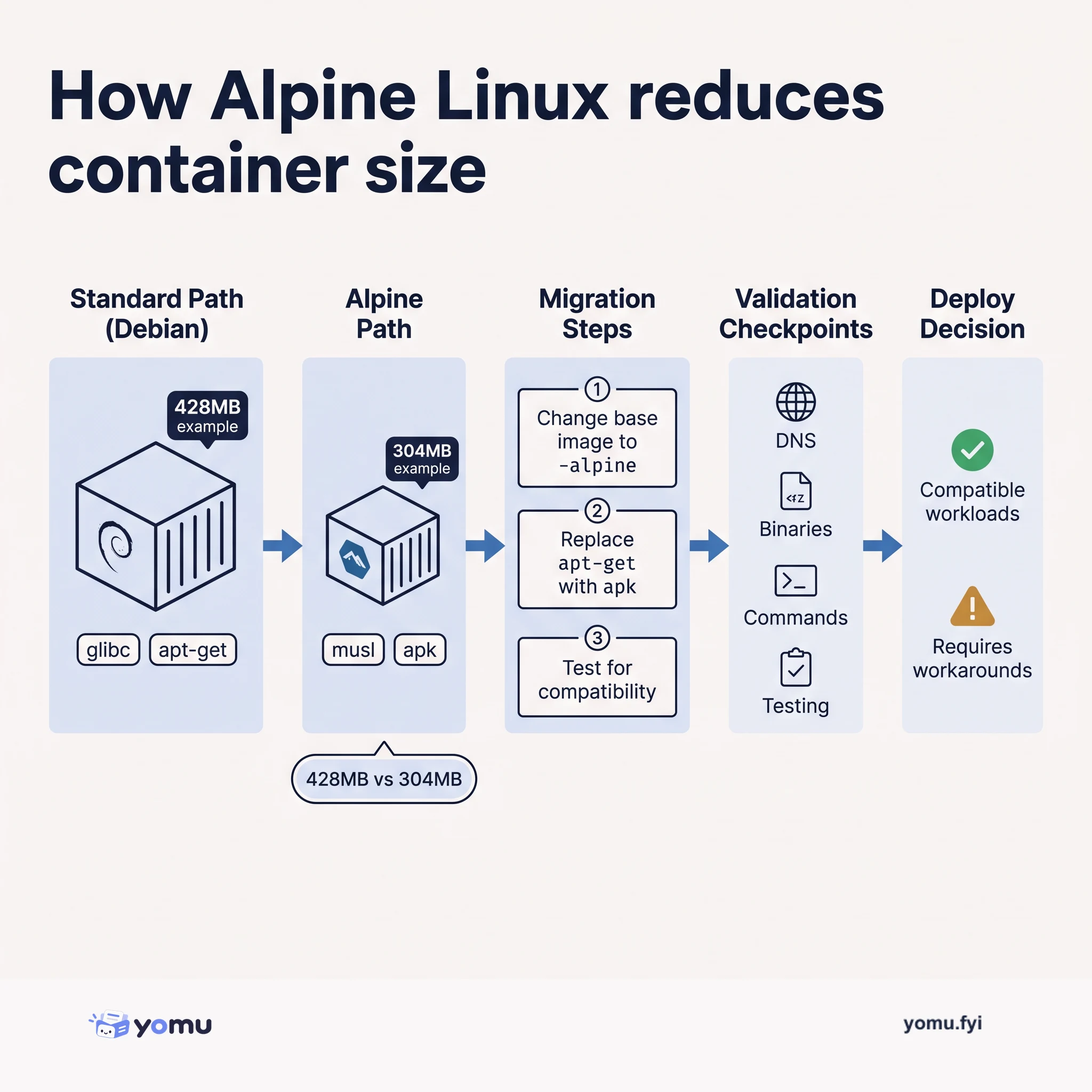
Alpine Linux shrinks container images by replacing glibc with musl and using a minimal base, but introduces compatibility trade-offs you must evaluate before switching.
The Good Stuff
Paid picks we use ourselves. Links carry a referral code — a subscription through one earns us a commission at no extra cost to you.
Newest first
Fly.io introduces new virtual-machine configurations after developers shifted attention from CPU-intensive workloads such as image processing, machine learning predictions, and video transcoding toward databases, which need higher RAM-to-CPU ratios. Shared-cpu VMs offer up to 2GB of RAM, while dedicated-cpu VMs reach 64GB across configurations with one, two, four, or eight dedicated CPUs. Shared-cpu-1x pricing starts at $1.94 per month for 256MB and reaches $10.70 for 2GB; dedicated-cpu-1x with 2GB costs $31 per month. The pricing model combines dedicated hardware with shared CPU capacity, averaging 12 shared VMs per CPU and using cgroups priorities and relocation to manage contention. Persistent storage remains unavailable, so the post says ephemeral VMs are unsuitable for database applications and that Fly.io should offer storage.
Kubernetes does not enable Docker image signature verification by default, leaving organizations to decide whether images are trusted before they run in a cluster. The post explains code signing through hashes and public/private keys, then describes Binary Authorization as a combination of metadata storage, an enforcer, and a signing service. Using Grafeas and Kritis, or GKE’s Binary Authorization, cluster policies require specified attestors to sign images; invalid or unsigned images are blocked before their containers start. Voucher supplies the missing signing component as a REST service running in Cloud Run or Kubernetes: build pipelines submit image paths, Voucher performs security checks, signs qualifying images, and records signatures in the metadata service. Its extensible checks can verify internal ownership, GitHub commits, approvals, builder identity, and vulnerability counts, while distinct cluster policies balance compliance requirements with faster experimentation; Voucher later moved into the Grafeas organization.
Pi-Hole blocks advertising and tracking domains by acting as a DNS server that returns a dummy address for listed hosts, but a home deployment is difficult to use while traveling and can incur latency. The post presents “Fli-Hole,” a globally reachable Pi-Hole application deployed on Fly’s edge network, using the official Docker image without modifying Pi-Hole itself. Its configuration sets INTERFACE and DNSMASQ_LISTENING, exposes UDP port 53 through fly.toml, stores the web password as a Fly secret, and deploys with fly deploy. Additional Fly regions, such as Frankfurt, can be added so nearby traffic is routed through them. Each regional instance has independent settings and no persistence or sharing, while Dockerfile changes and redeployment provide a way to distribute configuration updates.
Flyctl v0.0.139 adds built-in builders for Node, Ruby, Deno, Go, and static web servers, allowing an app to be initialized and deployed without a Dockerfile. The release also lets flyctl init select a public Docker image, stores that choice in fly.toml, and supports repeatable image builds with configurable ports and health checks. Region visibility improves through backup-region listings and a (b) marker in flyctl status, while guided certificate creation supplies DNS instructions for traffic direction and ownership verification. Additional changes include --import, --local-only, timestamped JSON status output, orgs and dns commands, and clearer deployment and authentication messaging. The changelog notes that orgs and dns remain works in progress, and version 0.0.139 fixes an issue with builtin init.
Workload isolation makes it harder for a vulnerability in one service to compromise the rest of a platform, and becomes especially important when hosting other people’s code. The post surveys isolation mechanisms from chroot and privilege separation through namespaced containers, mandatory access control, seccomp-bpf, capabilities, and language runtimes, before considering virtualized approaches. It emphasizes that network exposure is often the most consequential attack surface, while chroot alone leaves access to ptrace, procfs, device nodes, and networking. Firecracker is presented as the selected VMM: a small Rust implementation that limits itself with seccomp-bpf and runs under an external jailer providing chroot, namespaces, and dropped privileges. The closing menu includes nsjail, unprivileged Docker with tighter filtering, gVisor, and Firecracker or Kata; absent hostile code, the author would tune nsjail for return on investment.
The post shows how to deploy a tiny static signpost site on Fly.io using GoStatic, with the aim of keeping the application’s footprint and running cost low. GoStatic is a self-contained web server that can run in a bare Docker image; the described image is 6MB, while the completed deployment reports 7.7MB. The setup uses fly init examplegostatic -p 8043, a two-line Dockerfile based on pierrezemb/gostatic, and an index.html copied to /srv/http/index.html; Fly routes ports 80 and 443 to GoStatic’s port 8043 and provides HTTPS. After deployment reaches one healthy instance, the post reduces the default micro-2x VM from 512MB RAM to micro-1x, which provides 128MB. This matches the small workload and is presented as a way to reduce running costs.
A new community venture’s website is built with Hugo, served by Caddy, and deployed on Fly, with a custom makeroni.cc domain added after the initial deployment. The process initializes a Fly app on port 80, uses Hugo’s Quickstart and Ananke theme, and employs a multi-stage Docker build based on klakegg/hugo:0.74.0-onbuild, copying generated files into caddy:2.1.1. Caddy serves the static files with file_server while auto_https is disabled because Fly handles certificate management; separate rules serve makeroni.cc and redirect the old fly.dev hostname. DNS A and AAAA records connect the domain to Fly, and flyctl certs create requests a Let’s Encrypt certificate through DNS validation, leaving the site ready to serve securely after redeployment.
An unexpected viral submission on Hacker News prompted sudden alpha traffic for Supabase, attracting 30,000 visitors and over 1,400 signups in one week. The surge strained initial infrastructure, which initially relied on a single server running Docker Compose for middleware and Digital Ocean for customer databases. System bottlenecks emerged rapidly, including hit limits on Digital Ocean droplet counts, frequent physical server faults, and a three-hour provisioning outage when Cloudflare reached its 1,000-subdomain limit. In response, the team migrated middleware to multiple globally load-balanced ECS clusters via AWS Global Accelerator. Supabase also transitioned 1,800 servers from Digital Ocean to AWS t3a instances, nearly halving database startup times from 90 seconds to 50 seconds.
Fly supports WebSocket connections, and the post demonstrates that support with flychat-ws, a small chat application built from raw WebSockets and Express. Deployment requires cloning the example, running npm install, then using flyctl init, flyctl deploy, and flyctl open, with no application-specific configuration changes. Its fly.toml maps internal TCP port 8080 to HTTP port 80 and TLS/HTTP port 443, sets concurrency limits of 20 soft and 25 hard, and checks the service every 10 seconds with a two-second timeout. The Node server broadcasts each received message to every connected client, while the browser selects ws or wss from the served protocol and sends JSON messages. TLS terminates at Fly’s network edge, and the app can also run locally or in Docker.
Deno on Fly explains how to package and deploy a Deno 1.0 application using a Dockerfile rather than a buildpack. The example uses the hellodeno-dockerfile project, with an Alpine Linux and Deno 1.0.0 base image, port 8080, a non-root deno user, and separate dependency and application caching layers. A deps.ts file pins imported package versions, while the Dockerfile runs deno cache deps.ts and deno cache server.ts before starting server.ts with deno run --allow-net server.ts. After local Docker testing, the deployment flow uses flyctl init to create the Fly app and fly.toml, then flyctl deploy to build and push the image. The resulting application is available at a Fly hostname, with HTTP and TLS routing to port 8080, automatic HTTPS redirection, and the option to scale globally and add domains with generated certificates.
Powerbuilding with Fly explains how flyctl controls Docker-image builds when deploying applications to Fly infrastructure. It covers selecting the application configuration with --config, choosing an alternate Dockerfile with --dockerfile, and passing build-time values through --build-args. Using NGINX_PORT as an example, the post shows how Docker ARG can receive a default or command-line value and how ENV=${NGINX_PORT} carries that value into the running image; flyctl deploy --build-args NGINX_PORT=4000 overrides 8080. Build arguments are intended for non-sensitive data because values are baked into the image and may be retrievable, while Fly Secrets are recommended for sensitive application data and are injected as environment variables when the image starts.
Fly Answers More Questions addresses three Fly usage questions: protection against malicious TCP connections that trigger runaway scaling, dedicated credentials for GitHub Actions, and selecting Dockerfiles in monorepos. For scaling abuse, Fly apps can impose per-region and global instance limits; requests beyond those limits are dropped, while networking protections are already in place. A configurable monthly maximum spend is described as in preview, and usage from an obvious DDoS or similar event may be waived. For continuous deployment, the suggested pattern is a dedicated user with a personal access token, added to a Fly organization so it can deploy to projects. For complex builds, updated flyctl adds deploy's --dockerfile option, allowing a selected Dockerfile instead of the default Dockerfile.
Fly Friday describes how to customize a Docker image before deploying it to Fly, building on an earlier example that deployed Docker’s official httpd image. The default image serves files from /usr/local/apache2/html and displays “It works”; replacing that content requires adding local HTML files to the image. A two-line Dockerfile uses FROM httpd:2.4 as the base and COPY ./public_html/ /usr/local/apache2/htdocs/ to place the contents of a public_html directory into the new image, which Fly then deploys. The post also notes that the directory must be created and populated with HTML, and points to a video and Fly Docs, including a hands-on path to a free account and first app deployment.
Flyctl adds a new -p option to flyctl apps create, allowing users to set an app’s internal port during initial creation. The numeric value is written to the generated fly.toml configuration, replacing the default port of 8080. This addresses workflows using prebuilt Docker images, where users may not control the port and previously had to create the app, edit fly.toml, and change the internal port manually. Available from Flyctl release 0.94, the flag removes that edit and is shown in the first Fly Friday video. The post defines the internal port as the port an application uses to communicate with the world, while the command-line setting supplies that value before deployment configuration is generated.
flyctl now supports building and deploying NodeJS, Rails, Go, and Java applications to Fly with two commands. The feature uses Cloud Native Buildpacks from buildpacks.io, turning an application into a Docker image during deployment without requiring users to understand Buildpacks. Cloud Native Buildpacks are described as an evolution of Heroku and Cloud Foundry systems, but are not compatible with their older buildpacks. After installing the latest flyctl, users can initialize an app with flyctl init --builder cloudfoundry/cnb:bionic and run flyctl deploy, then open it with flyctl open. Buildpack support complements Dockerfile-based image builds, while listed builders provide different language coverage and image sizes; the post recommends heroku/buildpacks:18 for its wider coverage.
Terrier is an open-source tool for identifying and verifying files and other components in OCI images and running containers, introduced alongside a Blackhat Europe talk on exploiting builds in the cloud. It targets supply-chain and forensic use cases, such as checking whether an image contains a known file or malicious package. YAML configuration selects image or container mode, supplies SHA256 hashes and, for container checks, paths; Terrier scans image layers or a container’s merged folder while keeping processing in memory for performance. Examples locate /usr/local/go/bin/go, report that the Jeilyfish package is absent, and verify curl and Go files in a running container; CircleCI and GitHub Actions examples show how checks can gate image-build pipelines.
Heroku offers six deployment strategies: Git push, GitHub integration, Review Apps, Docker, Terraform, and the “Deploy to Heroku” button. Each has different requirements and trade-offs, and strategies can be combined in a workflow. Git push is simple but requires a developer with access to both repository and app, while GitHub integration can automate deployments and block them until CI tests pass. Review Apps provide disposable instances for pull requests; Docker supplies self-contained environments but requires maintaining a stack and does not support pipeline promotions. Terraform uses declarative HCL to manage Heroku and external infrastructure despite lacking official Heroku support, and buttons offer one-click deployments from GitHub repositories but do not auto-update or connect deployed apps back to their repositories.
Grab built Loki, a dynamic mock server written in Golang that simulates backend services on local developer machines and CI pipelines. Mobile app testing previously suffered from heavy dependencies on complex, brittle staging environments and interconnected services communicating over HTTP, HTTPS, and TCP. Loki handles both HTTP and TCP traffic on distinct ports while exposing a unified RESTful API to manage test expectations. It provides runtime flexibility through sandboxed JavaScript execution, configurable request sequence ordering, and an in-memory cron scheduler for TCP push messages. Adopting Loki decoupled mobile releases from staging stability, improving delivery cycles and enabling automated UI testing with Espresso and XCUITest.
The post presents Cloud Native Buildpacks (CNB) as an alternative to hand-written Dockerfiles for turning application source code into Docker images. It argues that Dockerfiles make developers manage language runtimes, system packages, dependency caching, cleanup, and repeated maintenance, creating a leaky abstraction between application and deployment concerns. CNB uses app-aware buildpacks to detect a project’s language from files such as Gemfile or pom.xml, reuse work from previous builds, download dependencies, prepare the application, and export an OCI-compliant image. The beta buildpacks.io tooling provides pack build and a Heroku builder supporting Ruby, Node.js, Java, Python, PHP, and Go; pack rebase can update an image’s toolchain without rebuilding it. The stated conclusion is that this approach reduces operational complexity while retaining compatibility with Docker tooling and the broader container ecosystem.
Shopify adopted Apache Kafka in 2014 as a data bus for reliable messaging, initially collecting events and aggregating logs, then expanded to multi-tenant regional and aggregate clusters delivering billions of messages daily. In 2017, it migrated Kafka infrastructure from data centers to the cloud with zero downtime by mirroring regional data to both aggregate clusters before moving producers and consumers to cloud clusters. Shopify chose Kubernetes over GCP virtual machines because StatefulSets provide ordered, graceful deployment and scaling, while Custom Resources and Controllers support cluster-specific automation. The implementation uses self-built Kafka images in an own registry, persistent volumes, node and inter-pod affinity controls, taints, rack-awareness across zones, readiness probes, and resource-monitoring sidecars to limit restart and availability risks. The migration completed successfully, and Shopify now runs multiple regional clusters plus an aggregate cluster that mirrors data for the data warehouse.
The best engineering reads, once a week.