Agentforce Actions: Where Should the Work Run?
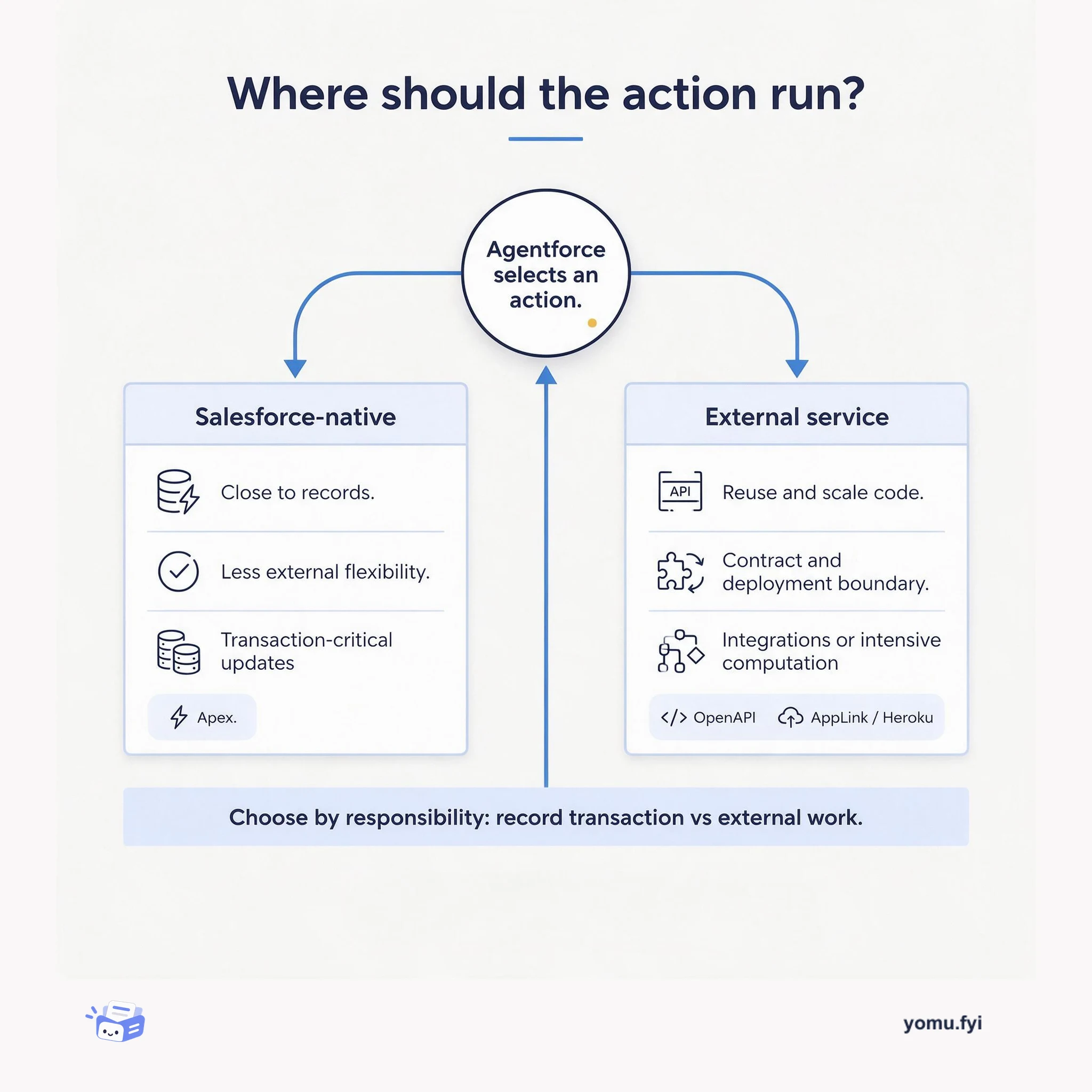
Agentforce selects actions to complete a task; this explainer weighs native record updates against external services so engineers can place each responsibility sensibly.
Loading…
Topic
16 posts about Salesforce. Every summary links to the original.
See the idea
Agentforce selects actions to complete a task; this explainer weighs native record updates against external services so engineers can place each responsibility sensibly.
The Good Stuff
Paid picks we use ourselves. Links carry a referral code — a subscription through one earns us a commission at no extra cost to you.
Newest first
Intercom announced new HubSpot and Marketo apps that sync customer data to help sales and marketing teams nurture and convert more leads. The apps sync leads and conversations across tools, allowing teams to avoid switching tabs or losing sales opportunities. They integrate with Intercom’s Operator bot to automatically qualify and send leads to HubSpot, Marketo, or Salesforce, or manually send with one click. Users can view lead data from these tools by hovering over external profile links in Intercom Inbox, and basic information updates automatically. Every Intercom conversation is sent to the lead’s profile in HubSpot, Marketo, or Salesforce, providing a complete history of interactions for continued nurture campaigns.
Twilio announced general availability of its Salesforce Partner Contact Center Integration, embedding its global Super Network with over 4,800 direct carrier relationships into the native Salesforce workspace. The integration unifies omnichannel orchestration across voice, SMS, and WhatsApp using Twilio TaskRouter, routing conversations into Salesforce’s omnichannel widget while preserving existing skills-based routing rules and syncing agent presence across channels. Real-time event metadata streams into the widget before a call connects, showing recent customer activity and sentiment to reduce average handling times and eliminate repeated information requests. Carrier-grade telephony with native real-time transcription and recording splits caller and agent voices for precise transcriptions, sentiment scoring, and post-call summaries. By pairing Salesforce’s familiar interface with Twilio’s communications engine, the integration gives agents a seamless workspace with a single source of truth, eliminating tab-switching and lost context.
Enterprise AI agents without persistent memory suffer from the “Groundhog Day” problem, repeatedly asking users to re-explain themselves. Agentforce Memory addresses this by giving agents persistent memory that retains user preferences, conversation history, and context across sessions. The team first established a shared terminology document to define concepts like semantic and episodic memory before architectural discussions could proceed. The architecture evolved incrementally, starting with conversation history injection and later adding semantic retrieval to find relevant past information regardless of recency. Memory retrieval uses keyword search during pre-orchestration to balance context quality with low latency, and moving memory into the Reasoner simplified configuration for administrators. Privacy and user trust were treated as architectural requirements from the start, enabling individual user controls over memory creation and management.
Salesforce’s Assistive Authoring aimed to reduce prompt-template creation from 25 minutes to under a minute by using Agent Graph. A router node dispatches natural-language requests to specialized sub-agents for creation, refinement, or clarification while state variables carry context. Deterministic controls prevent the LLM from corrupting routing, record identity, or structured output through guarded transitions and a server-side transpose layer. A discovery service normalizes available data fields into an allowlist, and the LLM can only select from validated references. A human-in-the-loop gate ensures the agent never saves or executes, presenting output as an accept-or-reject diff only.
Agentforce Health Monitoring (AHM) addresses silent availability failures in production AI agents that traditional monitoring misses because agents can appear healthy even when unreachable. The team unified telemetry from approximately five or six locations across sessions, reasoning steps, tool calls, errors, and escalations into a coherent representation. End-to-end alerting latency was reduced from roughly 20 minutes to several minutes by converting Data 360 ingestion to streaming and simplifying query complexity. AHM provides 16+ built-in metrics including agent availability, error rate, response/escalation rate, engagement, and latency, with a drill-down interface connecting alerts to session context. The roadmap includes cost, TTFT/TTLT, toxicity, feedback metrics, RAG Quality Monitoring integration, and eventually a runtime insight agent for root-cause analysis and automated remediation.
Heroku Connect’s built-in CLI diagnostic utility addresses troubleshooting when Salesforce records lag or fields fail to update as expected, replacing manual dashboard searches with a focused health check. After installing the Heroku Connect CLI plugin, engineers can run heroku connect:diagnose --verbose to inspect connection-level settings and mapping or field configurations. The output reports sequential GREEN, YELLOW, RED, or SKIPPED statuses, with checks covering Salesforce API version, permissions, database plan, schema changes, field types, unique identifiers, and other constraints. Examples include an outdated API version, missing View All Data or Modify All Data permissions, binary or calculated fields, and Salesforce or Postgres schema drift; the text pairs these warnings with actions such as recreating or refreshing a connection, removing binary fields, or realigning mappings. Running the command before migrations or Salesforce schema changes provides an immediate view of configuration mismatches and sync bottlenecks.
The article describes Heroku’s effort to unify Salesforce and data from more than 20 applications in a real-time analytics warehouse after traditional ETL created API, freshness, performance, and maintenance problems. Its architecture uses Heroku Postgres as an operational warehouse and staging layer, AWS Redshift for historical analytics, Heroku Connect for direct Salesforce replication, follower databases for read-only source access, and Apache Airflow for orchestration. Template-driven Python jobs and 200+ JSON definitions support incremental, bulk, and date-range loads, while 30+ DAGs and monitoring across 12 regional Heroku Connect instances provide automated retries and consistency. Reported outcomes include over 10 TB processed monthly, sub-minute freshness, 99.99% pipeline uptime, 60% lower integration costs, and 40% better customer analysis accuracy. Tableau and Dataclips provide real-time, historical, and ad hoc reporting, while planned or newly described capabilities include Postgres Advanced, expanded Connect synchronization, and zero-copy Data Cloud ingestion in beta.
Heroku Connect customers needing current Salesforce data for applications such as custom quoting have faced stale records because legacy synchronization could lag, with Opportunity Line Items among unsupported objects for Accelerated Polling. Heroku is rolling out support for Salesforce Change Data Capture (CDC), allowing Accelerated Polling to listen for changes instead of relying only on the Salesforce Streaming API. That change adds more than 170 Salesforce standard objects to Accelerated Polling, including Opportunity Line Items, Pricebook2, Asset, and OpportunityLineItem, so critical data can synchronize more quickly. To enable it, a Salesforce administrator turns on CDC for selected objects, after which the corresponding Heroku Connect mappings expose the “Uses Accelerated Polling” option.
Salesforce integrations commonly use Connected Apps or External Services, but long-lived OAuth tokens and public vendor endpoints can expose org data to replay and misuse. Heroku AppLink provides a managed bridge in which a service mesh admits requests only from explicitly connected Salesforce orgs, validates context, and exposes services as native Salesforce actions. For calls back to Salesforce, its SDK obtains short-lived, scoped credentials at runtime through user, user-plus, or authorized-user modes, avoiding refresh-token storage in vendor systems. The mesh uses the x-client-context header to convey org and user information, while the SDK keeps bearer credentials out of application code. The post describes setup commands for the AppLink add-on, service-mesh buildpack, External Service publication, and authorizations, concluding that AppLink improves governance, least privilege, and replay resistance.
AppLink Fundamentals III describes how to build Salesforce extensions on Heroku, covering local testing, OpenAPI contract management, deployment workflows, and programming-language selection. For applications that receive Salesforce requests, the supplied invoke.sh script simulates production headers using Salesforce CLI data, can activate session-based permission sets, and accepts JSON payloads for testing; Pattern 1 applications that call Salesforce APIs do not require this special setup. The OpenAPI specification serves as the shared contract for endpoints and Salesforce consumers, with publish-time validation intended to catch misalignment. AppLink also supports Agentforce actions through x-sfdc agent extensions, enabling topics, publishing, input and display settings, privacy controls, and outputs such as generated PDFs in the automotive finance example. The comparison positions Apex for transaction-critical record updates and AppLink languages such as Node.js, Python, and Java for external integrations, intensive computation, elastic scaling, and reuse of existing code.
Heroku AppLink lets connected Heroku applications extend Salesforce through Data Cloud, Flow, Apex, and Agentforce, bringing external logic, real-time data processing, and automation into Salesforce orgs. It uses an OpenAPI YAML or JSON specification, including x-sfdc metadata for authentication and permissions, to generate strongly typed Apex classes, Flow External Service definitions, Agent Actions, and related Connected App and Permission Set configurations. Developers can invoke services synchronously or asynchronously from Apex, use operations as no-code Flow actions, and configure Agentforce to call endpoints for specialized processing; callbacks support longer-running work. AppLink uses User Mode authentication by default, while administrator-controlled Permission Sets can temporarily elevate access during execution without changing a user’s permanent permissions.
AppLink Fundamentals I describes four integration patterns for connecting Salesforce orgs with Heroku applications, focusing on API access and Salesforce extension. Pattern 1 uses run-as-user authentication for automated or customer-facing applications, with the AppLink add-on, CLI plugin, optional SDK, named authorizations, and SOQL queries through the Data API; the SDK manages authentication, session management, and connection pooling for single- or multi-org access. Pattern 2 lets Salesforce users invoke published Heroku services through Flow, Apex, or Agentforce, using User Mode or elevated “user mode plus” permissions controlled by Permission Sets, an OpenAPI description, and a service-mesh buildpack that blocks external access. The post also positions batch processing and real-time eventing as extensions of these patterns, and describes Data Cloud querying and Data Action Targets for applications to receive Data Cloud events.
Heroku AppLink is now generally available from the Salesforce Setup menu, extending Salesforce with Heroku applications and code written in virtually any programming language. The initial release provides SDK support for Node.js and Python, while Java examples and direct AppLink API access demonstrate how other languages can integrate; the APIs provide authentication, authorization, connection pooling, and access to Salesforce and Data Cloud data. AppLink combines an add-on, service-mesh buildpack, dashboard, CLI, API, SDK, OpenAPI integration, and Salesforce API integration to provision connections, restrict and authenticate requests, publish services, and monitor org integrations. The add-on is free, with normal Heroku billing for compute and data resources, and published applications can extend Flow, Apex, and Agentforce while user mode is enabled by default.
MuleSoft Anypoint Flex Gateway provides a pattern for exposing APIs and microservices running in Heroku Private Spaces while adding API management and security controls. The tutorial deploys an internal Heroku application, creates or imports an OpenAPI 3.0 specification in Anypoint Design Center, publishes it to Exchange, registers the gateway through Runtime Manager, and deploys it in the same Private Space. That placement lets internal-routing applications receive public traffic through the gateway while routing access through a centrally configured layer managed with MuleSoft and Heroku. It then applies a Client ID Enforcement policy in API Manager, showing that requests with incorrect credentials fail and requests using the issued Client ID and Client Secret can authenticate. The pattern is presented as a foundation for Heroku and Salesforce multi-cloud integrations.
Salesforce Platform Events and Change Data Capture enable custom applications to react to activity in Salesforce, motivating an event-sourced design for responsive, durable integrations. The article demonstrates a Node.js app on Heroku that consumes the Salesforce Streaming API through jsforce 1.9.0 or later, whose Faye-based streaming client handles authentication, network connectivity, and message callbacks. It notes that a basic subscription loses its position on restart and cannot coordinate parallel processing, then uses Redis to persist each topic’s Replay ID and distribute messages through pub/sub or reliable queues. Because the Salesforce Streaming API lacks consumer-group delivery, a singleton stream_consumer feeds Redis while scalable web or worker processes handle work. The design also recommends a separate non-admin integration user and monitoring connection status, active clients, last message time, and processing duration.
Heroku Connect synchronizes data in both directions between Salesforce (Force.com) and Heroku Postgres, but its original polling design trades simplicity and reliability for synchronization latency, wasted API calls, and unnecessary database queries. The post presents an event-driven alternative using the Force.com Streaming API and PostgreSQL’s LISTEN/NOTIFY system. For Salesforce, Heroku Connect automatically creates a PushTopic per synchronized table, subscribes with Node.js and NForce, and dispatches Redis tasks when notifications arrive. Those events act as change signals rather than complete data transfers: workers query the Force.com SOAP API because streaming has limitations and subscribers may miss events. On Postgres, PL/pgSQL trigger functions call pg_notify after DML, while node-postgres listens on named channels; the system supports added UPDATE and DELETE triggers, though triggers are still required.
The best engineering reads, once a week.